跳转到主内容
加入维修社区 - 创建账户

Flash Motherboard

你所需要的

    1. Flash Motherboard, Front and Back Covers: 步骤 1 中的图像 1,3 Flash Motherboard, Front and Back Covers: 步骤 1 中的图像 2,3 Flash Motherboard, Front and Back Covers: 步骤 1 中的图像 3,3
      • Unscrew a total of 6 4.45 mm phillips head screws using a #00 phillips head screwdriver.

      • There are 2 screws on the left side (when looking at the front of the camera).

      • There are 3 screws on the bottom

      • There is 1 screw on the right side

      询问修复机器人

      添加评论

    2. Flash Motherboard: 步骤 2 中的图像 1,1
      • Turn to the bottom of the camera.

      • Open the memory card cover by sliding the "CARD/BATT." button up, and then pulling the cover to the left.

      询问修复机器人

      添加评论

    3. Flash Motherboard: 步骤 3 中的图像 1,1
      • This is what the SD card/battery compartment looks like when opened.

      • Remove one 4.45mm phillips head screw from the SD card/battery compartment using a #00 phillips head screwdriver.

      询问修复机器人

      添加评论

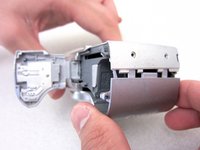
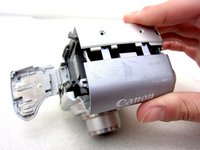
    4. Flash Motherboard: 步骤 4 中的图像 1,2 Flash Motherboard: 步骤 4 中的图像 2,2
      • Gently remove the front cover away from the camera body.

      • Tip: Start by loosening the teeth on the left side of the camera next to the battery compartment.

      询问修复机器人

      添加评论

    5. Flash Motherboard: 步骤 5 中的图像 1,1
      • The camera should look like this once the front cover is removed.

      询问修复机器人

      添加评论

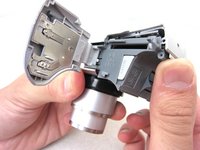
    6. Flash Motherboard: 步骤 6 中的图像 1,3 Flash Motherboard: 步骤 6 中的图像 2,3 Flash Motherboard: 步骤 6 中的图像 3,3
      在这个步骤中使用的工具:
      Tweezers
      $4.99
      • Start from the battery compartment and remove the back cover.

      • Caution: Do not tug on the back cover after it is removed. This could tear the ribbon attaching the back cover to the camera body.

      • Remove the connecting ribbon from the body of the camera using a pair of tweezers.

      询问修复机器人

      添加评论

    7. Flash Motherboard: 步骤 7 中的图像 1,1
      • Once the ribbon connecting the back cover is removed, the back of the camera body should look like this.

      询问修复机器人

      添加评论

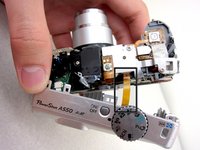
    1. Flash Motherboard, Flash Motherboard: 步骤 8 中的图像 1,1
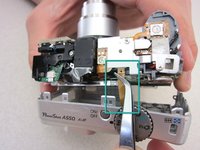
      • Turn to the front of the camera.

      • Find the flash motherboard located behind the flash assembly on the top right.

      询问修复机器人

      添加评论

    2. Flash Motherboard: 步骤 9 中的图像 1,1
      • Use a soldering iron and a desoldering wick to disconnect the wires from the marked locations.

      • Once the cables are disconnected, you are now ready to install a new motherboard.

      询问修复机器人

      添加评论

结论

To reassemble your device, follow these instructions in reverse order.

取消:我没有完成这个指南。

4等其他人完成本指南。

Jakub

于04/19/11注册

134 声望

创作了2篇指南

团队

Cal Poly, Team 8-6, Regan Spring 2011 Cal Poly, Team 8-6, Regan Spring 2011 的会员

CPSU-REGAN-S11S8G6

4 名成员

创作了23篇指南

0指南评论

添加评论

浏览统计数据:

过去 24 小时: 0

过去 7 天: 5

过去 30 天: 26

总计 4,497