跳转到主内容
加入维修社区 - 创建账户

Epson PowerLite 83+ Projector Lens Replacement

你所需要的

    1. Epson PowerLite 83+ Projector Lens Replacement, Motherboard: 步骤 1 中的图像 1,3 Epson PowerLite 83+ Projector Lens Replacement, Motherboard: 步骤 1 中的图像 2,3 Epson PowerLite 83+ Projector Lens Replacement, Motherboard: 步骤 1 中的图像 3,3
      • Remove the eight 5mm Phillips #2 screws securing the projector's bottom cover.

      • A long shank Phillips #2 screwdriver is required to reach the screws.

      询问修复机器人

      添加评论

    2. Epson PowerLite 83+ Projector Lens Replacement: 步骤 2 中的图像 1,3 Epson PowerLite 83+ Projector Lens Replacement: 步骤 2 中的图像 2,3 Epson PowerLite 83+ Projector Lens Replacement: 步骤 2 中的图像 3,3
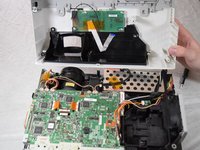
      • Flip the projector over and lift the top cover from the rear of the projector.

      • Two cables are connected at the front that prevent full removal.

      • Disconnect the slide cover JST connector. Grip the connector and rock it back and forth while apply gentle pressure.

      询问修复机器人

      添加评论

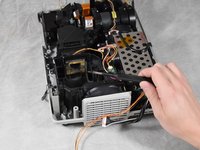
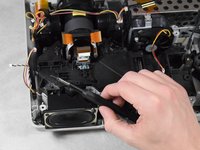
    3. Epson PowerLite 83+ Projector Lens Replacement: 步骤 3 中的图像 1,2 Epson PowerLite 83+ Projector Lens Replacement: 步骤 3 中的图像 2,2
      • Using a spudger, lift the ribbon cable's locking tab along the length of the cable.

      • Remove the ribbon cable from the connector and place the projector's top cover aside.

      询问修复机器人

      添加评论

    4. Epson PowerLite 83+ Projector Lens Replacement: 步骤 4 中的图像 1,3 Epson PowerLite 83+ Projector Lens Replacement: 步骤 4 中的图像 2,3 Epson PowerLite 83+ Projector Lens Replacement: 步骤 4 中的图像 3,3
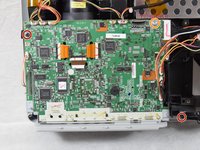
      • Remove the two 6 mm Phillips #2 screws.

      • Remove the single silver 5 mm Phillips #2 screw.

      询问修复机器人

      添加评论

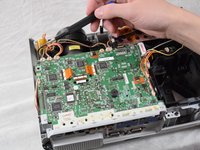
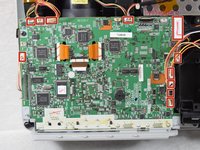
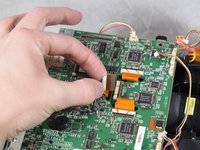
    5. Epson PowerLite 83+ Projector Lens Replacement: 步骤 5 中的图像 1,3 Epson PowerLite 83+ Projector Lens Replacement: 步骤 5 中的图像 2,3 Epson PowerLite 83+ Projector Lens Replacement: 步骤 5 中的图像 3,3
      • Using your fingernails or a spudger, remove the eleven JST connectors attached to the motherboard.

      询问修复机器人

      添加评论

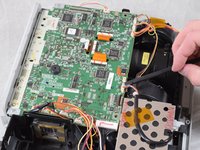
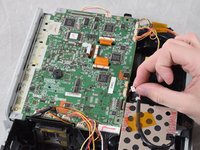
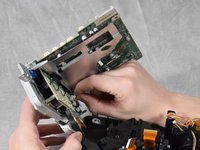
    6. Epson PowerLite 83+ Projector Lens Replacement: 步骤 6 中的图像 1,2 Epson PowerLite 83+ Projector Lens Replacement: 步骤 6 中的图像 2,2
      • Using a spudger, flip up the plastic locking tabs and gently remove the three ribbon cables from their connectors.

      询问修复机器人

      添加评论

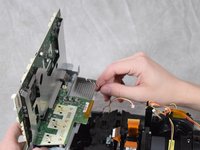
    7. Epson PowerLite 83+ Projector Lens Replacement: 步骤 7 中的图像 1,2 Epson PowerLite 83+ Projector Lens Replacement: 步骤 7 中的图像 2,2
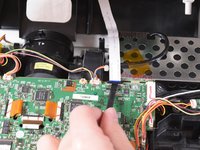
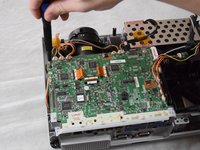
      • Ensure all JST connectors are clear of the motherboard and that the ribbon cables freely move in their motherboard cutouts.

      • Lift the motherboard from the front side of the projector to clear the ribbon cables.

      • Disconnect the speaker's JST connector on the underside of the motherboard using your fingernails.

      • Remove the motherboard from the case.

      询问修复机器人

      添加评论

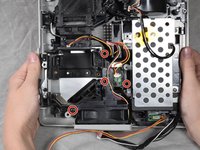
    1. Epson PowerLite 83+ Projector Lens Replacement, Projector Lens: 步骤 8 中的图像 1,3 Epson PowerLite 83+ Projector Lens Replacement, Projector Lens: 步骤 8 中的图像 2,3 Epson PowerLite 83+ Projector Lens Replacement, Projector Lens: 步骤 8 中的图像 3,3
      • Remove the four 6 mm Phillips #2 screws securing the fan bracket.

      • Remove the fan bracket by pulling straight up and set it aside.

      询问修复机器人

      添加评论

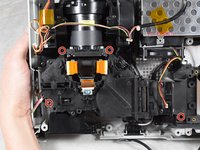
    2. Epson PowerLite 83+ Projector Lens Replacement: 步骤 9 中的图像 1,3 Epson PowerLite 83+ Projector Lens Replacement: 步骤 9 中的图像 2,3 Epson PowerLite 83+ Projector Lens Replacement: 步骤 9 中的图像 3,3
      • Remove the four 6 mm Phillips #2 screws securing the projector lens.

      询问修复机器人

      添加评论

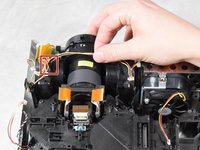
    3. Epson PowerLite 83+ Projector Lens Replacement: 步骤 10 中的图像 1,2 Epson PowerLite 83+ Projector Lens Replacement: 步骤 10 中的图像 2,2
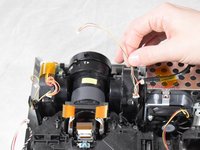
      • Unhook the JST connector wire from wire stay and move it aside.

      • Remove the projector lens from the base.

      询问修复机器人

      添加评论

结论

To reassemble your device, follow these instructions in reverse order.

取消:我没有完成这个指南。

Billy Fox

于02/22/22注册

467 声望

创作了3篇指南

团队

Clemson, Team 2-4, Hunter Spring 2022 Clemson, Team 2-4, Hunter Spring 2022 的会员

CLEM-HUNTER-S22S2G4

4 名成员

创作了18篇指南

1指南评论

source for a replacement lens? I surely need one.

christopher wanko - 回复 分享

添加评论

浏览统计数据:

过去 24 小时: 1

过去 7 天: 4

过去 30 天: 24

总计 926