跳转到主内容
加入维修社区 - 创建账户

Emson Star Wars R2-D2 Humidifier Fan Replacement

你所需要的

  1. Emson Star Wars R2-D2 Humidifier Fan Replacement, Fan: 步骤 1 中的图像 1,1
    • Remove the top cover of the humidifier by pulling upwards.

    询问修复机器人
  2. Emson Star Wars R2-D2 Humidifier Fan Replacement: 步骤 2 中的图像 1,1
    • Grip the dial from the front of the device and gently pull it away to remove it.

    询问修复机器人
  3. Emson Star Wars R2-D2 Humidifier Fan Replacement: 步骤 3 中的图像 1,1
    • Remove the blue water tank of the humidifier by pulling upwards.

    询问修复机器人
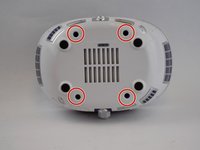
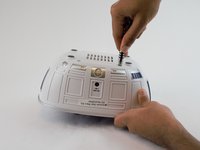
  4. Emson Star Wars R2-D2 Humidifier Fan Replacement: 步骤 4 中的图像 1,2 Emson Star Wars R2-D2 Humidifier Fan Replacement: 步骤 4 中的图像 2,2
    • Use a PH1 screwdriver bit and 150mm extension to unscrew the four screws from the bottom cover.

    询问修复机器人
  5. Emson Star Wars R2-D2 Humidifier Fan Replacement: 步骤 5 中的图像 1,1
    • Remove the blue plastic top by pulling upwards on the middle notch.

    询问修复机器人
  6. Emson Star Wars R2-D2 Humidifier Fan Replacement: 步骤 6 中的图像 1,1
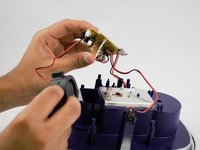
    • This is where the fan is located. Carefully remove the fan from its compartment.

    • At this stage, you may remove the pin connector of the fan from the printed circuit board. However, it may be difficult to pull the pin. We recommend removing the printed circuit board for more clearance during removal.

    • Remove the screws on the printed circuit board using the same PH1 driver.

    询问修复机器人
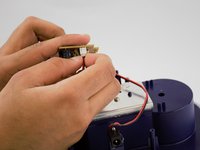
  7. Emson Star Wars R2-D2 Humidifier Fan Replacement: 步骤 7 中的图像 1,2 Emson Star Wars R2-D2 Humidifier Fan Replacement: 步骤 7 中的图像 2,2
    • Grip the fan's connector located on the printed circuit board and pull it away from the connector (see second picture).

    询问修复机器人
结论

To reassemble your device, follow these instructions in reverse order.

4等其他人完成本指南。

Yash Chari

于02/15/17注册

240 声望

创作了2篇指南

团队

USF Tampa, Team 8-5, Eyestone Spring 2017 USF Tampa, Team 8-5, Eyestone Spring 2017 的会员

USFT-EYESTONE-S17S8G5

4 名成员

创作了5篇指南

0指南评论

添加评论

浏览统计数据:

过去 24 小时: 0

过去 7 天: 4

过去 30 天: 52

总计 1,016