跳转到主内容
加入维修社区 - 创建账户

Eclipse 180BL Battery Replacement

你所需要的

    1. Eclipse 180BL Battery Replacement, Battery: 步骤 1 中的图像 1,1
      • Remove the two screws located on the bottom of the device with a phillips head screw driver.

      • The two screws can be removed using the PH00 head from the iFixit repair toolkit.

      • Both screws are 1/8 inch in length.

      • The bottom cap will come off to reveal the inside main component.

      询问修复机器人

      添加评论

    2. Eclipse 180BL Battery Replacement: 步骤 2 中的图像 1,2 Eclipse 180BL Battery Replacement: 步骤 2 中的图像 2,2
      • Remove the main inner component using Spudger, by pushing on the USB port. This will take some force.

      • Hold on the sides with your fingers, and push to release from the top.

      询问修复机器人

      添加评论

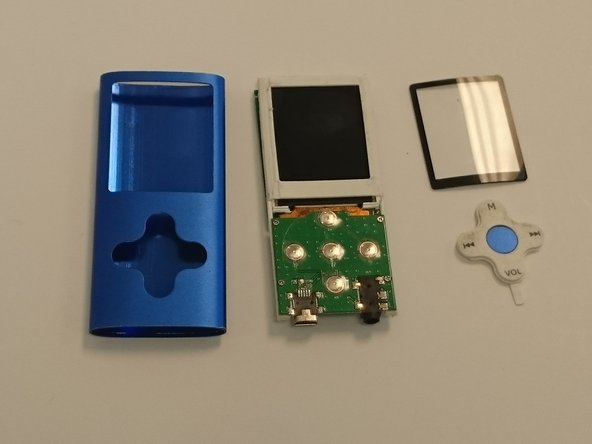
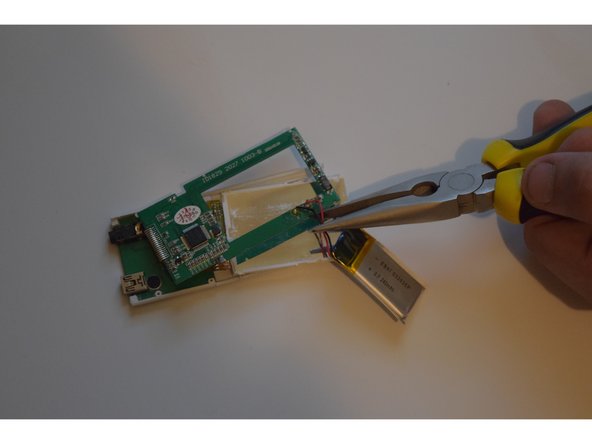
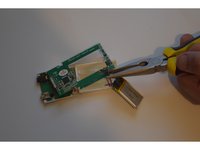
    3. Eclipse 180BL Battery Replacement: 步骤 3 中的图像 1,3 Eclipse 180BL Battery Replacement: 步骤 3 中的图像 2,3 Eclipse 180BL Battery Replacement: 步骤 3 中的图像 3,3
      • The plastic LCD cover and the key pad will now be loose; they were held in place by the tension between the case and the internal main component.

      • Locate the large square pack with a black and red wire coming out of it, this is the battery.

      • Cut the red and black wires to remove the old battery.

      询问修复机器人

      添加评论

    4. Eclipse 180BL Battery Replacement: 步骤 4 中的图像 1,1
      • To Replace, connect the two new lines ( red and black) between the new battery and the device.

      • You have successfully replaced the battery!

      询问修复机器人

      添加评论

结论

To reassemble your device, follow these instructions in reverse order.

取消:我没有完成这个指南。

3等其他人完成本指南。

0指南评论

添加评论

浏览统计数据:

过去 24 小时: 1

过去 7 天: 10

过去 30 天: 53

总计 2,243