跳转到主内容
加入维修社区 - 创建账户

此翻译由机器生成,尚未经过人工审核。 会说这种语言吗? 查看评论

DualShock 2 拆解

你所需要的

    1. DualShock 2 拆解, DualShock 2 拆解: 步骤 1 中的图像 1,2 DualShock 2 拆解, DualShock 2 拆解: 步骤 1 中的图像 2,2
      • 首先,检查你的控制器(无论是否为无线)的连接端口是否缺失针脚。

      • 如果你使用的是有线控制器(通过线缆直接连接到主机的控制器),试着向不同方向弯折线缆。这可能会修复控制器线缆内部的断路,作为一种临时解决方法。

      添加评论

    2. DualShock 2 拆解: 步骤 2 中的图像 1,2 DualShock 2 拆解: 步骤 2 中的图像 2,2
      • 翻转控制器,并拧下控制器底部所有的 6 颗螺丝。

      询问修复机器人

      添加评论

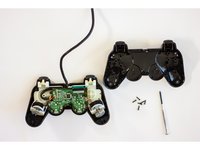
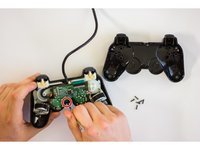
    3. DualShock 2 拆解: 步骤 3 中的图像 1,2 DualShock 2 拆解: 步骤 3 中的图像 2,2
      • 螺丝卸下后,用手小心地将控制器撬开。

      • 拧下固定电路板的螺丝。

      询问修复机器人

      添加评论

    4. DualShock 2 拆解: 步骤 4 中的图像 1,1
      • 小心地将电路板从控制器的前盖板上拆下。

      添加评论

    5. DualShock 2 拆解: 步骤 5 中的图像 1,1
      • 检查橡胶垫上是否有杂物阻碍了黑色触点。这些黑色触点用于在按键板上形成电气连接,若有杂物可能导致接触不良。

      询问修复机器人

      添加评论

    6. DualShock 2 拆解: 步骤 6 中的图像 1,1
      • 检查柔性按键电路板本身是否有污垢或碎屑,这些杂物可能会阻碍橡胶按钮垫的正常工作。

      询问修复机器人

      添加评论

    7. DualShock 2 拆解: 步骤 7 中的图像 1,1
      • 检查柔性触发器电路板与控制器主电路板之间的连接。

      询问修复机器人

      添加评论

    8. DualShock 2 拆解: 步骤 8 中的图像 1,1
      • 如果已经完成了前面的步骤,但按键仍然无法正常工作,请考虑更换主电路板或柔性触发按键电路板。

      询问修复机器人

      添加评论

    9. DualShock 2 拆解: 步骤 9 中的图像 1,1
      • 按照拆解步骤的相反顺序进行组装,将手柄恢复原状。将手柄连接到主机,并测试修复是否成功。

      询问修复机器人

      添加评论

终点

取消:我没有完成这个指南。

48等其他人完成本指南。

Peder Hertel

于09/29/15注册

1,503 声望

撰写一个指南

团队

Cal Poly, Team 17-5, Green Fall 2015 Cal Poly, Team 17-5, Green Fall 2015 的会员

CPSU-GREEN-F15S17G5

4 名成员

创作了19篇指南

7指南评论

Dualshock 2 controllers, model A and H, are having 8 pins, not 9. Your first Step is false and rarely wires are the cause of the problem.

Eva Langley - 回复 分享

No my Dual-shock 2 controller has 9 pins so you are wrong he is right man.

Adam Bolyard - 回复 分享

Eva Langley is correct, some of these controllers have only 8 pins, not 9. I myself can conformed this because I just recently opened one of two brand new fresh out of the box Sony original equipment controllers that I purchased (for a little less than $10 a piece) during a clearance sale at my local Sears just before they went out of business. So Eva is NOT wrong. I still have the second one still in the box and before anyone ask, I don’t won’t to sale. I purchased them because I have had both my original controllers go out after they were sitting up for a few years without use. My game units are very well taken care of but the controllers of the PS2 just stopped working and finding a definitive answer to why this happens is STILL very elusive in 2019.

byordsilp - 回复 分享

After opening one of these, the R2 and L2 buttons don't feel right, is there a way to fix this?

Fridtjof Riibe - 回复 分享

Try to put R2 and L2 after you close the shell. The buttons have clips that hold on position after you insert them .

Alex SC - 回复 分享

添加评论

浏览统计数据:

过去 24 小时: 38

过去 7 天: 223

过去 30 天: 958

总计 87,677