跳转到主内容
加入维修社区 - 创建账户

Disassembling IBM ThinkPad A30 Upper Case

你所需要的

    1. Disassembling IBM ThinkPad A30 Upper Case, Battery: 步骤 1 中的图像 1,2 Disassembling IBM ThinkPad A30 Upper Case, Battery: 步骤 1 中的图像 2,2
      • Flip the ThinkPad over so that it is upside down.

      • Slide the highlighted tab to the left.

      • With your finger on the tab, remove the battery by lifting it upwards away from the laptop.

      询问修复机器人

      添加评论

    1. Disassembling IBM ThinkPad A30 Upper Case, Hard Drive: 步骤 2 中的图像 1,3 Disassembling IBM ThinkPad A30 Upper Case, Hard Drive: 步骤 2 中的图像 2,3 Disassembling IBM ThinkPad A30 Upper Case, Hard Drive: 步骤 2 中的图像 3,3
      • Remove the highlighted screw with a Phillips #1 screwdriver.

      • Pull the hard drive out.

      询问修复机器人

      添加评论

    1. Disassembling IBM ThinkPad A30 Upper Case, Upper Case: 步骤 3 中的图像 1,1
      • Make sure the laptop is upside down and oriented in the direction shown.

      • Remove the six 16.7mm screws inside the circled holes.

      询问修复机器人

      添加评论

    2. Disassembling IBM ThinkPad A30 Upper Case: 步骤 4 中的图像 1,1
      • Rotate the ThinkPad so that the hard drive bay is facing you.

      • Remove the black cover to reveal a 14.8mm screw.

      • Remove the uncovered screw with a Phillips #0 screwdriver.

      询问修复机器人

      添加评论

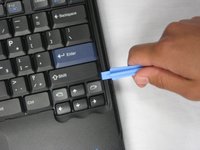
    3. Disassembling IBM ThinkPad A30 Upper Case: 步骤 5 中的图像 1,2 Disassembling IBM ThinkPad A30 Upper Case: 步骤 5 中的图像 2,2
      • Flip the ThinkPad over and open the LCD panel.

      • Pry apart the keyboard with a plastic opening tool or with your fingers.

      询问修复机器人

      添加评论

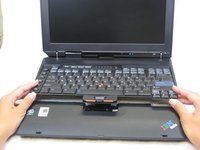
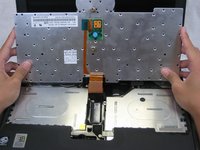
    4. Disassembling IBM ThinkPad A30 Upper Case: 步骤 6 中的图像 1,3 Disassembling IBM ThinkPad A30 Upper Case: 步骤 6 中的图像 2,3 Disassembling IBM ThinkPad A30 Upper Case: 步骤 6 中的图像 3,3
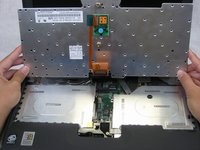
      • Be careful not to pull out the keyboard carelessly; there is a connector underneath it!

      • Lift the front end of the keyboard as shown.

      • Using your fingers, remove the black film cover.

      询问修复机器人

      添加评论

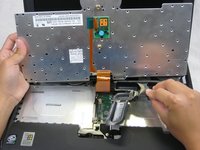
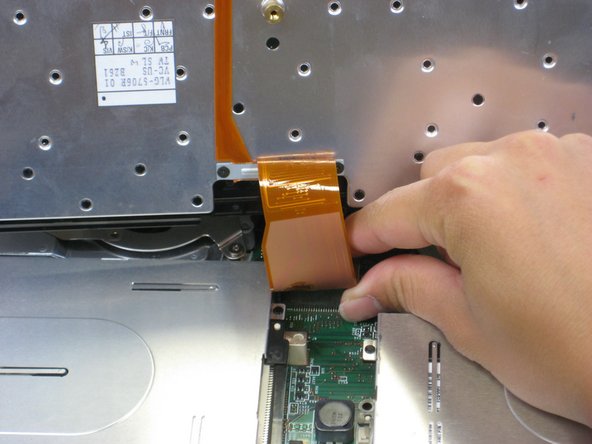
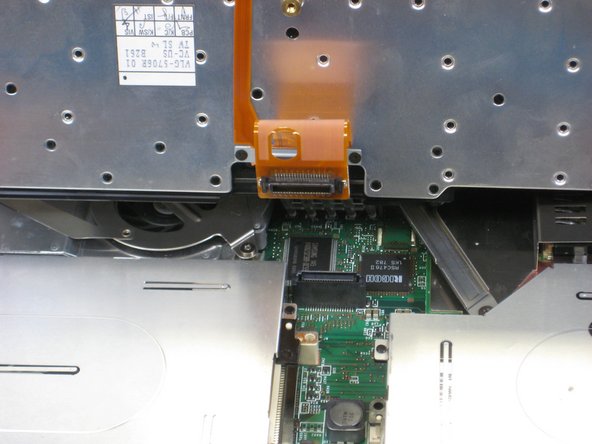
    5. Disassembling IBM ThinkPad A30 Upper Case: 步骤 7 中的图像 1,3 Disassembling IBM ThinkPad A30 Upper Case: 步骤 7 中的图像 2,3 Disassembling IBM ThinkPad A30 Upper Case: 步骤 7 中的图像 3,3
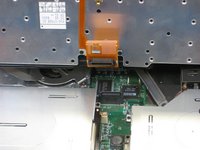
      • Locate the connector attached to the motherboard.

      • Disconnect the ribbon cable by removing the connector.

      询问修复机器人

      添加评论

    6. Disassembling IBM ThinkPad A30 Upper Case: 步骤 8 中的图像 1,2 Disassembling IBM ThinkPad A30 Upper Case: 步骤 8 中的图像 2,2
      • Lift and remove the keyboard.

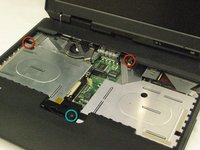
      • Remove the two 5.6mm screws.

      • Remove the 16.7mm screw.

      询问修复机器人

      添加评论

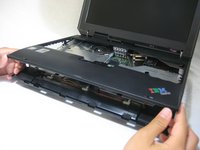
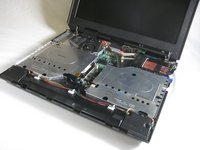
    7. Disassembling IBM ThinkPad A30 Upper Case: 步骤 9 中的图像 1,3 Disassembling IBM ThinkPad A30 Upper Case: 步骤 9 中的图像 2,3 Disassembling IBM ThinkPad A30 Upper Case: 步骤 9 中的图像 3,3
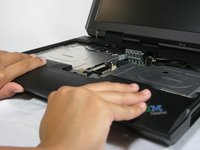
      • You will need to use a little force. Be wary of the tabs.

      • Pry off the upper case with your hands.

      询问修复机器人

      添加评论

结论

To reassemble your device, follow these instructions in reverse order.

取消:我没有完成这个指南。

另外一个人完成了本指南。

Alan

于10/07/10注册

380 声望

创作了6篇指南

团队

Cal Poly, Team 4-44, Amido Fall 2010 Cal Poly, Team 4-44, Amido Fall 2010 的会员

CPSU-AMIDO-F10S4G44

4 名成员

创作了90篇指南

0指南评论

添加评论

浏览统计数据:

过去 24 小时: 1

过去 7 天: 7

过去 30 天: 37

总计 2,645