跳转到主内容
加入维修社区 - 创建账户

Disassembling 8BitDo Ultimate Wireless Case

你所需要的

  1. Disassembling 8BitDo Ultimate Wireless Case, Case: 步骤 1 中的图像 1,2 Disassembling 8BitDo Ultimate Wireless Case, Case: 步骤 1 中的图像 2,2
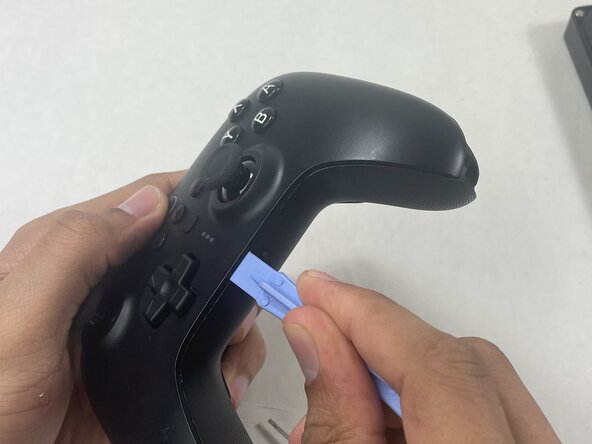
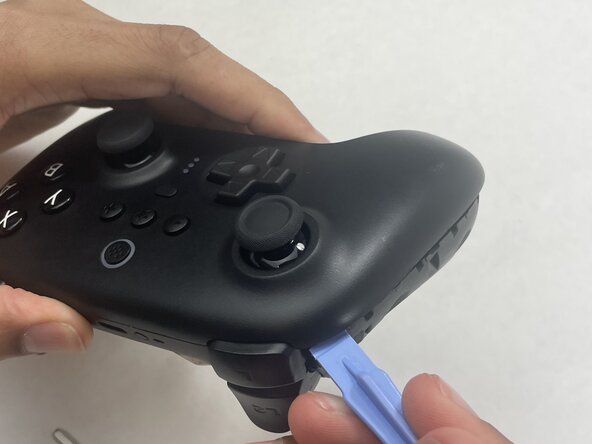
    • Insert an opening pick into the seam between the left controller grip and main controller body.

    • Pry the grip off.

    • Repeat for the right grip.

    询问修复机器人
  2. Disassembling 8BitDo Ultimate Wireless Case: 步骤 2 中的图像 1,2 Disassembling 8BitDo Ultimate Wireless Case: 步骤 2 中的图像 2,2
    • Remove the six 8 mm T6 Torx screws securing the rear case to the front case.

    询问修复机器人
  3. Disassembling 8BitDo Ultimate Wireless Case: 步骤 3 中的图像 1,3 Disassembling 8BitDo Ultimate Wireless Case: 步骤 3 中的图像 2,3 Disassembling 8BitDo Ultimate Wireless Case: 步骤 3 中的图像 3,3
    • Insert an opening tool into seam at the bottom of the device and carefully pry the front and back shells apart.

    • Set the halves next to each other with care not to strain the connected ribbon cables.

    询问修复机器人
  4. Disassembling 8BitDo Ultimate Wireless Case: 步骤 4 中的图像 1,3 Disassembling 8BitDo Ultimate Wireless Case: 步骤 4 中的图像 2,3 Disassembling 8BitDo Ultimate Wireless Case: 步骤 4 中的图像 3,3
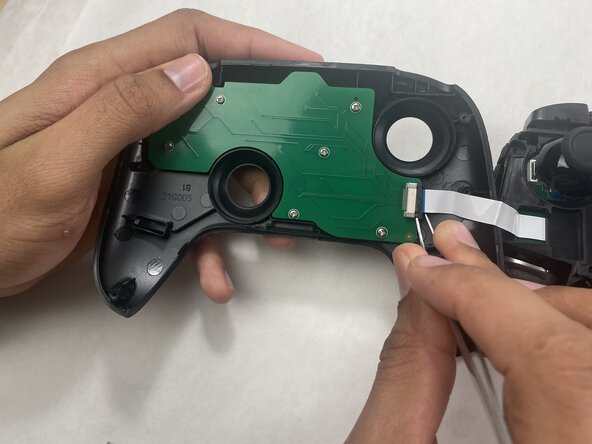
    • The ribbon cable is secured with a locking tab connector.

    • Use tweezers to unlock the locking tab on the ribbon cable connector, then gently disconnect the ribbon cable.

    询问修复机器人
结论

To reassemble your device, follow these instructions in reverse order.

Connor Bassolino

于03/29/22注册

23,148 声望

创作了111篇指南

0指南评论

添加评论

浏览统计数据:

过去 24 小时: 2

过去 7 天: 18

过去 30 天: 45

总计 45