跳转到主内容
加入维修社区 - 创建账户

Dell Studio 1737 Keyboard Replacement

你所需要的

  1. Dell Studio 1737 Keyboard Replacement, Battery: 步骤 1 中的图像 1,2 Dell Studio 1737 Keyboard Replacement, Battery: 步骤 1 中的图像 2,2
    • Slide the battery release slider all the way to the right and push the battery straight out of the back of the computer

    询问修复机器人
  2. Dell Studio 1737 Keyboard Replacement, Keyboard: 步骤 2 中的图像 1,1
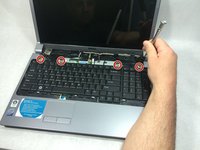
    • Use a plastic opening tool to detach the internal clips (marked with red boxes in photo) and release the small plastic panel above the keyboard

    • This panel doesn't come off just yet, this step is just to make it easier when it comes time to remove it

    询问修复机器人
  3. Dell Studio 1737 Keyboard Replacement: 步骤 3 中的图像 1,1
    • Remove the 4mm ph1 screw under the battery

    询问修复机器人
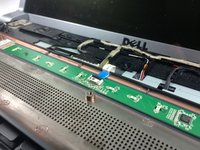
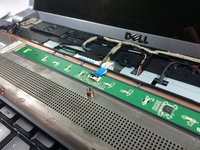
  4. Dell Studio 1737 Keyboard Replacement: 步骤 4 中的图像 1,3 Dell Studio 1737 Keyboard Replacement: 步骤 4 中的图像 2,3 Dell Studio 1737 Keyboard Replacement: 步骤 4 中的图像 3,3
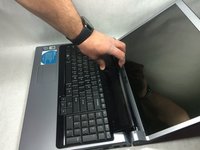
    • Pry black panel away from laptop body starting at the base of the screen

    • Be careful when flipping the panel over, as the panel is still attached by the fragile ribbon cable

    • Flip the panel over onto the keyboard

    • Detach the ribbon cable from the motherboard as shown

    询问修复机器人
  5. Dell Studio 1737 Keyboard Replacement: 步骤 5 中的图像 1,1
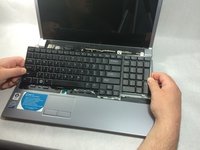
    • Starting at the top where you just removed the black panel, pry the black bezel away from the outside of the keyboard

    询问修复机器人
  6. Dell Studio 1737 Keyboard Replacement: 步骤 6 中的图像 1,2 Dell Studio 1737 Keyboard Replacement: 步骤 6 中的图像 2,2
    • Use a small screwdriver to take out the 4 4mm ph1 screws along the top of the keyboard

    • Lift from the top of the keyboard and flip it over onto the palmrest

    • Again, be very careful of the ribbon cable attaching it, as these are easily damaged

    询问修复机器人
  7. Dell Studio 1737 Keyboard Replacement: 步骤 7 中的图像 1,2 Dell Studio 1737 Keyboard Replacement: 步骤 7 中的图像 2,2
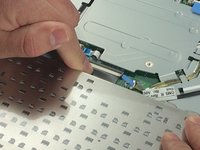
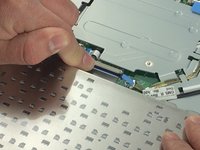
    • Remove the ribbon cable as shown

    询问修复机器人
结论

To reassemble your device, follow these instructions in reverse order.

2等其他人完成本指南。

团队

0指南评论

添加评论

浏览统计数据:

过去 24 小时: 0

过去 7 天: 3

过去 30 天: 39

总计 910