跳转到主内容
加入维修社区 - 创建账户

Dell Latitude 3310 RAM Replacement

你所需要的

  1. Dell Latitude 3310 RAM Replacement, Bottom Cover: 步骤 1 中的图像 1,1
    • Remove seven 8.0 mm screws using a Phillips #1 screwdriver.

    • Remove three 5.0 mm screws using a Phillips #1 screwdriver.

    询问修复机器人
  2. Dell Latitude 3310 RAM Replacement: 步骤 2 中的图像 1,1
    • Using the iFixit opening tool, gently pry between the body of the laptop and the bottom cover. Make your way around the laptop carefully releasing all plastic clips.

    • The screen hinges are an ideal spot to begin prying.

    询问修复机器人
  3. Dell Latitude 3310 RAM Replacement: 步骤 3 中的图像 1,1
    • Remove the bottom cover.

    询问修复机器人
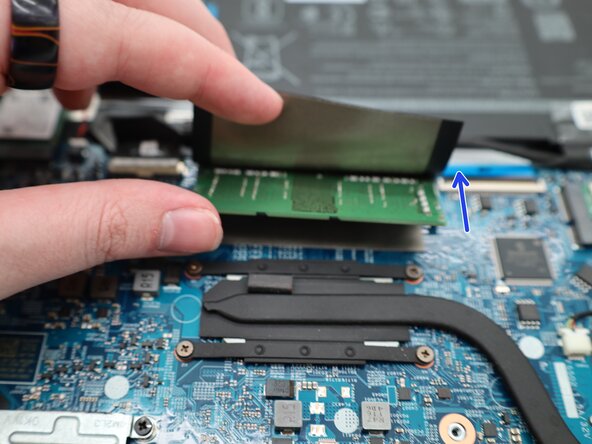
  4. Dell Latitude 3310 RAM Replacement, RAM: 步骤 4 中的图像 1,2 Dell Latitude 3310 RAM Replacement, RAM: 步骤 4 中的图像 2,2
    • Lift the plastic cover up to expose the memory chipset.

    • Carefully pull the clips away from the chip to disengage them.

    询问修复机器人
  5. Dell Latitude 3310 RAM Replacement: 步骤 5 中的图像 1,2 Dell Latitude 3310 RAM Replacement: 步骤 5 中的图像 2,2
    • After the clips are moved, the RAM will lift up on its own.

    • Remove the RAM.

    询问修复机器人
结论

To reassemble your device, follow these instructions in reverse order.

0指南评论

添加评论

浏览统计数据:

过去 24 小时: 0

过去 7 天: 8

过去 30 天: 25

总计 144