跳转到主内容
加入维修社区 - 创建账户

Dell Inspiron 9100 Mini-PCI (WiFi) Card Replacement

你所需要的

    1. Dell Inspiron 9100 Mini-PCI (WiFi) Card Replacement, Battery: 步骤 1 中的图像 1,3 Dell Inspiron 9100 Mini-PCI (WiFi) Card Replacement, Battery: 步骤 1 中的图像 2,3 Dell Inspiron 9100 Mini-PCI (WiFi) Card Replacement, Battery: 步骤 1 中的图像 3,3
      • Unplug the laptop from the power adapter and turn the power off.

      • Failure to unplug laptop before proceeding could result in risk of electric shock!

      询问修复机器人

      添加评论

    2. Dell Inspiron 9100 Mini-PCI (WiFi) Card Replacement: 步骤 2 中的图像 1,3 Dell Inspiron 9100 Mini-PCI (WiFi) Card Replacement: 步骤 2 中的图像 2,3 Dell Inspiron 9100 Mini-PCI (WiFi) Card Replacement: 步骤 2 中的图像 3,3
      • Slide the battery-lock tab and hold.

      • Flip the battery away from the chassis to remove it.

      询问修复机器人

      添加评论

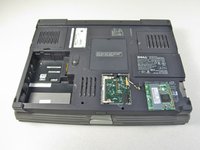
    1. Dell Inspiron 9100 Mini-PCI (WiFi) Card Replacement, Mini-PCI (WiFi) Card: 步骤 3 中的图像 1,2 Dell Inspiron 9100 Mini-PCI (WiFi) Card Replacement, Mini-PCI (WiFi) Card: 步骤 3 中的图像 2,2
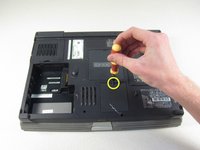
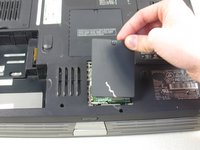
      • Undo the screw on the Mini-PCI card cover labeled "C"

      • This screw will remain within the panel

      • Remove the panel from the chassis.

      询问修复机器人

      添加评论

    2. Dell Inspiron 9100 Mini-PCI (WiFi) Card Replacement: 步骤 4 中的图像 1,1
      • Disconnect the antenna cables from the Mini-PCI card.

      询问修复机器人

      添加评论

    3. Dell Inspiron 9100 Mini-PCI (WiFi) Card Replacement: 步骤 5 中的图像 1,3 Dell Inspiron 9100 Mini-PCI (WiFi) Card Replacement: 步骤 5 中的图像 2,3 Dell Inspiron 9100 Mini-PCI (WiFi) Card Replacement: 步骤 5 中的图像 3,3
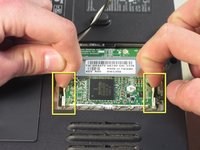
      • Use your fingertips to carefully spread apart the white plastic tabs.

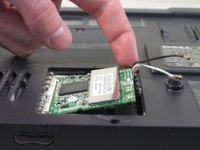
      • Flip the Mini-PCI card up at a 45 degree angle.

      • Remove the card from the computer by sliding out diagonally

      • Ground yourself while dealing with the card. Static shock can cause damage to the card. Store the card in anti-static bag when not in use.

      询问修复机器人

      添加评论

结论

To reassemble your device, follow these instructions in reverse order.

取消:我没有完成这个指南。

另外一个人完成了本指南。

charlierefvem

于01/11/11注册

854 声望

创作了7篇指南

团队

Cal Poly, Team 13-2, Forte Winter 2011 Cal Poly, Team 13-2, Forte Winter 2011 的会员

CPSU-FORTE-W11S13G2

5 名成员

创作了69篇指南

0指南评论

添加评论

浏览统计数据:

过去 24 小时: 2

过去 7 天: 8

过去 30 天: 39

总计 4,713