跳转到主内容
加入维修社区 - 创建账户

Dell Inspiron 15-7537 RAM Replacement

你所需要的

  1. Dell Inspiron 15-7537 RAM Replacement, Bottom Case: 步骤 1 中的图像 1,1
    • Make sure the display is closed. Then, flip the computer over so that you can see the bottom cover.

    • Loosen the two 5 mm Phillips #0 on the upper edge of the cover.

    • These screws will stay captive to the case.

    询问修复机器人

    添加评论

  2. Dell Inspiron 15-7537 RAM Replacement: 步骤 2 中的图像 1,1
    • Remove the two 5 mm interior screws that connect the cover to the assembly using the same Philips head screwdriver from the previous step.

    询问修复机器人

    添加评论

  3. Dell Inspiron 15-7537 RAM Replacement: 步骤 3 中的图像 1,1
    • Use a spudger to remove the base cover from the rest of bottom cover.

    添加评论

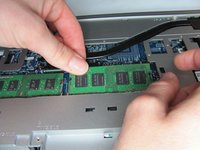
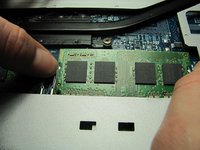
  4. Dell Inspiron 15-7537 RAM Replacement, RAM: 步骤 4 中的图像 1,2 Dell Inspiron 15-7537 RAM Replacement, RAM: 步骤 4 中的图像 2,2
    • Gently pull apart clips on the ends of the memory module until the memory module pops up.

    询问修复机器人

    添加评论

  5. Dell Inspiron 15-7537 RAM Replacement: 步骤 5 中的图像 1,1
    • Pull the RAM out at a 45 degree angle.

    询问修复机器人

    添加评论

结论

To reassemble your device, follow these instructions in reverse order.

取消:我没有完成这个指南。

2等其他人完成本指南。

团队

Cal Poly, Team 18-2, Maness Winter 2015 Cal Poly, Team 18-2, Maness Winter 2015 的会员

CPSU-MANESS-W15S18G2

4 名成员

创作了8篇指南

0指南评论

添加评论

浏览统计数据:

过去 24 小时: 1

过去 7 天: 7

过去 30 天: 38

总计 2,809