跳转到主内容

Contixo V9 Motherboard Replacement

你所需要的

  1. Contixo V9 Motherboard Replacement, Motherboard: 步骤 1 中的图像 1,2 Contixo V9 Motherboard Replacement, Motherboard: 步骤 1 中的图像 2,2
    • Find the separation line between the front and back side of the device on the outer edge of the tablet.

    • Use the plastic opening tool to pry apart the tablet, lifting the face off.

  2. Contixo V9 Motherboard Replacement: 步骤 2 中的图像 1,3 Contixo V9 Motherboard Replacement: 步骤 2 中的图像 2,3 Contixo V9 Motherboard Replacement: 步骤 2 中的图像 3,3
    • Remove the three screws along the perimeter of the motherboard using the Phillips #000 screwdriver to unscrew.

  3. Contixo V9 Motherboard Replacement: 步骤 3 中的图像 1,3 Contixo V9 Motherboard Replacement: 步骤 3 中的图像 2,3 Contixo V9 Motherboard Replacement: 步骤 3 中的图像 3,3
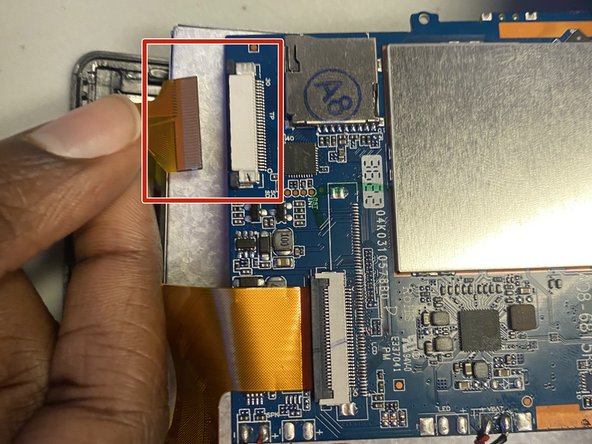
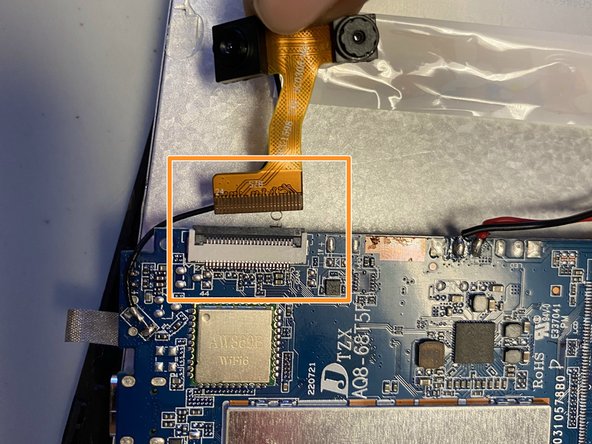
    • Locate the three golden ribbons along the perimeter of the motherboard.

    • There are two dark tabs; pull each away from the cream connection port. Once tabs are in open position remove the gold ribbon.

    • Flip up the dark tab and pull the gold ribbon away.

    • Do not pull the the cables harshly as it could rip the ribbon.

    • Reference this guide for more help with attaching or detaching cables.

  4. Contixo V9 Motherboard Replacement: 步骤 4 中的图像 1,3 Contixo V9 Motherboard Replacement: 步骤 4 中的图像 2,3 Contixo V9 Motherboard Replacement: 步骤 4 中的图像 3,3
    • Locate the battery on the opened tablet.

    • Use the spudger or one of the blue iFixit tools to lift the battery from the base of the tablet.

    • It is possible to use your hand to pry the battery away from the base of the tablet but not recommended.

  5. Contixo V9 Motherboard Replacement: 步骤 5 中的图像 1,3 Contixo V9 Motherboard Replacement: 步骤 5 中的图像 2,3 Contixo V9 Motherboard Replacement: 步骤 5 中的图像 3,3
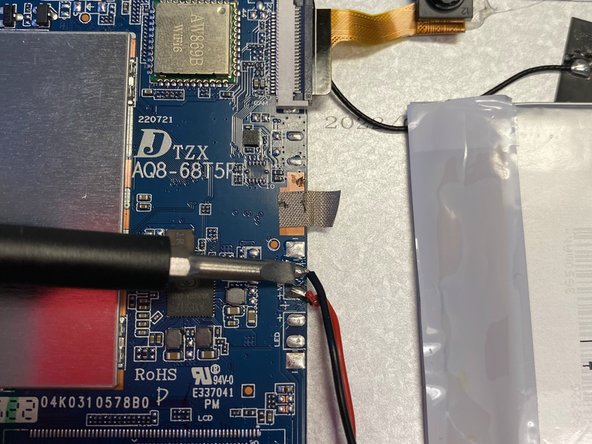
    • Detach the motherboard from the battery by pressing the soldering tip tool to each of the three connection points.

    • Exercise caution when desoldering the battery.

    • The tool located in the pictures is not the soldering tip tool but rather used for reference of where to detach.

    • Reference this guide for more help with soldering and desoldering the connections.

  6. Contixo V9 Motherboard Replacement: 步骤 6 中的图像 1,1
    • Remove the motherboard from the base of the device. Switch with replacement.

结论

To reassemble your device, follow these instructions in reverse order.

1指南评论

My motherboard strip is burnt, and need a replacement! Any idea on where I can find an extra? Thanks!!

Jen Staggs - 回复

添加评论

浏览统计数据:

过去 24 小时: 2

过去 7 天: 8

过去 30 天: 25

总计 329