跳转到主内容
加入维修社区 - 创建账户

Canon PowerShot SX600 HS Flash Assembly Replacement

你所需要的

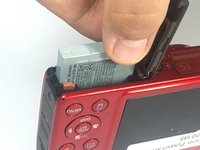
    1. Canon PowerShot SX600 HS Flash Assembly Replacement, Battery: 步骤 1 中的图像 1,1
      • To remove the battery, locate the battery cover on the bottom of the camera.

      • Using your thumb, press down on the cover and slide it outwards.

      询问修复机器人

      添加评论

    2. Canon PowerShot SX600 HS Flash Assembly Replacement: 步骤 2 中的图像 1,1
      • Depress the orange lever holding the battery in place to unlock it.

      询问修复机器人

      添加评论

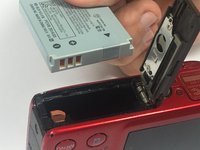
    3. Canon PowerShot SX600 HS Flash Assembly Replacement: 步骤 3 中的图像 1,2 Canon PowerShot SX600 HS Flash Assembly Replacement: 步骤 3 中的图像 2,2
      • Use your fingers to remove the battery.

      • Be sure to remember the alignment of the nodes for reassembly.

      询问修复机器人

      添加评论

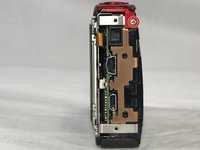
    1. Canon PowerShot SX600 HS Flash Assembly Replacement, Power and Shutter Buttons: 步骤 4 中的图像 1,1
      • Use a #000 Phillips screwdriver to unscrew the four 4mm screws located on the sides of the camera (2 for each side).

      询问修复机器人

      添加评论

    2. Canon PowerShot SX600 HS Flash Assembly Replacement: 步骤 5 中的图像 1,1
      • Unscrew the four 2mm located on the bottom of the camera using a Phillips #000 screwdriver.

      询问修复机器人

      添加评论

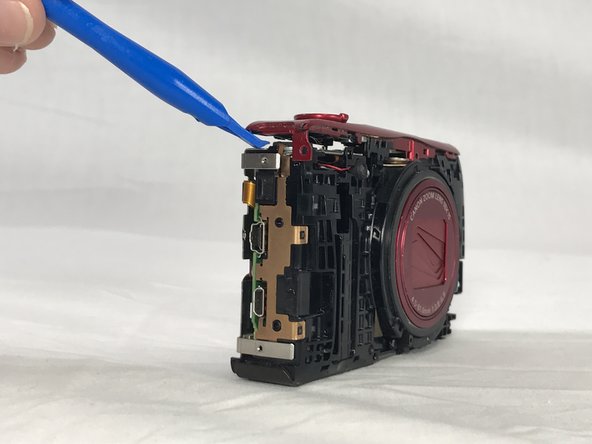
    3. Canon PowerShot SX600 HS Flash Assembly Replacement: 步骤 6 中的图像 1,1
      • Use a plastic opening tool to loosen and remove both the front and back plates of the camera, as well as the two side pieces.

      询问修复机器人

      添加评论

    4. Canon PowerShot SX600 HS Flash Assembly Replacement: 步骤 7 中的图像 1,2 Canon PowerShot SX600 HS Flash Assembly Replacement: 步骤 7 中的图像 2,2
      • Unscrew the three 2mm screws attaching the piece to the camera frame with a #000 Phillips screwdriver.

      询问修复机器人

      添加评论

    5. Canon PowerShot SX600 HS Flash Assembly Replacement: 步骤 8 中的图像 1,1
      • Use an opening tool to gently remove the power and shutter button assembly from the frame.

      询问修复机器人

      添加评论

    1. Canon PowerShot SX600 HS Flash Assembly Replacement, Display Screen: 步骤 9 中的图像 1,2 Canon PowerShot SX600 HS Flash Assembly Replacement, Display Screen: 步骤 9 中的图像 2,2
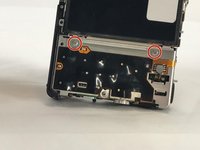
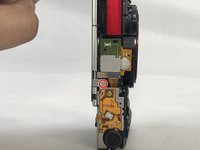
      • Unscrew the 2mm screw connections of the main board protector from the camera frame using a #000 Phillips head screwdriver (2 on front, 1 on top)

      询问修复机器人

      添加评论

    2. Canon PowerShot SX600 HS Flash Assembly Replacement: 步骤 10 中的图像 1,1
      • Use a Phillips #000 screwdriver to unscrew the 4mm screw.

      询问修复机器人

      添加评论

    3. Canon PowerShot SX600 HS Flash Assembly Replacement: 步骤 11 中的图像 1,1
      在这个步骤中使用的工具:
      Tweezers
      $4.99
      • Use a pair of tweezers to remove the no-fuss connector from its holder.

      添加评论

    4. Canon PowerShot SX600 HS Flash Assembly Replacement: 步骤 12 中的图像 1,1
      • Gently lift the protector from the frame.

      询问修复机器人

      添加评论

    5. Canon PowerShot SX600 HS Flash Assembly Replacement: 步骤 13 中的图像 1,1
      • Lift the LCD screen ZIF connector tab and remove the ribbon cable.

      • Detach the no-fuss connector.

      • Lift the screen from its holder.

      添加评论

    1. Canon PowerShot SX600 HS Flash Assembly Replacement, Flash Assembly: 步骤 14 中的图像 1,1
      • Unplug the assembly from the main no-fuss connector.

      询问修复机器人

      添加评论

    2. Canon PowerShot SX600 HS Flash Assembly Replacement: 步骤 15 中的图像 1,1
      • Unplug the assembly from its flat-top connection.

      询问修复机器人

      添加评论

    3. Canon PowerShot SX600 HS Flash Assembly Replacement: 步骤 16 中的图像 1,1
      • Use a #000 Phillips screwdriver to remove the three 4mm screws that hold the assembly to the frame.

      询问修复机器人

      添加评论

    4. Canon PowerShot SX600 HS Flash Assembly Replacement: 步骤 17 中的图像 1,1
      • Gently lift the assembly out of its place.

      询问修复机器人

      添加评论

结论

Fix your Canon's flash in order to take bright, vibrant photographs.

取消:我没有完成这个指南。

2等其他人完成本指南。

团队

USF Tampa, Team S6-G4, Lacy Spring 2017 USF Tampa, Team S6-G4, Lacy Spring 2017 的会员

USFT-LACY-S17S6G4

3 名成员

创作了9篇指南

1指南评论

my SX610 HS flash didn't work. im trying to just troubleshoot it to see if it might came loose or anything. do i still need to do all steps?

Nurul Huda Mohd Asri - 回复 分享

添加评论

浏览统计数据:

过去 24 小时: 3

过去 7 天: 7

过去 30 天: 48

总计 1,492