跳转到主内容
加入维修社区 - 创建账户

Canon PowerShot SD200 Buttons Replacement

你所需要的

    1. Canon PowerShot SD200 Buttons Replacement, Battery: 步骤 1 中的图像 1,3 Canon PowerShot SD200 Buttons Replacement, Battery: 步骤 1 中的图像 2,3 Canon PowerShot SD200 Buttons Replacement, Battery: 步骤 1 中的图像 3,3
      • The camera used to create these repair guides had a broken lens assembly. As a result, the lens is sticking out in all of the photos, but it is important to note that this should not be the case with your camera. The lens should retract itself back into the camera when it is turned off.

      • Use your fingernail to slide the dark gray tab located on the bottom of the device towards the edge of camera.

      • Slide the light gray door away from the LCD screen and pull up to open the door.

      • Both battery and memory card should now be visible.

      询问修复机器人
      添加评论

    2. Canon PowerShot SD200 Buttons Replacement: 步骤 2 中的图像 1,2 Canon PowerShot SD200 Buttons Replacement: 步骤 2 中的图像 2,2
      • Rotate the small brown tab towards the edge of the camera.

      • The battery should pop up.

      询问修复机器人
      添加评论

    3. Canon PowerShot SD200 Buttons Replacement: 步骤 3 中的图像 1,1
      • Pull the battery straight out of the battery holder.

      • When putting the battery back in, make sure it is oriented the same as it was before.

      询问修复机器人

      添加评论

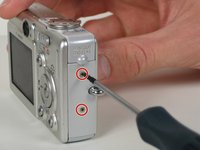
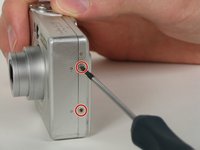
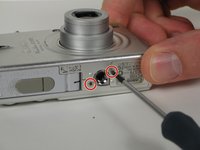
    1. Canon PowerShot SD200 Buttons Replacement, Buttons: 步骤 4 中的图像 1,3 Canon PowerShot SD200 Buttons Replacement, Buttons: 步骤 4 中的图像 2,3 Canon PowerShot SD200 Buttons Replacement, Buttons: 步骤 4 中的图像 3,3
      • Close the light gray battery compartment door.

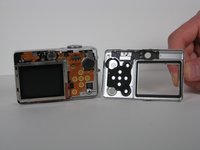
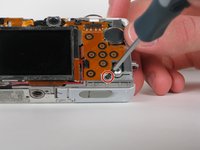
      • Remove the six 2.8 mm Phillips screws on the outside of the case. Two screws are found on each side of the camera, and the final two are found on the bottom.

      询问修复机器人

      添加评论

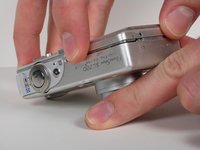
    2. Canon PowerShot SD200 Buttons Replacement: 步骤 5 中的图像 1,2 Canon PowerShot SD200 Buttons Replacement: 步骤 5 中的图像 2,2
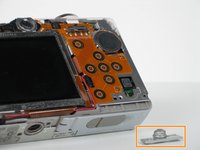
      • Use your fingers to carefully pry off the back casing from the camera assembly.

      询问修复机器人

      添加评论

    3. Canon PowerShot SD200 Buttons Replacement: 步骤 6 中的图像 1,3 Canon PowerShot SD200 Buttons Replacement: 步骤 6 中的图像 2,3 Canon PowerShot SD200 Buttons Replacement: 步骤 6 中的图像 3,3
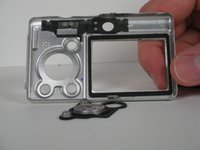
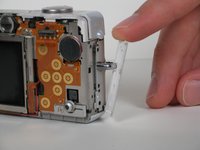
      • Push the buttons out with your finger if they did not fall out while removing the casing.

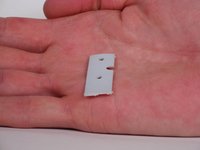
      • Pull off the white plastic side piece if it did not fall out while removing the casing.

      询问修复机器人

      添加评论

    4. Canon PowerShot SD200 Buttons Replacement: 步骤 7 中的图像 1,2 Canon PowerShot SD200 Buttons Replacement: 步骤 7 中的图像 2,2
      • Remove the one 2.2 mm Phillips screw from the bottom of the camera.

      • Take off the print button.

      询问修复机器人

      添加评论

    5. Canon PowerShot SD200 Buttons Replacement: 步骤 8 中的图像 1,2 Canon PowerShot SD200 Buttons Replacement: 步骤 8 中的图像 2,2
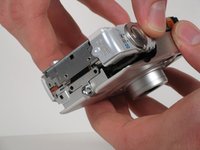
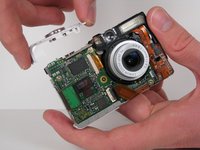
      • Use your fingers to carefully pry off the front casing of the camera. The front casing should pull straight off.

      询问修复机器人

      添加评论

    6. Canon PowerShot SD200 Buttons Replacement: 步骤 9 中的图像 1,2 Canon PowerShot SD200 Buttons Replacement: 步骤 9 中的图像 2,2
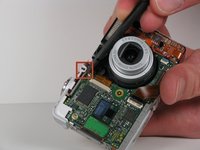
      • Use the flat end of the spudger to lift open the white plastic latch on the front of the camera. Once the latch is lifted up, move the latch up towards the top edge of the camera.

      • Remove the top button assembly by pulling straight up.

      询问修复机器人

      添加评论

结论

To reassemble your device, follow these instructions in reverse order.

取消:我没有完成这个指南。

James Loy

于10/06/10注册

103 声望

创作了7篇指南

团队

Cal Poly, Team 5-12, Maness Fall 2010 Cal Poly, Team 5-12, Maness Fall 2010 的会员

CPSU-MANESS-F10S5G12

4 名成员

创作了16篇指南

0指南评论

添加评论

浏览统计数据:

过去 24 小时: 1

过去 7 天: 7

过去 30 天: 28

总计 1,984