跳转到主内容
加入维修社区 - 创建账户

Canon PowerShot S230 Camera Casing Replacement

你所需要的

  1. Canon PowerShot S230 Camera Casing Replacement, Battery: 步骤 1 中的图像 1,1
    • On the bottom of the camera, use your thumb to press the rubber battery cover towards the side of the camera with the strap base. The cover will shift to extend beyond the rest of the camera.

    询问修复机器人
  2. Canon PowerShot S230 Camera Casing Replacement: 步骤 2 中的图像 1,1
    • Hold the end of the battery cover that extends beyond the camera and lift it up.

    询问修复机器人
  3. Canon PowerShot S230 Camera Casing Replacement: 步骤 3 中的图像 1,1
    • Locate the orange tab next to the battery. Next roll the tab back in order for the battery to come out.

    询问修复机器人
  4. Canon PowerShot S230 Camera Casing Replacement: 步骤 4 中的图像 1,1
    • Pull the battery out.

    询问修复机器人
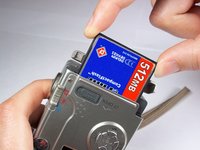
  5. Canon PowerShot S230 Camera Casing Replacement, Memory Card: 步骤 5 中的图像 1,3 Canon PowerShot S230 Camera Casing Replacement, Memory Card: 步骤 5 中的图像 2,3 Canon PowerShot S230 Camera Casing Replacement, Memory Card: 步骤 5 中的图像 3,3
    • Locate the sliding button labeled "CF open" on the back of the camera.

    • Press and slide down the button labeled "CF open". The memory card cover will pop open.

    询问修复机器人
  6. Canon PowerShot S230 Camera Casing Replacement: 步骤 6 中的图像 1,3 Canon PowerShot S230 Camera Casing Replacement: 步骤 6 中的图像 2,3 Canon PowerShot S230 Camera Casing Replacement: 步骤 6 中的图像 3,3
    • Push down on the black square button next to the memory card slot. This will release the memory card from the slot.

    询问修复机器人
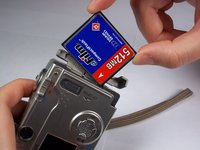
  7. Canon PowerShot S230 Camera Casing Replacement: 步骤 7 中的图像 1,2 Canon PowerShot S230 Camera Casing Replacement: 步骤 7 中的图像 2,2
    • Pull the memory card out of the memory card slot.

    询问修复机器人
  8. Canon PowerShot S230 Camera Casing Replacement, Camera Casing: 步骤 8 中的图像 1,1
    • Remove two 2.4mm Phillips screws from the right side of the camera.

    询问修复机器人
  9. Canon PowerShot S230 Camera Casing Replacement: 步骤 9 中的图像 1,1
    • Remove two 2.4mm Phillips screws above the label on the bottom of the camera.

    • Remove two 2.8mm Phillips screws next to the tripod hole.

    询问修复机器人
  10. Canon PowerShot S230 Camera Casing Replacement: 步骤 10 中的图像 1,1
    • Remove the two 3.2mm Phillips screws that are closer to the top and bottom edges of the camera.

    • Remove the two 3.8mm Phillips screws on either side of the strap base.

    询问修复机器人
  11. Canon PowerShot S230 Camera Casing Replacement: 步骤 11 中的图像 1,1
    • Remove one 1.6mm Phillips screw from the above the CF open button on back of the camera.

    询问修复机器人
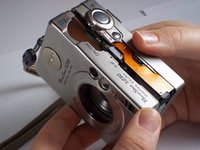
  12. Canon PowerShot S230 Camera Casing Replacement: 步骤 12 中的图像 1,3 Canon PowerShot S230 Camera Casing Replacement: 步骤 12 中的图像 2,3 Canon PowerShot S230 Camera Casing Replacement: 步骤 12 中的图像 3,3
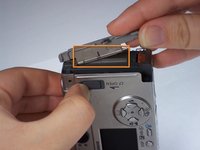
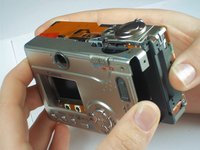
    • Gently pull the front casing from the camera.

    • The following items will either fall off or will be loose: the strap base, the gray rubber cover labeled "Digital A/V Out", and the black rubber piece over the view finder.

    • Remove the memory card cover by sliding down the CF open button and moving the pin.

    询问修复机器人
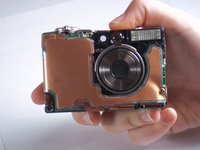
  13. Canon PowerShot S230 Camera Casing Replacement: 步骤 13 中的图像 1,2 Canon PowerShot S230 Camera Casing Replacement: 步骤 13 中的图像 2,2
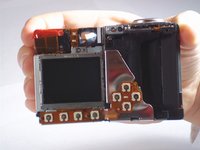
    • Gently pull the back casing from the camera.

    询问修复机器人
结论

To reassemble your device, follow these instructions in reverse order.

团队

Cal Poly, Team 13-1, Forte Winter 2011 Cal Poly, Team 13-1, Forte Winter 2011 的会员

CPSU-FORTE-W11S13G1

4 名成员

创作了5篇指南

0指南评论

添加评论

浏览统计数据:

过去 24 小时: 1

过去 7 天: 6

过去 30 天: 57

总计 2,105