跳转到主内容
加入维修社区 - 创建账户

Canon PowerShot A620 Camera Housing Replacement

你所需要的

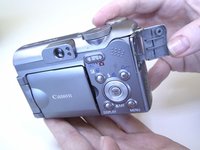
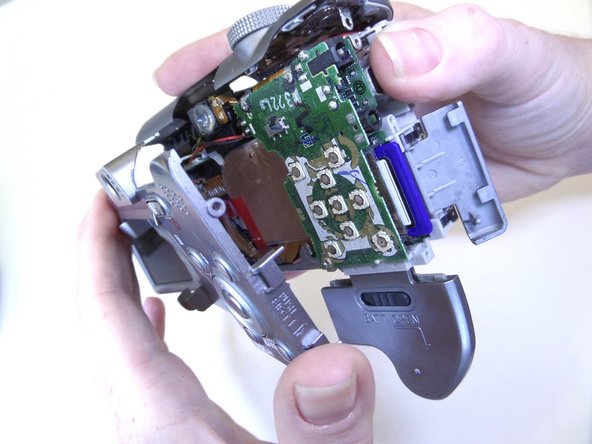
    1. Canon PowerShot A620 Camera Housing Replacement, Open Battery Door: 步骤 1 中的图像 1,3 Canon PowerShot A620 Camera Housing Replacement, Open Battery Door: 步骤 1 中的图像 2,3 Canon PowerShot A620 Camera Housing Replacement, Open Battery Door: 步骤 1 中的图像 3,3
      • Slide the tab on the battery door while pushing the battery door away from you. The battery door should pop open.

      询问修复机器人

      添加评论

    2. Canon PowerShot A620 Camera Housing Replacement, Insert Batteries: 步骤 2 中的图像 1,2 Canon PowerShot A620 Camera Housing Replacement, Insert Batteries: 步骤 2 中的图像 2,2
      • Insert AA batteries according to the diagram printed on the camera.

      • Close the battery door.

      询问修复机器人

      添加评论

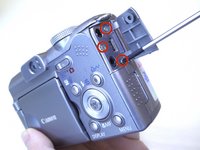
    1. Canon PowerShot A620 Camera Housing Replacement, Side Panel: 步骤 3 中的图像 1,3 Canon PowerShot A620 Camera Housing Replacement, Side Panel: 步骤 3 中的图像 2,3 Canon PowerShot A620 Camera Housing Replacement, Side Panel: 步骤 3 中的图像 3,3
      • Unscrew the three Phillips #00 1.6x3mm screws on the side.

      • Lift loose panel from the case.

      • Unscrew the two Phillips #00 1.6x3mm screws that were previously hidden beneath the panel.

      询问修复机器人

      添加评论

    2. Canon PowerShot A620 Camera Housing Replacement, Bottom Panel: 步骤 4 中的图像 1,1
      • Unscrew the two Phillips #00 1.6x3mm screws on the bottom panel.

      询问修复机器人

      添加评论

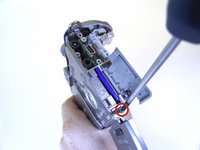
    3. Canon PowerShot A620 Camera Housing Replacement, Battery Compartment: 步骤 5 中的图像 1,1
      • Open the battery door.

      • Unscrew the four Phillips #00 1.6x3mm screws in the battery compartment.

      询问修复机器人

      添加评论

    4. Canon PowerShot A620 Camera Housing Replacement, Terminal Cover: 步骤 6 中的图像 1,2 Canon PowerShot A620 Camera Housing Replacement, Terminal Cover: 步骤 6 中的图像 2,2
      • Lift the terminal cover on the side of the camera.

      • Unscrew the three Phillips #00 1.6x3mm screws beneath the terminal cover.

      询问修复机器人

      添加评论

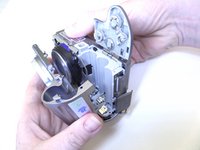
    5. Canon PowerShot A620 Camera Housing Replacement, Top Panel: 步骤 7 中的图像 1,1
      • Gently pull the top panel to separate it from the case.

      • Although the top panel will now be free from the rest of the case, it will still be attached to the camera by a ribbon cable.

      询问修复机器人

      添加评论

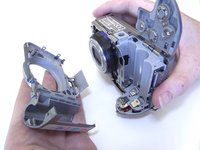
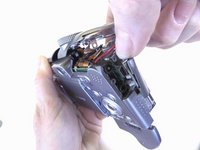
    6. Canon PowerShot A620 Camera Housing Replacement, Front Panel: 步骤 8 中的图像 1,2 Canon PowerShot A620 Camera Housing Replacement, Front Panel: 步骤 8 中的图像 2,2
      • Gently pull the front panel to separate it from the camera.

      • The battery terminals are easy to access from this step.

      询问修复机器人

      添加评论

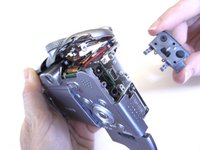
    7. Canon PowerShot A620 Camera Housing Replacement, Terminal Cover: 步骤 9 中的图像 1,2 Canon PowerShot A620 Camera Housing Replacement, Terminal Cover: 步骤 9 中的图像 2,2
      • Gently pull the terminal cover to separate it from the camera.

      询问修复机器人

      添加评论

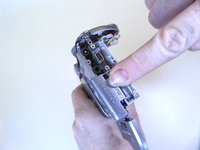
    8. Canon PowerShot A620 Camera Housing Replacement, Memory Card Cover: 步骤 10 中的图像 1,2 Canon PowerShot A620 Camera Housing Replacement, Memory Card Cover: 步骤 10 中的图像 2,2
      • Slide the memory card cover down.

      • Unscrew the Phillips #00 1.6x3mm screw beneath the memory card cover.

      询问修复机器人

      添加评论

    9. Canon PowerShot A620 Camera Housing Replacement, Back Panel: 步骤 11 中的图像 1,2 Canon PowerShot A620 Camera Housing Replacement, Back Panel: 步骤 11 中的图像 2,2
      • Gently pull the back panel to separate it from the camera.

      询问修复机器人

      添加评论

结论

To reassemble your device, follow these instructions in reverse order.

取消:我没有完成这个指南。

2等其他人完成本指南。

Jaime Abraham

于09/08/14注册

350 声望

创作了3篇指南

团队

CSU Fullerton, Team 1-1, Bruce Fall 2014 CSU Fullerton, Team 1-1, Bruce Fall 2014 的会员

CSUF-BRUCE-F14S1G1

3 名成员

创作了6篇指南

1指南评论

Ottima spiegazione: é tutto facile quando la spiegazione é semplice ed univoca. Ma redigere istruzioni semplici é un'arte che non tutti possiedono.

Paolo Ravera - 回复 分享
添加评论

浏览统计数据:

过去 24 小时: 1

过去 7 天: 6

过去 30 天: 21

总计 2,371