跳转到主内容
加入维修社区 - 创建账户

Canon PowerShot A460 Front Lens Replacement

你所需要的

  1. Canon PowerShot A460 Front Lens Replacement, Battery: 步骤 1 中的图像 1,1
    • Slide the switch on the battery cover labeled "CARD/BATT. OPEN." to the right.

    • While still holding the switch, pull the cover down, allowing it to release and open.

    询问修复机器人
  2. Canon PowerShot A460 Front Lens Replacement: 步骤 2 中的图像 1,1
    • Tilt the camera slightly to allow the batteries to fall out.

    询问修复机器人
  3. Canon PowerShot A460 Front Lens Replacement: 步骤 3 中的图像 1,1
    • Press on and release the memory card to eject it.

    询问修复机器人
  4. Canon PowerShot A460 Front Lens Replacement, Front Casing: 步骤 4 中的图像 1,1
    • Unscrew the 5mm Phillips #00 screw from the bottom of the camera.

    • Make sure to keep the different size screws organized to make reassembling the camera simpler.

    询问修复机器人
  5. Canon PowerShot A460 Front Lens Replacement: 步骤 5 中的图像 1,1
    • Unscrew the three 2mm Phillips #00 screws that are located on the bottom of the camera.

    询问修复机器人
  6. Canon PowerShot A460 Front Lens Replacement: 步骤 6 中的图像 1,1
    • Remove the 4mm Phillips #00 screw that is located on the left side of the camera, if the display screen is facing you.

    询问修复机器人
  7. Canon PowerShot A460 Front Lens Replacement: 步骤 7 中的图像 1,1
    • Take out the 4mm Phillips #00 screw under the rubber flap on the right end of the camera.

    询问修复机器人
  8. Canon PowerShot A460 Front Lens Replacement: 步骤 8 中的图像 1,2 Canon PowerShot A460 Front Lens Replacement: 步骤 8 中的图像 2,2
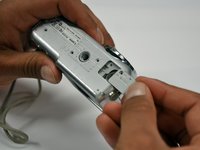
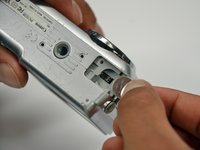
    • Remove the second battery cover on the bottom of camera.

    • Take the silver battery out of the camera.

    询问修复机器人
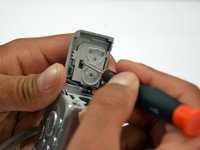
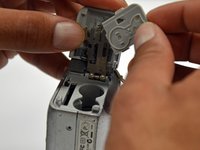
  9. Canon PowerShot A460 Front Lens Replacement: 步骤 9 中的图像 1,3 Canon PowerShot A460 Front Lens Replacement: 步骤 9 中的图像 2,3 Canon PowerShot A460 Front Lens Replacement: 步骤 9 中的图像 3,3
    • Remove the 4mm Phillips #00 screw on the inside of the flap that hides the battery and memory card slots.

    • Remove the light grey, plastic piece.

    • Remove the plastic portion of the battery flap cover. The metal piece will remain attached.

    询问修复机器人
  10. Canon PowerShot A460 Front Lens Replacement: 步骤 10 中的图像 1,3 Canon PowerShot A460 Front Lens Replacement: 步骤 10 中的图像 2,3 Canon PowerShot A460 Front Lens Replacement: 步骤 10 中的图像 3,3
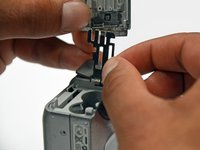
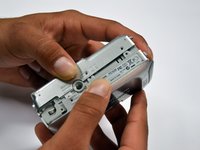
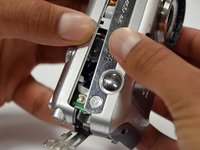
    • Slightly pull on each side of the camera. It should loosen up and come apart.

    • If it does not pull apart right away, use a little more force.

    • Do not give up!

    询问修复机器人
  11. Canon PowerShot A460 Front Lens Replacement, Back Casing: 步骤 11 中的图像 1,1
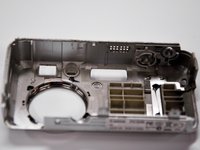
    • Remove the back case of the camera by pulling from the top.

    • Be careful when pulling off the case. There is a delicate gold ribbon connecting the bottom of the camera to the back case.

    询问修复机器人
  12. Canon PowerShot A460 Front Lens Replacement, LCD Screen: 步骤 12 中的图像 1,1
    • Remove the 4mm Phillips #00 screw from above the ribbon.

    询问修复机器人
  13. Canon PowerShot A460 Front Lens Replacement: 步骤 13 中的图像 1,1
    • Gently peel off the blue tape on the top of the LCD screen.

    询问修复机器人
  14. Canon PowerShot A460 Front Lens Replacement: 步骤 14 中的图像 1,1
    • Remove the 4mm Phillips #00 screw previously concealed by the blue tape.

    询问修复机器人
  15. Canon PowerShot A460 Front Lens Replacement: 步骤 15 中的图像 1,1
    • Gently lift the LCD screen off of the front casing by pulling up a tab on the side of the camera.

    询问修复机器人
  16. Canon PowerShot A460 Front Lens Replacement: 步骤 16 中的图像 1,1
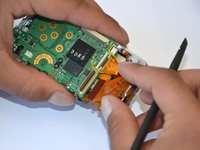
    • Using a spudger, lift the grey tabs to allow the ribbon to slide out.

  17. Canon PowerShot A460 Front Lens Replacement: 步骤 17 中的图像 1,1
    • Since the tabs have been lifted, the ribbon should now slide out out easily.

    • Be careful not to distort the ribbon in any way.

  18. Canon PowerShot A460 Front Lens Replacement, Motherboard: 步骤 18 中的图像 1,1
    • Remove the 5mm Phillips #00 screw located above the small black piece on the right side of the mother board.

    询问修复机器人
  19. Canon PowerShot A460 Front Lens Replacement: 步骤 19 中的图像 1,2 Canon PowerShot A460 Front Lens Replacement: 步骤 19 中的图像 2,2
    • Remove the 4mm Phillips #00 screw at the bottom of the black piece.

    • Detach the black piece that the screws previously held in place.

    询问修复机器人
  20. Canon PowerShot A460 Front Lens Replacement: 步骤 20 中的图像 1,1
    • Remove the 5mm Phillips #00 screw in the middle of the motherboard.

    询问修复机器人
  21. Canon PowerShot A460 Front Lens Replacement: 步骤 21 中的图像 1,1
    • Remove the 5mm Phillips #00 screw that holds the metal piece to the bottom of the camera .

    询问修复机器人
  22. Canon PowerShot A460 Front Lens Replacement: 步骤 22 中的图像 1,1
    • Remove the 5mm Phillips #00 screw that is located on the top of camera.

    询问修复机器人
  23. Canon PowerShot A460 Front Lens Replacement: 步骤 23 中的图像 1,1
    • Remove the 2mm Phillips #00 screw that is located on the far left of the motherboard.

    • Be careful not to damage the multiple adjacent orange ribbons.

    询问修复机器人
  24. Canon PowerShot A460 Front Lens Replacement: 步骤 24 中的图像 1,1
    • Remove the 5mm Phillips #00 screw near the bottom left of the motherboard.

    询问修复机器人
  25. Canon PowerShot A460 Front Lens Replacement: 步骤 25 中的图像 1,2 Canon PowerShot A460 Front Lens Replacement: 步骤 25 中的图像 2,2
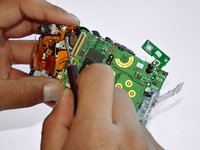
    • Using a spudger, unlock the locking mechanism that holds the lower orange ribbon in place.

    • Once unlocked, slide out the ribbon.

    询问修复机器人
  26. Canon PowerShot A460 Front Lens Replacement: 步骤 26 中的图像 1,1
    • Using a spudger, unlock the locking mechanism that holds the upper orange ribbon in place.

    • Once unlocked, slide out the ribbon.

    询问修复机器人
  27. Canon PowerShot A460 Front Lens Replacement: 步骤 27 中的图像 1,1
    • All that is required is to unsolder the few remaining wires. Then, the motherboard will be ready to be replaced!

    询问修复机器人
  28. Canon PowerShot A460 Front Lens Replacement, Front Lens: 步骤 28 中的图像 1,1
    • Remove the six 2mm Phillips #00 screws that are located under the motherboard.

    询问修复机器人
  29. Canon PowerShot A460 Front Lens Replacement: 步骤 29 中的图像 1,2 Canon PowerShot A460 Front Lens Replacement: 步骤 29 中的图像 2,2
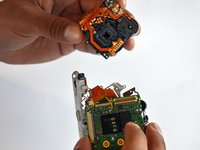
    • Remove the 4mm Phillips #00 screw that is located under the now disconnected top orange ribbon.

    • The lens piece can now be removed from the camera.

  30. Canon PowerShot A460 Front Lens Replacement: 步骤 30 中的图像 1,1
    • Remove the 5mm Phillips #00 screw on the back of the lens piece.

    询问修复机器人
  31. Canon PowerShot A460 Front Lens Replacement: 步骤 31 中的图像 1,1
    • Remove the 2mm Phillips #00 screw on the bottom of the lens piece.

    询问修复机器人
  32. Canon PowerShot A460 Front Lens Replacement: 步骤 32 中的图像 1,1
    • Remove the two 2mm Phillips #00 screws on the top of the lens piece.

    询问修复机器人
  33. Canon PowerShot A460 Front Lens Replacement: 步骤 33 中的图像 1,1
    • Gently slide off the black piece surrounding the lens. The lens is now disassembled!

    询问修复机器人
结论

To reassemble your device, follow these instructions in reverse order.

4等其他人完成本指南。

团队

Cal Poly, Team 19-42, Regan Winter 2013 Cal Poly, Team 19-42, Regan Winter 2013 的会员

CPSU-REGAN-W13S19G42

4 名成员

创作了12篇指南

1指南评论

please put a big warning note on the step after removing the blue tape from the lens. and the next on is where you lift something on the mother board with a spluger..something like that. well i used a screwdriver and got such a big electrical shock.... scared the crapola out of me. please make a note .... can get electrical shock....

Gaby - 回复 分享

添加评论

浏览统计数据:

过去 24 小时: 3

过去 7 天: 21

过去 30 天: 106

总计 5,498