跳转到主内容
加入维修社区 - 创建账户

Canon EOS 5D Mark II Top Panel Replacement

你所需要的

    1. Canon EOS 5D Mark II Top Panel Replacement, Clock Battery: 步骤 1 中的图像 1,1
      • Lift the rubber flap covering the input/output jacks.

      询问修复机器人
      添加评论

    2. Canon EOS 5D Mark II Top Panel Replacement: 步骤 2 中的图像 1,1
      • Using a Phillips #000, remove the single 3.4 mm screw.

      添加评论

    3. Canon EOS 5D Mark II Top Panel Replacement: 步骤 3 中的图像 1,1
      • This step will permanently erase all user settings.

      • The memory battery can now be easily slid out of place.

      • If you are following this guide in an effort to perform a hard reset, you should now press the shutter button multiple times in order to drain any left over power, then replace the batteries and power the device back on. You have just performed a hard reset!

      添加评论

    1. Canon EOS 5D Mark II Top Panel Replacement, Back Panel: 步骤 4 中的图像 1,1
      • Peel back the rubber cover above the in/out ports to reveal two screw heads.

      询问修复机器人

      添加评论

    2. Canon EOS 5D Mark II Top Panel Replacement: 步骤 5 中的图像 1,1
      • Remove both 5.4 mm screws using a Phillips #0.

      添加评论

    3. Canon EOS 5D Mark II Top Panel Replacement: 步骤 6 中的图像 1,1
      • Lift the in/out port plastic covering from the bottom where the backup battery used to be.

      添加评论

    4. Canon EOS 5D Mark II Top Panel Replacement: 步骤 7 中的图像 1,1
      • Remove each 6.3 mm screw on either side of the viewfinder using a Phillips #0 screwdriver.

      添加评论

    5. Canon EOS 5D Mark II Top Panel Replacement: 步骤 8 中的图像 1,1
      • Remove the three 4.8 mm screws on the bottom of the back plate using a Phillips #0.

      添加评论

    6. Canon EOS 5D Mark II Top Panel Replacement: 步骤 9 中的图像 1,1
      • Peel back the rubber covering next to the menu dial to access the screw.

      • Remove the single 3.4 mm screw using a Phillips #0.

      询问修复机器人

      添加评论

    7. Canon EOS 5D Mark II Top Panel Replacement: 步骤 10 中的图像 1,1
      • The back panel can now fall off easily by turning the device upside down. Be sure to catch it so the data ribbons do not tear or tug.

      询问修复机器人

      添加评论

    8. Canon EOS 5D Mark II Top Panel Replacement: 步骤 11 中的图像 1,1
      • Remove each data ribbon cable from the motherboard by applying pressure down towards the motherboard and gently sliding your thumb upwards on the slot where the cable meets the motherboard. This will raise a very small clip that locks the cable in place.

      • The back panel is now free from the rest of the device.

      询问修复机器人

      添加评论

    1. Canon EOS 5D Mark II Top Panel Replacement, Front Panel: 步骤 12 中的图像 1,1
      在这个步骤中使用的工具:
      Tweezers
      $4.99
      • Using tweezers, pull out the wire attaching the front panel to the motherboard.

      询问修复机器人

      添加评论

    2. Canon EOS 5D Mark II Top Panel Replacement: 步骤 13 中的图像 1,1
      • Peel off the rubber cover on the front panel in order to access the screws underneath.

      询问修复机器人

      添加评论

    3. Canon EOS 5D Mark II Top Panel Replacement: 步骤 14 中的图像 1,1
      • Remove each of the 4.9 mm three screws using a Phillips #0.

      询问修复机器人

      添加评论

    4. Canon EOS 5D Mark II Top Panel Replacement: 步骤 15 中的图像 1,1
      • Remove the two 4.8 mm screws above where the lens would be using a Phillips #0.

      询问修复机器人

      添加评论

    5. Canon EOS 5D Mark II Top Panel Replacement: 步骤 16 中的图像 1,1
      • Remove the single screw underneath where the lens would be using a Phillips #0.

      询问修复机器人

      添加评论

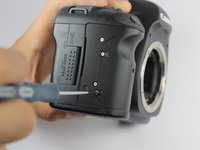
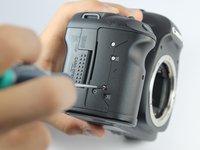
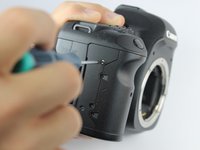
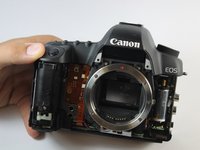
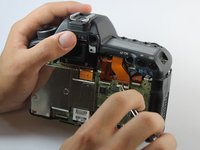
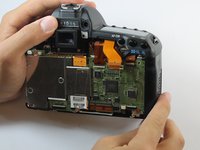
    6. Canon EOS 5D Mark II Top Panel Replacement: 步骤 17 中的图像 1,3 Canon EOS 5D Mark II Top Panel Replacement: 步骤 17 中的图像 2,3 Canon EOS 5D Mark II Top Panel Replacement: 步骤 17 中的图像 3,3
      • Remove the four 3.0 mm screws next to the memory card reader using a Phillips #0.

      询问修复机器人

      添加评论

    7. Canon EOS 5D Mark II Top Panel Replacement: 步骤 18 中的图像 1,2 Canon EOS 5D Mark II Top Panel Replacement: 步骤 18 中的图像 2,2
      • Remove the front panel by lifting upwards from the right side where the in/out ports used to be.

      添加评论

    1. Canon EOS 5D Mark II Top Panel Replacement, Top Panel: 步骤 19 中的图像 1,1
      • Remove the single 5.9 mm screw next to the the strap loop on the same side as the shutter button.

      询问修复机器人

      添加评论

    2. Canon EOS 5D Mark II Top Panel Replacement: 步骤 20 中的图像 1,1
      • Remove the single 3.8 mm screw underneath the camera strap on the same side as the in/out ports.

      • If you are having problems finding this screw, note the orientation of the viewfinder in the bottom center of the photo.

      询问修复机器人

      添加评论

    3. Canon EOS 5D Mark II Top Panel Replacement: 步骤 21 中的图像 1,2 Canon EOS 5D Mark II Top Panel Replacement: 步骤 21 中的图像 2,2
      在这个步骤中使用的工具:
      Tweezers
      $4.99
      • Using tweezers or your thumb, raise the clasp holding the topmost data ribbon cable in order to release it.

      询问修复机器人

      添加评论

    4. Canon EOS 5D Mark II Top Panel Replacement: 步骤 22 中的图像 1,1
      • The top panel is now free from the rest of the device. Lift to remove.

      添加评论

结论

To reassemble your device, follow these instructions in reverse order.

取消:我没有完成这个指南。

15等其他人完成本指南。

Mike Seed

于09/22/14注册

3,166 声望

创作了8篇指南

团队

USF Tampa, Team 1-6, Hickman Fall 2014 USF Tampa, Team 1-6, Hickman Fall 2014 的会员

USFT-HICKMAN-F14S1G6

3 名成员

创作了56篇指南

13指南评论

The strap hook on the left side of my 5d2 body got bent in a fall and I want to replace it. Do I have to go through all these steps or is there an easier way to get to it ? Thanks

Tim - 回复 分享

Everything it's very nice in this guide.

I just have a question?

Where do I can find the top panel to buy it?

It's seem almost impossible...

stefano masetti - 回复 分享

I would also like to know where a replacement top panel can be purchased from.

t1000email - 回复 分享

I purchased one on Ebay , (US) $100 USD

yanhao996 - 回复 分享

The guide is useful and quite easy to follow. Thanks

Janes - 回复 分享

添加评论

浏览统计数据:

过去 24 小时: 4

过去 7 天: 23

过去 30 天: 81

总计 15,986