跳转到主内容
加入维修社区 - 创建账户

Cambridge SoundWorks OontZ Angle Plus Motherboard Replacement

你所需要的

  1. Cambridge SoundWorks OontZ Angle Plus Motherboard  Replacement, Lower Casing: 步骤 1 中的图像 1,2 Cambridge SoundWorks OontZ Angle Plus Motherboard  Replacement, Lower Casing: 步骤 1 中的图像 2,2
    • Pull back the six screw covers on the bottom of the device.

    • Starting from the screw covers, peel the casing away from the bottom plate.

    询问修复机器人
  2. Cambridge SoundWorks OontZ Angle Plus Motherboard  Replacement, Battery: 步骤 2 中的图像 1,1
    • Unscrew the five 11.5mm Phillips screws on the bottom plate.

    询问修复机器人
  3. Cambridge SoundWorks OontZ Angle Plus Motherboard  Replacement: 步骤 3 中的图像 1,1
    • Carefully pull apart the bottom plate and the top plate, using the blue plastic opening tool.

    询问修复机器人
  4. Cambridge SoundWorks OontZ Angle Plus Motherboard  Replacement: 步骤 4 中的图像 1,1
    • Once the bottom plate and the top plate are separated, slowly pull the back plate away from the top plate.

    • There are wires connected to both plates so do this step with care.

    询问修复机器人
  5. Cambridge SoundWorks OontZ Angle Plus Motherboard  Replacement: 步骤 5 中的图像 1,1
    • Unscrew the two 10 mm Phillips screws on the brace holding down the battery.

    • Remove the brace that holds the battery in place.

    询问修复机器人
  6. Cambridge SoundWorks OontZ Angle Plus Motherboard  Replacement: 步骤 6 中的图像 1,1
    • Separate the battery from the bottom plate and set the bottom plate aside.

    询问修复机器人
  7. Cambridge SoundWorks OontZ Angle Plus Motherboard  Replacement: 步骤 7 中的图像 1,1
    • With some force, push the motherboard straight in toward the center of the device.

  8. Cambridge SoundWorks OontZ Angle Plus Motherboard  Replacement: 步骤 8 中的图像 1,1
    • Pull the motherboard straight out of the device.

    • There is some adhesive on the motherboard that holds it in place. This make the motherboard fit in the groove rather tight.

    询问修复机器人
  9. Cambridge SoundWorks OontZ Angle Plus Motherboard  Replacement: 步骤 9 中的图像 1,1
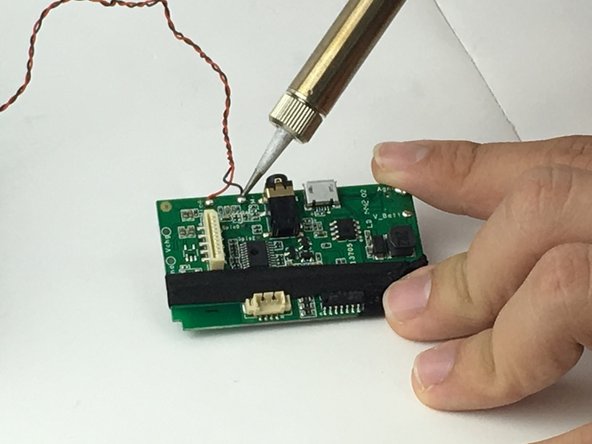
    • Desolder the wires that connect the battery to the motherboard, negative (black wire) and positive (red wire).

    询问修复机器人
  10. Cambridge SoundWorks OontZ Angle Plus Motherboard  Replacement, Motherboard: 步骤 10 中的图像 1,1
    • Unplug the wires that connect the speakers to the motherboard.

    询问修复机器人
  11. Cambridge SoundWorks OontZ Angle Plus Motherboard  Replacement: 步骤 11 中的图像 1,1
    • Unplug the thin white cable connected to the buttons.

    询问修复机器人
  12. Cambridge SoundWorks OontZ Angle Plus Motherboard  Replacement: 步骤 12 中的图像 1,2 Cambridge SoundWorks OontZ Angle Plus Motherboard  Replacement: 步骤 12 中的图像 2,2
    • Desolder the wires that connect the LED to the motherboard.

    询问修复机器人
结论

To reassemble your device, follow these instructions in reverse order.

团队

USF Tampa, Team 1-1, Nance Spring 2016 USF Tampa, Team 1-1, Nance Spring 2016 的会员

USFT-NANCE-S16S1G1

4 名成员

创作了6篇指南

0指南评论

添加评论

浏览统计数据:

过去 24 小时: 0

过去 7 天: 2

过去 30 天: 18

总计 2,062