跳转到主内容
加入维修社区 - 创建账户

Blackberry 7520 LCD Screen Replacement

你所需要的

    1. Blackberry 7520 LCD Screen Replacement, Battery: 步骤 1 中的图像 1,2 Blackberry 7520 LCD Screen Replacement, Battery: 步骤 1 中的图像 2,2
      • Turn the phone upside down.

      • Push down on the black button on the back of the phone to slide the rear panel off.

      • The battery should be visible now.

      询问修复机器人

      添加评论

    2. Blackberry 7520 LCD Screen Replacement: 步骤 2 中的图像 1,3 Blackberry 7520 LCD Screen Replacement: 步骤 2 中的图像 2,3 Blackberry 7520 LCD Screen Replacement: 步骤 2 中的图像 3,3
      • Hold the BlackBerry in one hand face-up with the screen facing towards you.

      • Gently smack the phone against your hand to dislodge the battery.

      询问修复机器人

      添加评论

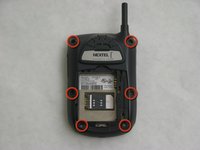
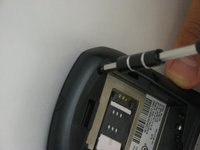
    1. Blackberry 7520 LCD Screen Replacement, Motherboard: 步骤 3 中的图像 1,2 Blackberry 7520 LCD Screen Replacement, Motherboard: 步骤 3 中的图像 2,2
      • Use a T6 Torx screwdriver to remove the 6 screws holding the rear of the phone.

      询问修复机器人

      添加评论

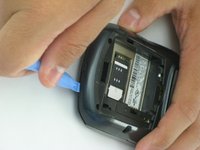
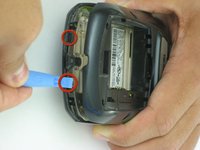
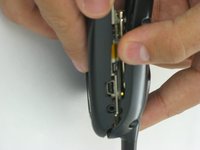
    2. Blackberry 7520 LCD Screen Replacement: 步骤 4 中的图像 1,2 Blackberry 7520 LCD Screen Replacement: 步骤 4 中的图像 2,2
      • Use a pick or plastic opening tool to push the clips holding the rear away from you.

      • Applying too much pressure could break the plastic clips and permanently damage your Blackberry.

      询问修复机器人

      添加评论

    3. Blackberry 7520 LCD Screen Replacement: 步骤 5 中的图像 1,1
      • Repeat the process of unlatching the clips for the top section of the Blackberry.

      询问修复机器人

      添加评论

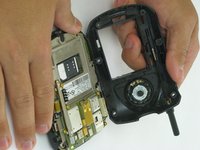
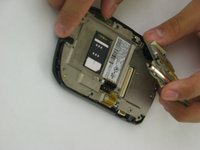
    4. Blackberry 7520 LCD Screen Replacement: 步骤 6 中的图像 1,2 Blackberry 7520 LCD Screen Replacement: 步骤 6 中的图像 2,2
      • Slide the rear panel forward to reveal the motherboard.

      询问修复机器人

      添加评论

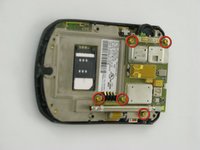
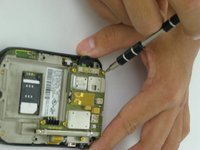
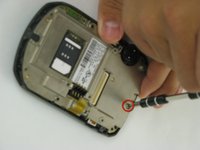
    5. Blackberry 7520 LCD Screen Replacement: 步骤 7 中的图像 1,2 Blackberry 7520 LCD Screen Replacement: 步骤 7 中的图像 2,2
      • Remove the indicated screws using a T6 Torx screwdriver.

      询问修复机器人

      添加评论

    6. Blackberry 7520 LCD Screen Replacement: 步骤 8 中的图像 1,2 Blackberry 7520 LCD Screen Replacement: 步骤 8 中的图像 2,2
      • Remove the motherboard.

      • Remove the indicated screw using the T6 Torx screwdriver.

      询问修复机器人

      添加评论

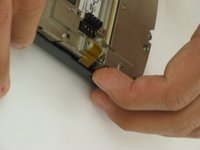
    7. Blackberry 7520 LCD Screen Replacement: 步骤 9 中的图像 1,2 Blackberry 7520 LCD Screen Replacement: 步骤 9 中的图像 2,2
      • Pull the metal plate away from the front panel of the cell phone.

      询问修复机器人

      添加评论

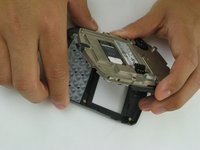
    8. Blackberry 7520 LCD Screen Replacement: 步骤 10 中的图像 1,1
      • Place the faceplate face-down and the interior of the phone face-up, as shown.

      询问修复机器人

      添加评论

    1. Blackberry 7520 LCD Screen Replacement, LCD Screen: 步骤 11 中的图像 1,1
      • Turn the phone so that it faces towards you.

      询问修复机器人

      添加评论

    2. Blackberry 7520 LCD Screen Replacement: 步骤 12 中的图像 1,1
      • Use a pick or other small tool to pop the small plastic clip holding the LCD panel on

      询问修复机器人

      添加评论

    3. Blackberry 7520 LCD Screen Replacement: 步骤 13 中的图像 1,2 Blackberry 7520 LCD Screen Replacement: 步骤 13 中的图像 2,2
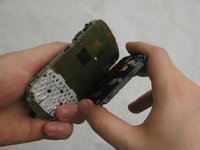
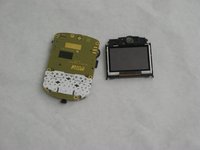
      • Pull the LCD screen off of the board.

      询问修复机器人

      添加评论

结论

To reassemble your device, follow these instructions in reverse order.

取消:我没有完成这个指南。

另外一个人完成了本指南。

Nathan

于01/18/10注册

31 声望

创作了6篇指南

团队

Cal Poly, Team 5-7, Forte Winter 2010 Cal Poly, Team 5-7, Forte Winter 2010 的会员

CPSU-FORTE-W10S5G7

5 名成员

创作了54篇指南

1指南评论

It’s too bad that iFixit didn’t post a teardown listing the parts for the BlackBerry 7520, since so little is known about its parts.

amosbatto - 回复 分享

添加评论

浏览统计数据:

过去 24 小时: 0

过去 7 天: 4

过去 30 天: 12

总计 1,723