跳转到主内容
加入维修社区 - 创建账户

Asus X751L DVD Drive Replacement

你所需要的

    1. Asus X751L DVD Drive Replacement, Keyboard: 步骤 1 中的图像 1,1
      • With the screen closed, place your laptop upside-down with the front facing you.

      • Remove the six 14.6mm Phillips #00 screws.

      • Remove the four 6.6mm Phillips #00 screws.

      询问修复机器人

      添加评论

    2. Asus X751L DVD Drive Replacement: 步骤 2 中的图像 1,1
      • Flip the laptop over and open the lid.

      • Pry around the edges of the laptop base using the plastic opening tool.

      • Prying too hard can break the plastic clips.

      询问修复机器人

      添加评论

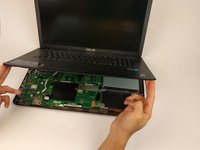
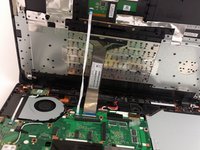
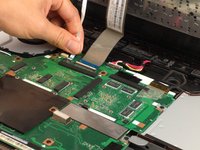
    3. Asus X751L DVD Drive Replacement: 步骤 3 中的图像 1,3 Asus X751L DVD Drive Replacement: 步骤 3 中的图像 2,3 Asus X751L DVD Drive Replacement: 步骤 3 中的图像 3,3
      • Carefully lift the keyboard up.

      • Be very careful when lifting the keyboard up. Two zero insertion force (ZIF) cables are between the keyboard assembly and the motherboard. Do not lift the assembly too high.

      • Disconnect the two ZIF connectors from the motherboard using your fingernail to lift the cream-colored tab.

      询问修复机器人

      添加评论

    1. Asus X751L DVD Drive Replacement, DVD Drive: 步骤 4 中的图像 1,1
      • With the keyboard panel open, face the laptop with the internal components facing towards you.

      • Remove the single 4.6mm Phillips #00 screw.

      询问修复机器人

      添加评论

    2. Asus X751L DVD Drive Replacement: 步骤 5 中的图像 1,1
      • Pull the optical drive out.

      询问修复机器人

      添加评论

结论

To reassemble your device, follow these instructions in reverse order.

取消:我没有完成这个指南。

2等其他人完成本指南。

Carl Ravina

于02/02/17注册

125 声望

撰写一个指南

团队

USF Tampa, Team 17-2, Blackwell Spring 2017 USF Tampa, Team 17-2, Blackwell Spring 2017 的会员

USFT-BLACKWELL-S17S17G2

4 名成员

创作了35篇指南

1指南评论

Spot on, took away any worries…………

paul pepper - 回复 分享

添加评论

浏览统计数据:

过去 24 小时: 0

过去 7 天: 4

过去 30 天: 20

总计 2,805