跳转到主内容
加入维修社区 - 创建账户

Asus 1015E-DS03 Keyboard Replacement

你所需要的

    1. Asus 1015E-DS03 Keyboard Replacement, Battery: 步骤 1 中的图像 1,1
      • Hold the laptop using both hands with the battery facing upwards.

      添加评论

    2. Asus 1015E-DS03 Keyboard Replacement: 步骤 2 中的图像 1,1
      • Push the two tabs located below the battery in towards each other using your thumbs.

      添加评论

    3. Asus 1015E-DS03 Keyboard Replacement: 步骤 3 中的图像 1,1
      • Push the battery upwards and out of the laptop as shown.

      添加评论

    4. Asus 1015E-DS03 Keyboard Replacement: 步骤 4 中的图像 1,1
      • Continue to push the battery upwards until it is completely separated from the laptop as shown.

      添加评论

    1. Asus 1015E-DS03 Keyboard Replacement, Keyboard: 步骤 5 中的图像 1,1
      • Once the battery is removed, unscrew the highlighted 3mm screws (4) using a #0 Phillps head screwdriver.

      • Be very careful not to lose the screws, these four screws are very small.

      询问修复机器人

      添加评论

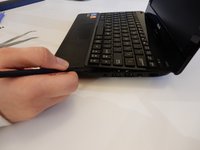
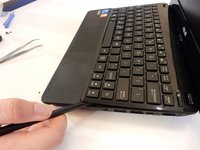
    2. Asus 1015E-DS03 Keyboard Replacement: 步骤 6 中的图像 1,2 Asus 1015E-DS03 Keyboard Replacement: 步骤 6 中的图像 2,2
      • After all four screws are removed, flip the laptop over with the keyboard facing up.

      • Use a spudger to pry up where the keyboard is attached to the laptop on all sides until it is detached from the laptop.

      • It is normal to hear cracking noises when prying off the keyboard.

      • After keyboard is detached from laptop, there is a ribbon cable still attached to the motherboard. See next step before completely removing keyboard.

      添加评论

    3. Asus 1015E-DS03 Keyboard Replacement: 步骤 7 中的图像 1,1
      • After the keyboard is detached, the ribbon cable which connects the keyboard to the laptop's motherboard is exposed.

      • Be careful not to tear or rip the ribbon cable.

      询问修复机器人

      添加评论

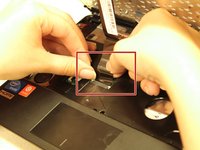
    4. Asus 1015E-DS03 Keyboard Replacement: 步骤 8 中的图像 1,1
      • Using the spudger push the white clips upwards that are holding the cable.

      询问修复机器人

      添加评论

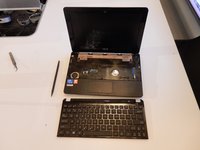
    5. Asus 1015E-DS03 Keyboard Replacement: 步骤 9 中的图像 1,2 Asus 1015E-DS03 Keyboard Replacement: 步骤 9 中的图像 2,2
      • Gently pull the strip out of the square slot.

      添加评论

结论

To reassemble your device, follow these instructions in reverse order.

取消:我没有完成这个指南。

2等其他人完成本指南。

团队

Clemson, Team 7-4, Benson Spring 2016 Clemson, Team 7-4, Benson Spring 2016 的会员

CLEM-BENSON-S16S7G4

5 名成员

创作了56篇指南

0指南评论

添加评论

浏览统计数据:

过去 24 小时: 0

过去 7 天: 9

过去 30 天: 38

总计 1,609