跳转到主内容
加入维修社区 - 创建账户

Anker Soundcore Select Pro A 3126 Button Panel Replacement

你所需要的

    1. Anker Soundcore Select Pro A 3126 Button Panel Replacement, Button Panel: 步骤 1 中的图像 1,2 Anker Soundcore Select Pro A 3126 Button Panel Replacement, Button Panel: 步骤 1 中的图像 2,2
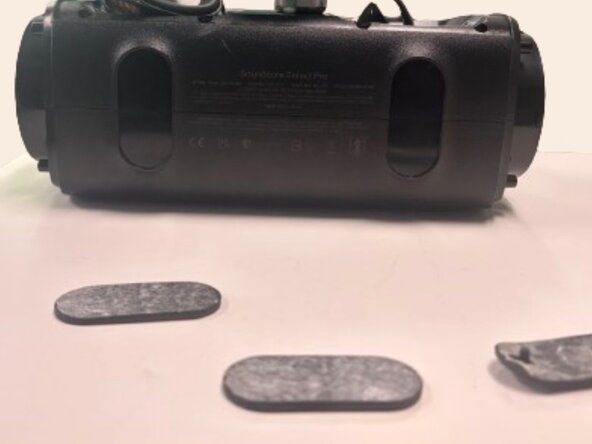
      • Use a spudger to remove each side speaker cover by inserting it in the crevice and using moderate force to pry them off.

      询问修复机器人

      添加评论

    2. Anker Soundcore Select Pro A 3126 Button Panel Replacement: 步骤 2 中的图像 1,2 Anker Soundcore Select Pro A 3126 Button Panel Replacement: 步骤 2 中的图像 2,2
      • Insert a spudger into the space between the grille and speaker frame to pry the mesh grille covering the front speakers.

      询问修复机器人

      添加评论

    3. Anker Soundcore Select Pro A 3126 Button Panel Replacement: 步骤 3 中的图像 1,1
      • Use a Phillips #1 screwdriver to remove the eight 12.7 mm screws securing the front cover.

      询问修复机器人

      添加评论

    4. Anker Soundcore Select Pro A 3126 Button Panel Replacement: 步骤 4 中的图像 1,1
      • Using a Phillips #1 screwdriver, remove the eight 8.75 mm screws around the corners of each speaker.

      询问修复机器人

      添加评论

    5. Anker Soundcore Select Pro A 3126 Button Panel Replacement: 步骤 5 中的图像 1,1
      • Flip the speaker so you have access to the bottom of the device.

      • Use a spudger to remove both rubber pads that protect the bottom of the device.

      询问修复机器人

      添加评论

    6. Anker Soundcore Select Pro A 3126 Button Panel Replacement: 步骤 6 中的图像 1,1
      • Using a spudger remove the rubber pad on the top handle to expose 3 screws underneath.

      • Using a Phillips #1 screwdriver, remove the three 6.75 mm screws.

      询问修复机器人

      添加评论

    7. Anker Soundcore Select Pro A 3126 Button Panel Replacement: 步骤 7 中的图像 1,3 Anker Soundcore Select Pro A 3126 Button Panel Replacement: 步骤 7 中的图像 2,3 Anker Soundcore Select Pro A 3126 Button Panel Replacement: 步骤 7 中的图像 3,3
      • Using a spudger, pry open the front half of the speaker.

      • The front and back halves of the speaker are connected by several cables. Open the speaker slowly and avoid pulling on the cables, as they can be damaged easily.

      询问修复机器人

      添加评论

    8. Anker Soundcore Select Pro A 3126 Button Panel Replacement: 步骤 8 中的图像 1,1
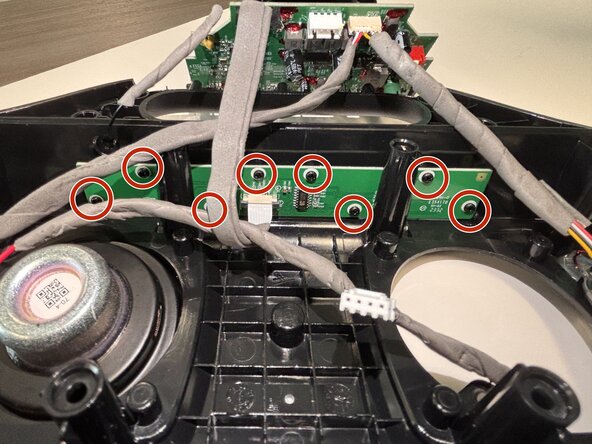
      • Use a Phillips #1 screwdriver to remove the eight 6.5 mm screws securing the button board.

      询问修复机器人

      添加评论

    9. Anker Soundcore Select Pro A 3126 Button Panel Replacement: 步骤 9 中的图像 1,2 Anker Soundcore Select Pro A 3126 Button Panel Replacement: 步骤 9 中的图像 2,2
      • Use the tip of the spudger to push the black plastic locking tab away from the socket.

      • Pull the ribbon cable straight out of the socket.

      • Remove the old button board.

      询问修复机器人

      添加评论

结论

To reassemble your device, follow these instructions in reverse order.

取消:我没有完成这个指南。

Matthew Garza

于02/24/26注册

387 声望

创作了2篇指南

0指南评论

添加评论

浏览统计数据:

过去 24 小时: 1

过去 7 天: 1

过去 30 天: 38

总计 100