跳转到主内容
加入维修社区 - 创建账户

Amazon Echo Studio Motherboard Replacement

你所需要的

    1. Amazon Echo Studio Motherboard Replacement, Power Supply Board: 步骤 1 中的图像 1,3 Amazon Echo Studio Motherboard Replacement, Power Supply Board: 步骤 1 中的图像 2,3 Amazon Echo Studio Motherboard Replacement, Power Supply Board: 步骤 1 中的图像 3,3
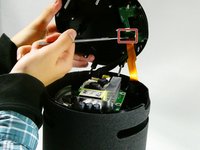
      • Flip the device upside down.

      • Pry up the edge of the rubber base panel with a spudger, then pull the rest of it off by hand.

      添加评论

    2. Amazon Echo Studio Motherboard Replacement: 步骤 2 中的图像 1,3 Amazon Echo Studio Motherboard Replacement: 步骤 2 中的图像 2,3 Amazon Echo Studio Motherboard Replacement: 步骤 2 中的图像 3,3
      • Use a T15 Torx screwdriver to remove the nine 3.2 mm screws.

      • Use a Torx T10 screwdriver to remove the six 2.7 mm screws.

      • After removing the screws, gently lift the base off, with care not to damage any of the connected cables.

      添加评论

    3. Amazon Echo Studio Motherboard Replacement: 步骤 3 中的图像 1,3 Amazon Echo Studio Motherboard Replacement: 步骤 3 中的图像 2,3 Amazon Echo Studio Motherboard Replacement: 步骤 3 中的图像 3,3
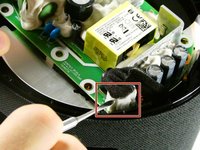
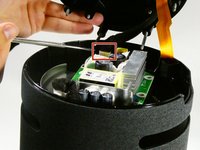
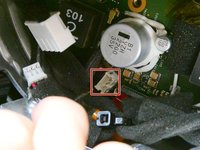
      • Before fully removing the base, remove the three attached connectors.

      询问修复机器人

      添加评论

    4. Amazon Echo Studio Motherboard Replacement: 步骤 4 中的图像 1,2 Amazon Echo Studio Motherboard Replacement: 步骤 4 中的图像 2,2
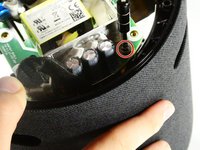
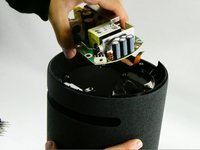
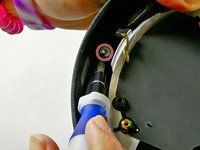
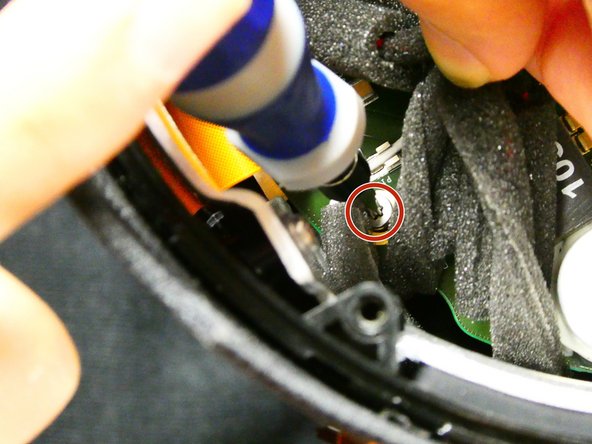
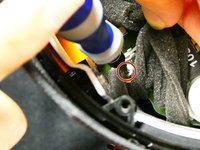
      • Now unscrew the the single 10 mm Phillips screw.

      • Remove the power supply board.

      添加评论

    1. Amazon Echo Studio Motherboard Replacement, Subwoofer: 步骤 5 中的图像 1,1
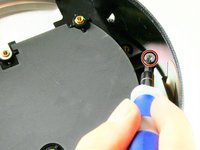
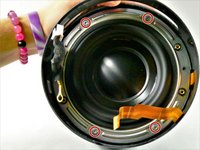
      • Remove the two screws located across from each other on the outside of the plastic ring shown.

      • Remove the plastic outer ring that hugs the inside of the edges of the device.

      • This may require you to use a soft prying tool to separate it from the outer shell.

      询问修复机器人

      添加评论

    2. Amazon Echo Studio Motherboard Replacement: 步骤 6 中的图像 1,3 Amazon Echo Studio Motherboard Replacement: 步骤 6 中的图像 2,3 Amazon Echo Studio Motherboard Replacement: 步骤 6 中的图像 3,3
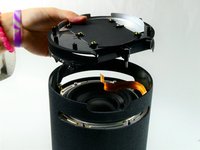
      • Remove the two 2.7 mm screws with a T10 Torx screwdriver.

      • Once the screws are removed, take the power supply's baseplate out of the unit.

      • You may need to gently pry the subwoofer's air ports from the round slots In the side of the unit.

      添加评论

    3. Amazon Echo Studio Motherboard Replacement: 步骤 7 中的图像 1,2 Amazon Echo Studio Motherboard Replacement: 步骤 7 中的图像 2,2
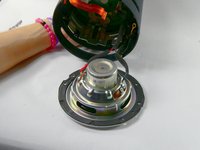
      • On the silver ring located on the outer edge of the plastic portion of the subwoofer, you will see four 2.7 mm screws. Use a Torx T10 screwdriver to remove them, in order to remove of the subwoofer.

      • Once the four screws have been removed, gently pull the subwoofer out as to not damage the wiring connecting the subwoofer to the main board inside the unit.

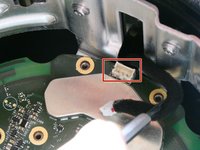
      • Follow the wires from the subwoofer to the main board and disconnect the connector attaching them.

      • Your subwoofer is now disconnected and ready to be replaced.

      添加评论

    1. Amazon Echo Studio Motherboard Replacement, Motherboard: 步骤 8 中的图像 1,2 Amazon Echo Studio Motherboard Replacement, Motherboard: 步骤 8 中的图像 2,2
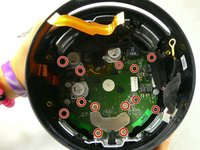
      • Remove the thirteen 9 mm Phillips #00 screws.

      • Some screws may be hidden by other components; simply hold them out of your way during screw removal.

      添加评论

    2. Amazon Echo Studio Motherboard Replacement: 步骤 9 中的图像 1,1
      • Unfasten the Phillips 9mm screws, using the Phillips #00 Screwdriver.

      • There may be obstruction against some screws, which can be avoided by using a spudger or your hand.

      询问修复机器人

      添加评论

    3. Amazon Echo Studio Motherboard Replacement: 步骤 10 中的图像 1,3 Amazon Echo Studio Motherboard Replacement: 步骤 10 中的图像 2,3 Amazon Echo Studio Motherboard Replacement: 步骤 10 中的图像 3,3
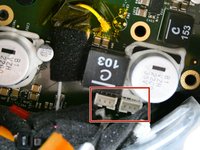
      • After removing the screws, locate the four power connectors on the motherboard and detach them from the motherboard.

      询问修复机器人

      添加评论

    4. Amazon Echo Studio Motherboard Replacement: 步骤 11 中的图像 1,1
      • Remove the motherboard from the device by pulling it out.

      • Be careful to not damage any of the loose wires inside the case while removing the motherboard.

      询问修复机器人

      添加评论

结论

To reassemble your device, follow these instructions in reverse order.

取消:我没有完成这个指南。

Colin Nicoll

于10/26/22注册

109 声望

撰写一个指南

团队

UMass Dartmouth, Team 2-6, Petersen Fall 2022 UMass Dartmouth, Team 2-6, Petersen Fall 2022 的会员

UMASSD-PETERSEN-F22S2G6

4 名成员

创作了19篇指南

6指南评论

where can I buy a motherboard replacement ?

Juan Daniel Hernandez R - 回复 分享

I also would like to know where to get a motherboard... my studio is stuck at the green ring.

Ed Wilcox - 回复 分享

i also would like to know. mine stuck with cyan circle

Алексей - 回复 分享

Is there any place to buy the Amazon Echo Studio Motherboard?

DOCA - 回复 分享

hi is there a place to buy this motherboard?

Bede Bede - 回复 分享

添加评论

浏览统计数据:

过去 24 小时: 0

过去 7 天: 12

过去 30 天: 62

总计 2,351