跳转到主内容

Amazon Echo Show Back Cover Replacement

仅作为前提条件
本指南仅提供前提条件!本指南是另一个程序的一部分,不能单独使用。

你所需要的

  1. Amazon Echo Show Back Cover Replacement, Back Cover: 步骤 1 中的图像 1,2 Amazon Echo Show Back Cover Replacement, Back Cover: 步骤 1 中的图像 2,2
    • Using your hands, gently remove the taped-in rubber foot from device.

  2. Amazon Echo Show Back Cover Replacement: 步骤 2 中的图像 1,2 Amazon Echo Show Back Cover Replacement: 步骤 2 中的图像 2,2
    • Carefully peel off the bottom pad to expose the fastening screws.

    • Remove three silver 1.4 T5 Torx screws on the top row.

    • Remove one green 1mm T5 Torx screw in the middle.

    • Remove a black 1.5mm T5 screw.

    • Remove three green 1mm T5 screws from the bottom row.

  3. Amazon Echo Show Back Cover Replacement: 步骤 3 中的图像 1,1
    • After the screws are removed, grip the front panel and remove, using a plastic opening tool if necessary. This will expose the inside of the device.

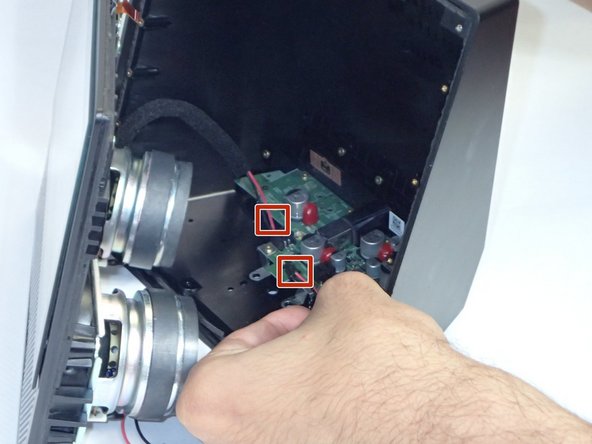
  4. Amazon Echo Show Back Cover Replacement: 步骤 4 中的图像 1,2 Amazon Echo Show Back Cover Replacement: 步骤 4 中的图像 2,2
    在这个步骤中使用的工具:
    Tweezers
    $4.99
    • Use tweezers or your hands to carefully disconnect the red wires connecting the speakers to the power supply board.

    • Repeat this step for the other speaker, and lay the front section flat with the facing down.

    • Make sure to ground yourself against a metal object nearby (ex. a metal chair, a door frame) before you touch any circuitry. An accidental static discharge can permanently damage a circuitboard.

结论

To reassemble your device, follow these instructions in reverse order.

2指南评论

this particular guide originally only had the prerequisite guide portion, so the steps to replace the top buttons were repeated across every single guide we had. I adjusted the prerequisite guide to include the separation of the two halves and moved the top button replacement guide to its own page. As this is still a private guide, it won’t be published unless we approve it.

Justin Williams - 回复

This article has been flagged as the prerequisite guide for a few of our articles, so I ended up altering it to be such. However, the ones that are not linked to this one, I added a few steps.

Justin Williams - 回复

添加评论

浏览统计数据:

过去 24 小时: 0

过去 7 天: 0

过去 30 天: 3

总计 484