跳转到主内容
加入维修社区 - 创建账户

Altec Lansing Mini Lifejacket 2 Motherboard Replacement

你所需要的

    1. Altec Lansing Mini Lifejacket 2 Motherboard Replacement, Back Panel: 步骤 1 中的图像 1,3 Altec Lansing Mini Lifejacket 2 Motherboard Replacement, Back Panel: 步骤 1 中的图像 2,3 Altec Lansing Mini Lifejacket 2 Motherboard Replacement, Back Panel: 步骤 1 中的图像 3,3
      • Use the spudger to remove the eight black pins from the front and back of the wire screens.

      询问修复机器人

      添加评论

    2. Altec Lansing Mini Lifejacket 2 Motherboard Replacement: 步骤 2 中的图像 1,3 Altec Lansing Mini Lifejacket 2 Motherboard Replacement: 步骤 2 中的图像 2,3 Altec Lansing Mini Lifejacket 2 Motherboard Replacement: 步骤 2 中的图像 3,3
      • Detach the eight secondary pins from the front and back of the wire mesh plates with a spudger.

      • Removing the secondary pins from the rubber casing is optional.

      询问修复机器人

      添加评论

    3. Altec Lansing Mini Lifejacket 2 Motherboard Replacement: 步骤 3 中的图像 1,2 Altec Lansing Mini Lifejacket 2 Motherboard Replacement: 步骤 3 中的图像 2,2
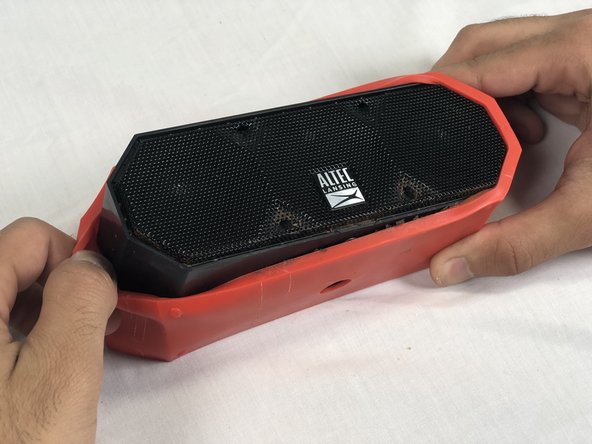
      • Remove both black and orange layers from the speaker body.

      询问修复机器人

      添加评论

    4. Altec Lansing Mini Lifejacket 2 Motherboard Replacement: 步骤 4 中的图像 1,3 Altec Lansing Mini Lifejacket 2 Motherboard Replacement: 步骤 4 中的图像 2,3 Altec Lansing Mini Lifejacket 2 Motherboard Replacement: 步骤 4 中的图像 3,3
      • Remove the single 7.8mm Phillips #2 screw from the mounting plate located under the device.

      • Slide the mounting plate out to remove it.

      添加评论

    5. Altec Lansing Mini Lifejacket 2 Motherboard Replacement: 步骤 5 中的图像 1,2 Altec Lansing Mini Lifejacket 2 Motherboard Replacement: 步骤 5 中的图像 2,2
      • Pry off the wire mesh on both sides using a metal spudger.

      • Be gentle to avoid bending the mesh.

      询问修复机器人

      添加评论

    6. Altec Lansing Mini Lifejacket 2 Motherboard Replacement: 步骤 6 中的图像 1,2 Altec Lansing Mini Lifejacket 2 Motherboard Replacement: 步骤 6 中的图像 2,2
      在这个步骤中使用的工具:
      Tweezers
      $4.99
      • Using tweezers, remove the four rubber stoppers in each corner of the rear panel.

      询问修复机器人

      添加评论

    7. Altec Lansing Mini Lifejacket 2 Motherboard Replacement: 步骤 7 中的图像 1,1
      • Remove the four 13.7mm Phillips #1 screws located underneath the rubber stoppers.

      询问修复机器人

      添加评论

    8. Altec Lansing Mini Lifejacket 2 Motherboard Replacement: 步骤 8 中的图像 1,1
      • Pull the case apart to access the interior components.

      询问修复机器人

      添加评论

    9. Altec Lansing Mini Lifejacket 2 Motherboard Replacement: 步骤 9 中的图像 1,3 Altec Lansing Mini Lifejacket 2 Motherboard Replacement: 步骤 9 中的图像 2,3 Altec Lansing Mini Lifejacket 2 Motherboard Replacement: 步骤 9 中的图像 3,3
      • To remove the back panel, gently pull out its wire harness.

      添加评论

    1. Altec Lansing Mini Lifejacket 2 Motherboard Replacement, Battery: 步骤 10 中的图像 1,3 Altec Lansing Mini Lifejacket 2 Motherboard Replacement, Battery: 步骤 10 中的图像 2,3 Altec Lansing Mini Lifejacket 2 Motherboard Replacement, Battery: 步骤 10 中的图像 3,3
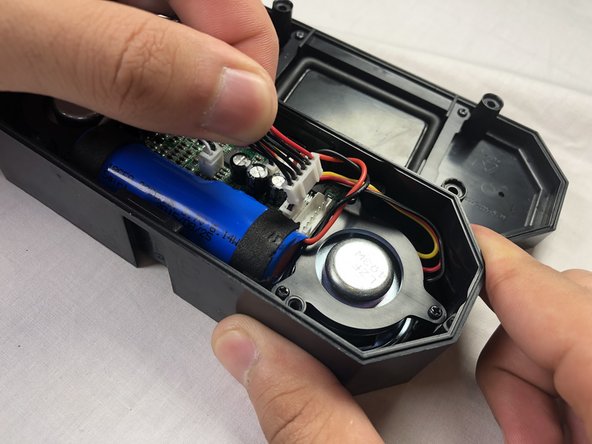
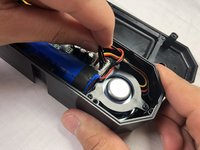
      • Disconnect the battery from the motherboard.

      • The battery is not secured within the case and can be removed after detaching its wiring from the circuit board.

      添加评论

    1. Altec Lansing Mini Lifejacket 2 Motherboard Replacement, Motherboard: 步骤 11 中的图像 1,3 Altec Lansing Mini Lifejacket 2 Motherboard Replacement, Motherboard: 步骤 11 中的图像 2,3 Altec Lansing Mini Lifejacket 2 Motherboard Replacement, Motherboard: 步骤 11 中的图像 3,3
      • Unplug the remaining four wire harnesses attached to the circuit board

      询问修复机器人

      添加评论

    2. Altec Lansing Mini Lifejacket 2 Motherboard Replacement: 步骤 12 中的图像 1,2 Altec Lansing Mini Lifejacket 2 Motherboard Replacement: 步骤 12 中的图像 2,2
      • Remove the three 9.1mm Phillips #1 screws located on the circuit board.

      询问修复机器人

      添加评论

    3. Altec Lansing Mini Lifejacket 2 Motherboard Replacement: 步骤 13 中的图像 1,3 Altec Lansing Mini Lifejacket 2 Motherboard Replacement: 步骤 13 中的图像 2,3 Altec Lansing Mini Lifejacket 2 Motherboard Replacement: 步骤 13 中的图像 3,3
      • Remove the motherboard.

      询问修复机器人

      添加评论

结论

To reassemble your device, follow these instructions in reverse order.

取消:我没有完成这个指南。

2等其他人完成本指南。

团队

USF Tampa, Team S3-G2, Nance Spring 2018 USF Tampa, Team S3-G2, Nance Spring 2018 的会员

USFT-NANCE-S18S3G2

4 名成员

创作了12篇指南

6指南评论

I own the IMW778-BLU-TA model. Where can I find a replacement motherboard for it??

Nick Cote - 回复 分享
same for me, anyone knows where can I find a replacement of the motherboard? thx

Travis - 回复 分享

need back panel replacement

rahul pande - 回复 分享

Same here! Loved the product. Can not afford to buy something else.

Mr Shopper - 回复 分享

I need 2 the board for charging,usb,aux cord that plugs into motherboard.

John Proffit - 回复 分享

添加评论

浏览统计数据:

过去 24 小时: 1

过去 7 天: 9

过去 30 天: 42

总计 6,382