跳转到主内容
加入维修社区 - 创建账户

Alienware Pro Wireless Gaming Mouse Battery Replacement

你所需要的

  1. Alienware Pro Wireless Gaming Mouse Battery Replacement, Feet: 步骤 1 中的图像 1,3 Alienware Pro Wireless Gaming Mouse Battery Replacement, Feet: 步骤 1 中的图像 2,3 Alienware Pro Wireless Gaming Mouse Battery Replacement, Feet: 步骤 1 中的图像 3,3
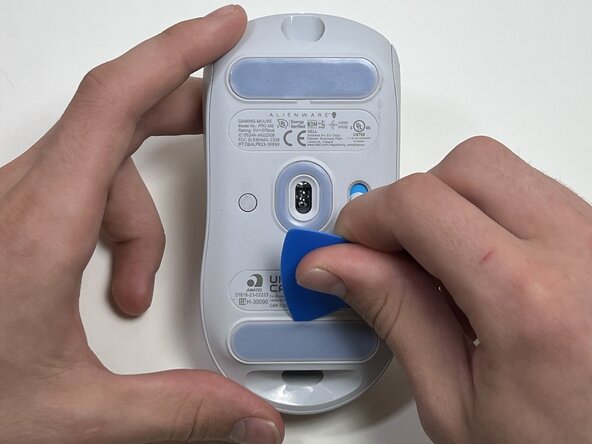
    • Flip the mouse over so the bottom is facing up..

    • Use an opening pick to gently peel the mouse foot off the bottom case.

    • The mouse feet warp easily so if you're not replacing them, be careful and don't rip them off. You will need them when you reassemble the mouse.

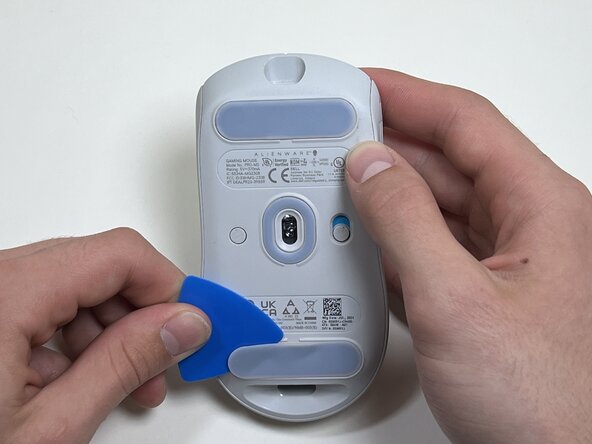
  2. Alienware Pro Wireless Gaming Mouse Battery Replacement: 步骤 2 中的图像 1,2 Alienware Pro Wireless Gaming Mouse Battery Replacement: 步骤 2 中的图像 2,2
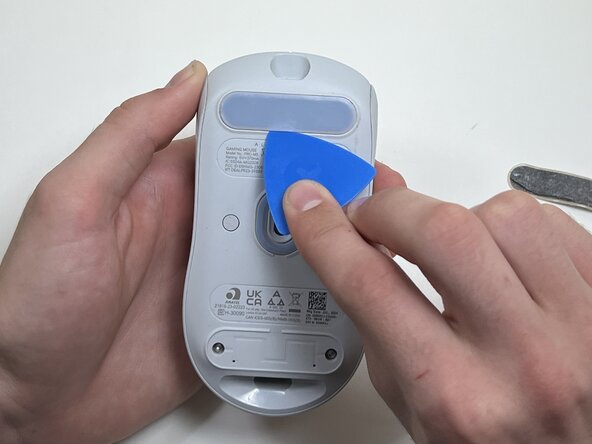
    • Peel and remove the other mouse foot.

  3. Alienware Pro Wireless Gaming Mouse Battery Replacement, Battery: 步骤 3 中的图像 1,1
    • Use a TR6 Torx security screwdriver to remove the four 6 mm screws under the foot pads.

  4. Alienware Pro Wireless Gaming Mouse Battery Replacement: 步骤 4 中的图像 1,3 Alienware Pro Wireless Gaming Mouse Battery Replacement: 步骤 4 中的图像 2,3 Alienware Pro Wireless Gaming Mouse Battery Replacement: 步骤 4 中的图像 3,3
    • Use your hands or a spudger to separate the bottom and top of the mouse.

    • Insert the end of the spudger in the seam between the top and bottom case, and slide it around the perimeter to release the clips holding it together.

    • You may hear a cracking sound when the clips are released.

  5. Alienware Pro Wireless Gaming Mouse Battery Replacement: 步骤 5 中的图像 1,2 Alienware Pro Wireless Gaming Mouse Battery Replacement: 步骤 5 中的图像 2,2
    • Use the pointed end of a spudger to push on alternating sides of the battery connector to "walk" it out of its socket.

    • Avoid pulling on the wires. If necessary, pull as close to the connector as possible to prevent damage to your mouse.

  6. Alienware Pro Wireless Gaming Mouse Battery Replacement: 步骤 6 中的图像 1,2 Alienware Pro Wireless Gaming Mouse Battery Replacement: 步骤 6 中的图像 2,2
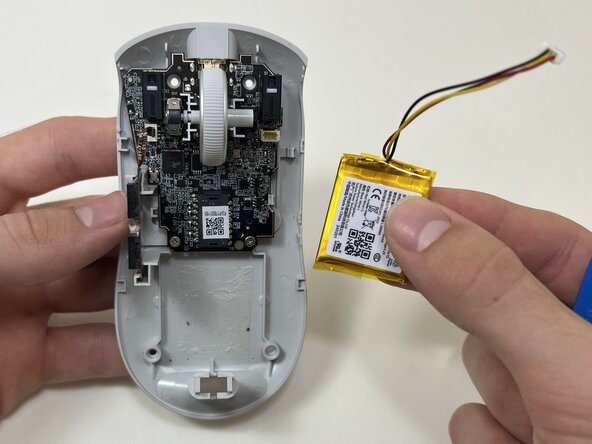
    • The battery is glued to the case.

    • Use an opening tool or spudger to loosen the adhesive under the battery.

    • Remove the battery.

结论

To reassemble your device, follow these instructions in reverse order. Take your e-waste to an R2 or e-Stewards certified recycler.

另外一个人完成了本指南。

Matt Seay

于09/29/25注册

401 声望

创作了3篇指南

团队

0指南评论

添加评论

浏览统计数据:

过去 24 小时: 3

过去 7 天: 8

过去 30 天: 34

总计 140