跳转到主内容
加入维修社区 - 创建账户

Alienware M14xR2 Battery Replacement

你所需要的

  1. Alienware M14xR2 Battery Replacement, Battery: 步骤 1 中的图像 1,1
    • Turn the computer off.

    • Disconnect the charging cable from the computer.

    • Failure to unplug the charging cable could result in electric shock and serious injury.

    • Flip the computer upside down.

    询问修复机器人
  2. Alienware M14xR2 Battery Replacement: 步骤 2 中的图像 1,3 Alienware M14xR2 Battery Replacement: 步骤 2 中的图像 2,3 Alienware M14xR2 Battery Replacement: 步骤 2 中的图像 3,3
    • Loosen the two 6.35 mm size 1 Phillips screws on the back cover.

    • The two screws are spring loaded and will not separate from the cover.

    • Slide the back cover towards you and then lift upwards to remove.

    询问修复机器人
  3. Alienware M14xR2 Battery Replacement: 步骤 3 中的图像 1,1
    • Loosen the two 6.35 mm size 1 Philips screws attaching the battery to the laptop.

    • The two screws are clipped into the battery and will not detach.

    询问修复机器人
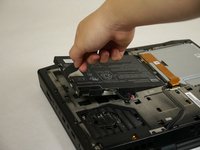
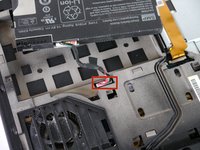
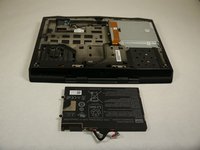
  4. Alienware M14xR2 Battery Replacement: 步骤 4 中的图像 1,3 Alienware M14xR2 Battery Replacement: 步骤 4 中的图像 2,3 Alienware M14xR2 Battery Replacement: 步骤 4 中的图像 3,3
    • Pull up on the black tab on the battery to reveal the connection between the battery and laptop.

    • Pull up on the white connector to disconnect it from the laptop.

    • The battery is now free to remove from the laptop and can be set aside.

    询问修复机器人
结论

To reassemble your device, follow these instructions in reverse order.

10等其他人完成本指南。

团队

Cal Poly, Team 13-4, Forte Fall 2013 Cal Poly, Team 13-4, Forte Fall 2013 的会员

CPSU-FORTE-F13S13G4

5 名成员

创作了6篇指南

0指南评论

添加评论

浏览统计数据:

过去 24 小时: 1

过去 7 天: 16

过去 30 天: 99

总计 11,520