跳转到主内容
加入维修社区 - 创建账户

Acer Extensa 4420 Back Panel Replacement

你所需要的

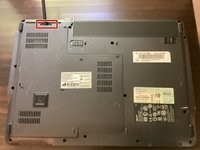
  1. Acer Extensa 4420 Back Panel Replacement, Battery: 步骤 1 中的图像 1,2 Acer Extensa 4420 Back Panel Replacement, Battery: 步骤 1 中的图像 2,2
    • First, make sure that the battery lock is turned off.

    • The battery lock makes it so the battery doesn't accidentally fall out of your computer while it is running.

    询问修复机器人

    添加评论

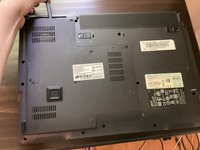
  2. Acer Extensa 4420 Back Panel Replacement: 步骤 2 中的图像 1,3 Acer Extensa 4420 Back Panel Replacement: 步骤 2 中的图像 2,3 Acer Extensa 4420 Back Panel Replacement: 步骤 2 中的图像 3,3
    • Then, slide the other battery lock while pulling the battery out.

    询问修复机器人

    添加评论

  3. Acer Extensa 4420 Back Panel Replacement, Back Panel: 步骤 3 中的图像 1,1
    在这个步骤中使用的工具:
    Phillips #00 Screwdriver
    $5.49
    • Unscrew all five screws on the back panel with a Phillips #00 screwdriver

    • The screws will stay in the back panel, so when you remove it, you don't have to worry about organizing the screws.

    询问修复机器人

    添加评论

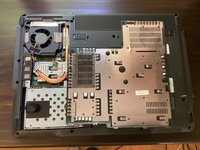
  4. Acer Extensa 4420 Back Panel Replacement: 步骤 4 中的图像 1,3 Acer Extensa 4420 Back Panel Replacement: 步骤 4 中的图像 2,3 Acer Extensa 4420 Back Panel Replacement: 步骤 4 中的图像 3,3
    在这个步骤中使用的工具:
    Spudger
    $3.99
    • Take a spudger and start to pry open the back panel. Finish prying it open with your hands.

    • Be extra careful and try not to break any clips in this process.

    询问修复机器人

    添加评论

结论

To reassemble your device, follow these instructions in reverse order.

取消:我没有完成这个指南。

TheMasterG

于07/19/24注册

1,412 声望

创作了12篇指南

0指南评论

添加评论

浏览统计数据:

过去 24 小时: 0

过去 7 天: 5

过去 30 天: 24

总计 233