热门论坛问题
提问这里还没有问题。成为第一个提问者吧!
Background
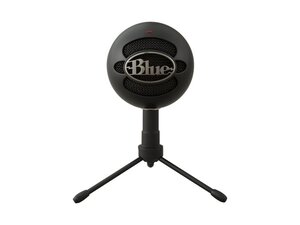
The SNOWBALL ICE is a compact USB plug-and-play condenser microphone designed for streaming, podcasting, and voice recording. It offers a cardioid pickup pattern optimized for single-person vocal capture and straightforward computer compatibility without extra drivers. The unit uses durable materials — a metal grille over the capsule and a weighted base — for stable desktop use. Key features include USB bus power, simple setup, and broad Windows/macOS support.
Identification
The Logitech SNOWBALL ICE can be identified by the model number (M/N A00145). The model label is on the housing and the USB cable connects at the rear/base. This label lists the model (M/N), part (P/N), and serial (S/N) numbers.
Specifications
- Form Factor: Desktop spherical USB microphone
- Microphone Type: Electret condenser (cardioid-optimized capsule)
- Polar Pattern: Cardioid (single-pattern)
- Bit Depth & Sample Rate: 16-bit / 44.1 kHz (USB audio)
- Frequency Response: Approx. 40 Hz – 18 kHz
- Connectivity: USB-A plug-and-play (USB 2.0 bus-powered)
- Power: USB bus-powered (no external power supply)
- Materials: Plastic body with metal grille and weighted base for stability
- Compatible Operating Systems: Windows and macOS — plug-and-play, no additional drivers required for basic operation
- Included Accessories: Detachable USB cable and adjustable desktop stand (contents may vary by region/retailer)
- Manufacturer: Logitech support page lists the product; design originated from the Snowball line (Blue Microphones relationship)
Troubleshooting
Common repair-relevant faults are no audio/recognition, intermittent USB connection, low or distorted output often caused by a damaged USB cable or failed capsule. Diagnose by checking OS input selection and levels, swapping USB ports and cable, testing the microphone on another computer, and inspecting the USB connector and cable for physical damage.
For additional troubleshooting help, visit: https://support.logi.com/hc/en-us/articl...
Additional Information
Warranty Info
Check Logitech warranty details via support.logi.com; hardware warranty periods vary by region (commonly a limited 1-year warranty).
