热门论坛问题
提问这里还没有问题。成为第一个提问者吧!
Background
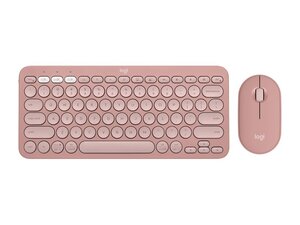
The Pebble 2 Combo is a compact wireless keyboard-and-mouse set from Logitech designed for everyday productivity and simple, clutter-free workspaces. The set emphasizes sustainable construction — many exterior plastics are made with recycled materials — and a slim, low-profile aesthetic. Key features include a slim keyboard and a pebble-shaped low-profile mouse offered in multiple tonal colors, with a focus on straightforward wireless connectivity and portability. The combo ships as a matched pair (keyboard + mouse) intended for general office and home use.
Identification
The Logitech Pebble 2 Combo includes Keyboard (M/N YR0091), Mouse (M/N MR0103) and USB receiver (M/N CU0021). Model labels are located as follows — Keyboard: on the underside product label; Mouse: on the underside product label; USB Receiver: printed on the flat face or side of the receiver housing near the USB plug. Each component carries its own model (M/N) and serial (S/N) identifiers.
Specifications
- Brand: Logitech
- Components: Keyboard and compact low-profile mouse (combo)
- Model / SKUs: 920-012061 (Tonal Graphite), 920-012198 (Tonal White), 920-012199 (Tonal Rose), 920-012415 (Black)
- Product ID: pebble-2-keyboard-mouse-combo
- Materials: Exterior plastics made with recycled plastic (Logitech product page)
- Colors / Finishes: Tonal Graphite, Tonal White, Tonal Rose, Black
- Form Factor: Slim low-profile full-size keyboard (compact footprint) and pebble-shaped mouse
- Connectivity: Wireless combo (Logitech product listing indicates a wireless keyboard and mouse; specific radio modes/accessories not detailed on the product page)
- Key Switches: Low-profile scissor-style switches (Logitech low-profile scissor mechanism; exact OEM/model not specified on product page)
- Power: Battery-powered — keyboard and mouse use user-replaceable batteries (product imagery indicates battery compartments; exact cell types not specified on page)
- Price Range: $49.99–$59.99 (US retail price range shown on product page)
Troubleshooting
Common faults include dead or weak batteries, intermittent wireless connection, and sticky or non-responsive keys. Diagnose by checking/replacing batteries, toggling power switches, re-pairing or re-seating the USB receiver, and inspecting under keycaps and in the mouse for debris or visible damage.
For additional troubleshooting help, visit: Visit Logitech Support (https://support.logi.com) for product help, contact options, and downloads.
Additional Information
Warranty Info
Refer to Logitech's warranty information page for region-specific limited-warranty terms; register the product on Logitech's support site to file claims.
