

How do I enter the advanced bios?
I want to enter the advanced bios in order change the tdp and I can't enter it no matter what key presses I do during startup I only get the regular bios?

声誉积分: 98.3千
 418
418
 297
297
 158
158
These laptops do not have that option :-(. The configurable TDP is set at the firmware level such it can’t be changed. Even if it could be done the HP Stream BIOS is so stripped out it’s enough to just make the machine work. The newer entry level HP 14 machines are probably better, but you're not gaining much more customization on a budget PC even if it's less of a turd.
You can't adjust much like you can on most PCs, which are much higher-end. That kind of customization is locked out because of the cooling issues these have—they're a literal plate of copper and a Celeron—some have a fan, but yours isn't that good :-(. It's the same reason they lock out the VRAM share on yours - if you allocated more than 128-256MB of your RAM to the VRAM on these, you would lose a very large chunk of RAM for your application space, as these are all 4GB/64GB eMMC affairs.
Granted, the Stream 14 can often take 8GB of RAM with an 8GB RAM module (if the board has an SODIMM slot - check to make sure), but HP doesn’t openly support it since it's like putting lipstick on a pig.
Take a look at my 640 G9. I can tweak the VRAM share but not the cTDP:
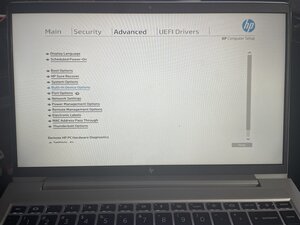
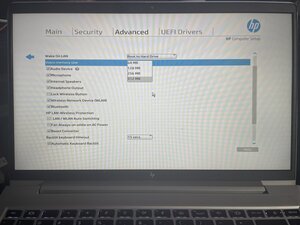
I did bump this up to 512MB from the base 64MB, but I also have 16GB of RAM, so I can waste a little bit of RAM to help it out. This one has dual channel RAM and is running on the Iris Xe GPU core, whereas unit #1 is still at 64MB being Intel UHD with single channel RAM (but I can also make it run Iris Xe with a RAM swap).
这个答案有帮助吗?
过去 24 小时: 2
过去 7 天: 8
过去 30 天: 19
总计 148
