跳转到主内容

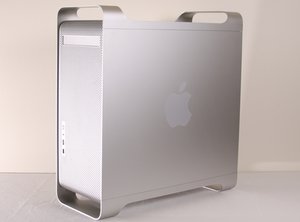
The PowerMac G5 is a desktop computer first produced in 2003 by the Apple Corporation. This guide will review the repair process of an Apple PowerMac G5 model number A1047 EMC 2061 from 2004. It was discontinued in 2006 as part of the Intel switch first to developers then consumers.

How can I remove the HDD in the upper bay?

I'd like to add a second drive to my G5 1.8. The problem is that the existing drive is in the upper bay, and the cables for the 2nd drive seem to be behind the drive. I did look at the question on removing the drive in the upper bay but could not understand the answer (as did someone else who posted a reply). How do you remove this drive without hitting the enclosure?

已回答! 显示答案 我也有这个问题

这是一个好问题吗?

得分 -1
添加一条评论

1个答案

已选择的解决方案

There are two pull levers on the side of the drive that lock it in place. They kind of blend in but take a close look and pull them. There is no outer door on a G5 for a second drive. That's how you can tell from the external if it is a Power Mac G5 vs an Intel Mac Pro.

这个答案有帮助吗?

得分 4

1条评论:

Thanks, but I find I don't need to remove the upper drive after all. At the bottom of the caddy are the 2 connectors+cables for the other SATA drive. You just pull them out and you're good to go.

完成的

添加一条评论

添加你的答案

dangold 将永远感激不已
浏览统计数据:

过去 24 小时: 0

过去 7 天: 0

过去 30 天: 1

总计 597