跳转到主内容
加入维修社区 - 创建账户

2015年3月更新的 13 英寸 MacBook Pro 配备 Retina 显示屏,型号为A1502,采用第五代英特尔酷睿 i5 和 i7 处理器,并配备 Force Touch触控板。

MacBook Pro doesn't charge after replacing Magsafe DC-in Board

Recently my MacBook Pro 13” Retina Early 2015 stopped charging, no green or amber lights on Magsafe. I tried with a friend’s known working charger, still doesn’t charge. I reset the SMC, both with and without charger plugged in, without any luck.

I then ordered a new Magsafe DC-In Board (took parts number off the old one, replaced it with the exact same model; 820-3584-a), installed it, checked for any muck or debris keeping it from connecting to the socket properly, but everything seems to be in order, though it still won’t charge, after resetting SMC a couple of times again - again both with and without adapter plugged in.

I tried resetting my PRAM, that didn’t fix it either. When I turn the laptop on (it still has some 10% charge left), the battery doesn’t indicate any problems as in “replace soon” or “replace now”. Battery isn’t swollen either. Since the charger doesn’t light up at all, I’m assuming there is a problem with the SMC/DC-In/Motherboard, rather than the battery itself, since there seems to be no communication. Under the ‘Hardware’ tab my laptop doesn’t indicate to sense the presence of the charger.

When I installed the new Magsafe DC-In Board, I measured the voltage coming into the motherboard when plugged in, measured about 1V DC.

Has anyone got an idea of what I could try next? The motherboard was replaced under warranty some 3 years ago, but by now that seems to be the only thing left I can imagine keeping the battery from charging.

Thanks a lot!
Block Image
Block Image
Block Image
Block Image
Block Image
Block Image
Block Image
Block Image
Block Image
Block Image
Block Image
Block Image
Block Image
Block Image
Block Image
Block Image
Block Image
Block Image
Block Image
已回答! 显示答案 我也有这个问题

这是一个好问题吗?

得分 2
4条评论

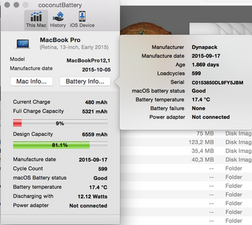
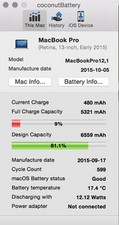
Let’s get a better view of things, install this gem of an app! CoconutBattery take a snapshot of the apps main window and post it here for us to see 在已经存在的问题里加入图片

完成的

I've added the CoconutBattery screenshots and made an edit to my original post: it seems both the Late 2013 and Early 2015 model are called A1502 and mine is in fact an Early 2015 model, not a Late 2013 as I originally stated.

完成的

It appears the charger is not connected! Is that correct? Please connect it and take a second snapshot after a minute so the know the system acknowledges its connected to the app.

完成的

The charger was actually connected, but that's the issue: the computer doesn't seem to recognize the presence of the charger...

完成的

添加一条评论

2个答案

已选择的解决方案

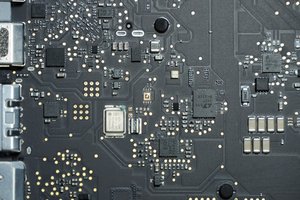
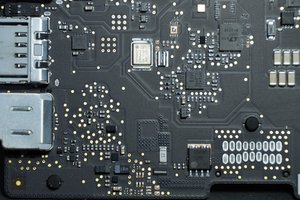
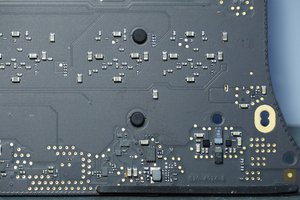
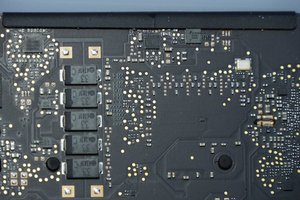
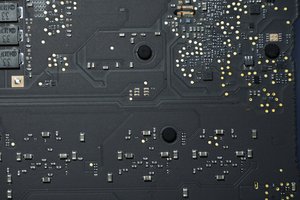
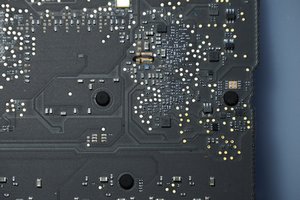
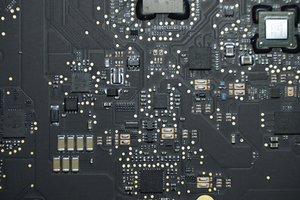
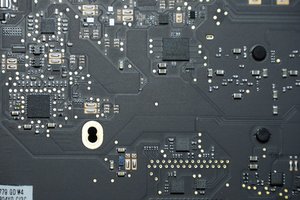
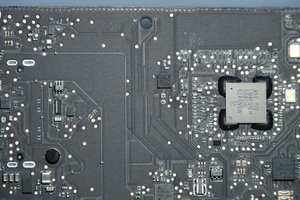
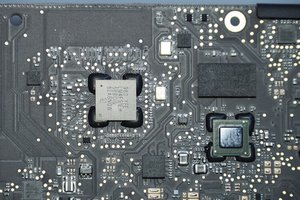
I disassembled the logic board, flipped it around and saw an oxidized contact on a clock crystal that is on the other side of the DC-In Board socket. (you can see this in the first two pictures of the logic board) Cleaned said contact with contact cleaner and now my laptop is charging again!

Thanks a lot to Dan for sharing his time and expertise, without whom I probably would have ended up paying for a new logic board…

这个答案有帮助吗?

得分 1

1条评论:

Glad to know your macbook is charging now.

I had my 2015 macbook air’s I/O assembled and the flex wire changed after having spilled milk tea on it.

When i got my macbook back however it wouldn’t charge after some time and would only get powered through the charger that would hold it at the same battery level but not charge it any further.

Then I tried another charger and it charged up to some point and stopped charging and the battery icon in the menu bar said “battery not charging, source: power adapter”

I took it back to the authorized service provider in my area and they used an original magsafe charger it charged up until 40 and stopped too.

Now i’m not sure what the issue could be since they’ve already fixed the flex wire and left i/o.

I did notice the spilled tea dried up on the monitor and other parts of my laptop when I got it back which makes me think the spilled liquid was not cleaned properly but I’m not too sure. Please help me out!

完成的

添加一条评论
最有帮助的答案

Time to trace the connections from the MagSafe to the logic board. The middle pin is the one wire sense line to the SMC and the MagSafe LED and charger logic.

See if the MagSafe cable pin is not jammed up and the socket on your system contact is clean. The replacement part could have been bad as well as they often are from parts systems.

Apple Portables: Troubleshooting MagSafe adapters

Block Image

An example of a damaged MagSafe connector from knockoff charger use.

Lacking safety features, cheap MacBook chargers create big sparks

If that doesn’t look like the issue then your SMC logic on the logic board has been damaged by the knockoff charger.

这个答案有帮助吗?

得分 2

10条评论:

Thanks for all your time and effort Dan, I get continuity with a multimeter from the middle pin all the way to the socket on the motherboard, so that doesn't seem to be the issue at hand. I've cleaned both the Magsafe charger pins and DC-In Board pins with contact cleaner and none of it looks burnt. I've only ever used the charger I got when I bought the MacBook new at an authorized seller, so I'm afraid it shouldn't be a knockoff. Seeing as I've reset my SMC multiple times and I get continuity from the pins of the DC-In Board all the way to the socket, is there any way to your knowledge I can repair it by replacing some other parts, or do you think the entire logic board needs to be replaced?

完成的

@Tomasz - Dd you have a liquid spill at some point into the keyboard and/or trackpad?

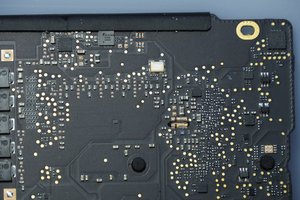
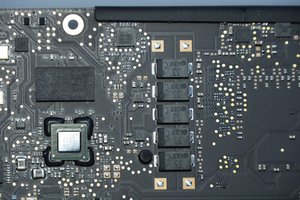
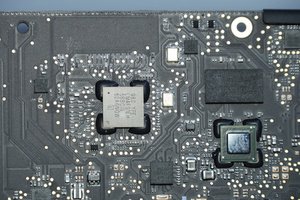
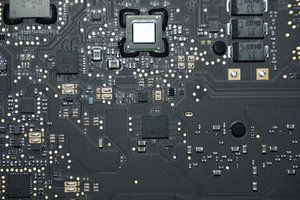
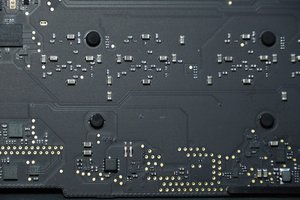
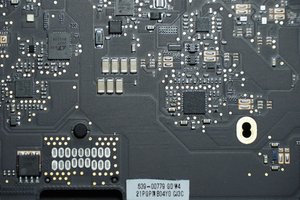
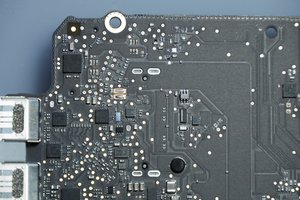
I fear the SMC logic on the back side of the logic board is damaged, while it might be repairable, it will take someone with deeper skills to fix your logic board, or your other choice is replacing it. Lets see how it looks as maybe we will be lucky! Follow this guide 替换MacBook Pro 13‘’Retina显示器2015年早期版本的主板 talk some detailed pics of the back side so we can see things.

完成的

No liquid spill, the one thing I can imagine is, since the laptop spends some time in my workshop, that some small metal filings/particles might have ended up inside and shorted something out. I'll disassemble it and take some pictures as you recommend, thanks again!

完成的

I've tried taking the best pictures I could, I'm afraid I had overestimated the macro-capabilities of my camera and lens. I hope they're clear enough? One thing I noticed is some green corrosion on the top right contact of a silver component which you can see in the first two pictures. Upon flipping the board around, that seems to be right underneath the DC-In Board socket, but this is only speculation of a novice.

完成的

@Tomasz - Sorry for not getting back to you we had a power outage for most of the evening hours. Of course it was on Halloween! Had to man the door for the ghouls and goblins ;-} Wasn't sure how many would visit given COVID.

Well, you found it! The green speck is on the clocking crystal shorting the case to one of the legs you could try cleaning off the green with some cleaner and a soft toothbrush. Hopefully that does it other wise you'll need to find someone with the needed tools to lift the crystal off and either clean underneath it or just replace it.

完成的

显示更多的5条评论

添加一条评论

添加你的答案

Tomasz 将永远感激不已
浏览统计数据:

过去 24 小时: 1

过去 7 天: 13

过去 30 天: 38

总计 2,158