
跳转到主内容

2015年3月更新的 13 英寸 MacBook Pro 配备 Retina 显示屏,型号为A1502,采用第五代英特尔酷睿 i5 和 i7 处理器,并配备 Force Touch触控板。

HELP! SHIFT key is linked to the CONTROL and OPTION key

I spilled a bit of water on my Macbook Pro last night. I closed my laptop and waited till this morning to use it again.

Every key works just fine except for the SHIFT key. Whenever I press it, the CONTROL and OPTION keys act like they’re pressed too. Can anybody help me? Thanks in advance! :)

(P.S. I’m pressing only the SHIFT key here in this photo)
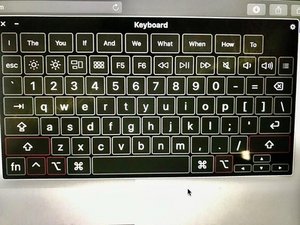
Block Image

I’ve also tried restarting my Macbook.

回答此问题 我也有这个问题

这是一个好问题吗?

得分 0
添加一条评论

1个答案

最有帮助的答案

Sadly you have water inside your systems keyboard which is shorting out the lines.

You really need to turn your system off and disconnect the battery ASAP!!

Follow this guide to get that far MacBook Pro(13 英寸,配备 Retina 显示屏2015 年初期)电池更换 stop at Step 6.

Now you need to keep your system cool until you review these steps in this guide 替换MacBook Pro 13‘’Retina显示器2015年早期版本的主板 following it to Step 31.

We need to get under the logic board, carefully lifting the black insulator and the backlight unit so we can get to the keyboard. Hopefully you can use a can of can’ed air to tryout the keyboard from this side, otherwise you’ll need to replace the keyboard. As well as clean up any water you find along the way.

This is a big job! You might want to find an independent repair person who can do this for you.

If you can tell us what the nearest city is we might be able to aim you to someone. Good Luck!

MacBook Pro 13" Retina Display Early 2015 主板图片

指南

替换MacBook Pro 13‘’Retina显示器2015年早期版本的主板

难度:

中等

20 minutes - 1 hour

MacBook Pro 13" Retina Display Early 2015 电池图片

指南

MacBook Pro(13 英寸,配备 Retina 显示屏2015 年初期)电池更换

难度:

困难

45 minutes - 2 hours

这个答案有帮助吗?

得分 1
添加一条评论

添加你的答案

jeddyboy90150 将永远感激不已
浏览统计数据:

过去 24 小时: 0

过去 7 天: 1

过去 30 天: 2

总计 170