跳转到主内容

2015年3月更新的 13 英寸 MacBook Pro 配备 Retina 显示屏,型号为A1502,采用第五代英特尔酷睿 i5 和 i7 处理器,并配备 Force Touch触控板。

Attempted to change SSD with adapter to NVME and now pro won't start

Hi,

I recently got a 2015 13” MacBook Pro retina with a 128 GB SSD drive which made it cheaper and I figured that I would be able to just replace the SSD pretty easily so I bought an 970 EVO SSD and an adapter to get some more storage. However after I installed the SSD drive my system will no longer turn on.

I disconnected what I thought was the connector to the battery which was stuck on with adhesive but now it will not stick back down and I do not know if I have broken the machine.

If I plug the device in the MagSafe cable turns green as if the system is fully charged but it still won’t turn on.

I have also reinstalled the original SSD drive in the system and it still will not turn on.

Here is an image of the tab I pulled up:

Block Image

Update (03/12/2020)

Here is a more detailed picture

I haven’t tried to power it on yet because I want to try to get the keyboard working so any help is greatly appreciated!!

Block Image

Update (03/12/2020)

Here is a more detailed picture of the tab in question that i pulled up, is there any way for me to get it to stick back down so that the keyboard will work again? Also I’m really hoping I didn’t kill this because I just bought it and I really just replaced the SSD

Block Image

Update (03/12/2020)

Block Image

heres the last pic before I go to bed, tried peeling the back off a little to get the connector to work and still couldn’t get it, any further suggestions from here?

回答此问题 我也有这个问题

这是一个好问题吗?

得分 0
3条评论

Thats helpful! You basically pulled the ribbon cable out of its connector so its not making electrical contact!

At this point I think the best thing you can do is not do anything more. I fear you maybe out of your depth with your skills.

Do you know someone who can help you here? This is not overly difficult but if you make a mistake you can trash your system!

Where do you live? Country if not in the states and nearest major city. Maybe we can aim you to someone who can help you.

完成的

I mean I could take it into the shop but I was really hoping to do it myself since I don’t wanna pay the money to have it fixed

完成的

So what exactly did I do wrong? Is the battery just disconnected?

完成的

添加一条评论

2个答案

最有帮助的答案

Take a look at Step 27 in this guide 替换MacBook Pro 13‘’Retina显示器2015年早期版本的主板

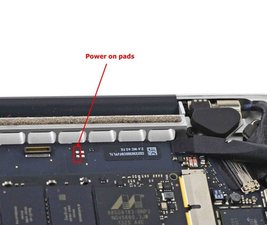
What you pulled on was the keyboard cable connection. This is also the pathway the power button also travels.

As it turns out there is a second way we can start the system using what we call power pads. Basically the are locations on the logic board that do the same function as the power button. Using a pair of tweezers or small screwdriver short across the two points

Block Image

First give this a try with your original SSD installed and do make sure you’ve disconnect the battery before changing the SSD drives. Did your system startup?

这个答案有帮助吗?

得分 1

6条评论:

I thought that looked like a KB connector. Poor macbook. :(

完成的

Tried to put tine screw driver on power pad but I still couldn't get anything, is there something that I'm doing wrong?

Also I am kind of new to all of this what do you mean by short across the two points?

完成的

Short as in use a metal tool like tweezers to bridge the contacts shown in that image. What does does is basically simulates a power button press.

完成的

Tried doing this with a small screwdriver but it didn’t do anything

完成的

You had the battery connector or charger when shorting those two pads right? Looks like we have a logic board problem. Not sure what happened there because SSD replacements tend to be straightforward.

完成的

显示更多的1条评论

添加一条评论

Can you show a picture of what is below that battery cable you lifted up on? I’d like to see if the mobo connector is broken, especially since you say it wont “stick back down”. They usually snap in and out of place, but you have have removed the mount from the motherboard.

It should still power on though with no battery connected and just the charger, I’d try a different charger. If that doesn’t work there is a chance the board died.

这个答案有帮助吗?

得分 0

10条评论:

Posted a more detailed photo in edit!

完成的

That keyboard connector looks okay. Flip up the latch on the north side of the connector, slide the rubbon cable into the south side, then close the latch.

完成的

The cable looks like its stuck to the tape that goes over the cable and connector once the cable is slid into the connector. You should be able to peel that sticky back a little, slide the cable in, latch it closed, then stick the tape back to the top of the connector.

完成的

Ah jeez I really wanna fix it but I’m afraid of totally messing it up, what’s the latch you are referring to?

完成的

I tried messing with it a little bit but I still couldn’t get the cable reconnected

完成的

显示更多的5条评论

添加一条评论

添加你的答案

jonathan yawn 将永远感激不已
浏览统计数据:

过去 24 小时: 1

过去 7 天: 1

过去 30 天: 5

总计 385