
跳转到主内容
加入维修社区 - 创建账户

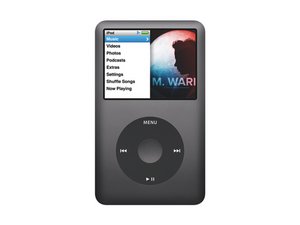
第六代 iPod classic 。机型型号 A1238,80/120/160 GB 机械硬盘,黑色或银色金属前面板。

Buttons don't work consistently

The menu button and centre button have stopped working, I've opened is up and gave it a serious cleaning but there's been no change. This is the second Ipod classic that I've had this issue with. Last time it was the 'next' button.

已回答! 显示答案 我也有这个问题

这是一个好问题吗?

得分 -1
2条评论

Which model iPod is it? What did you do the Last time it was the 'next' button."

完成的

The ipod I had before this one, where the 'next' button stopped working, I bought a new one.

They both were 6th generation.

完成的

添加一条评论

2个答案

已选择的解决方案

If you look at he logic board where the buttons are there's a yellow tape with a black tape on top.

Remove the yellow tape slightly to expose the metal contact (one piece will be stuck to the tape the other will be soldered to the board.

Make sure that the golden contacts on the logic board are clean corrosion free

With the metal exposed underneath the yellow tape you will probably need to scratch it a little bit and wipe it with your finger.

Put the tape with the metal contact back to how it was.

Repeat for the buttons not working.

It should work after you clean them.

这个答案有帮助吗?

得分 0

1条评论:

Tried it out, worked great! There didn't seem to but much build up on the contacts, but a little rubbing alcohol and a q-tip worked great on the contact and on the con-caved button the makes the contact.

完成的

添加一条评论

Tried it out, worked great! There didn't seem to but much build up on the contacts, but a little rubbing alcohol and a q-tip worked great on the contact and on the con-caved button the makes the contact.

这个答案有帮助吗?

得分 0
添加一条评论

添加你的答案

andrew 将永远感激不已
浏览统计数据:

过去 24 小时: 0

过去 7 天: 0

过去 30 天: 0

总计 159