跳转到主内容
加入维修社区 - 创建账户

iPhone 6s 电池连接

仅作为前提条件
本指南仅提供前提条件!本指南是另一个程序的一部分,不能单独使用。

你所需要的
  1. iPhone 6s 电池连接, 电池连接: 步骤 1 中的图像 1,1
    • 在拆解前请先关闭您的iPhone。

    • 取下2个在Lightining连接口处的3.4 mm Pentalobe螺丝。

  2. iPhone 6s 电池连接: 步骤 2 中的图像 1,1
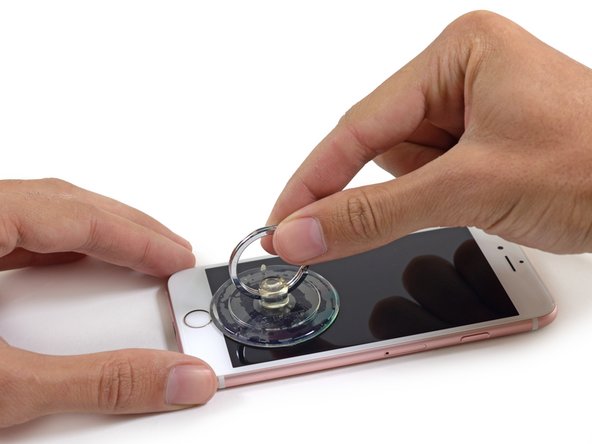
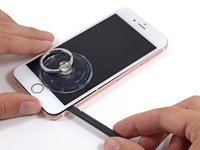
    • 如果您没有isclack,请使用单个的吸盘来提起前面板。

    • 在Home键上方放置吸盘。

    • 确保吸盘已经牢牢吸附在了屏幕上。

  3. iPhone 6s 电池连接: 步骤 3 中的图像 1,3 iPhone 6s 电池连接: 步骤 3 中的图像 2,3 iPhone 6s 电池连接: 步骤 3 中的图像 3,3
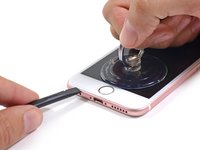
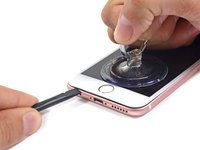
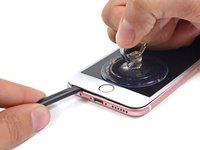
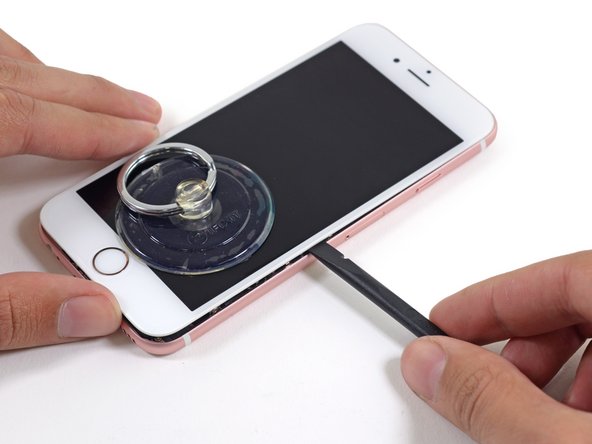
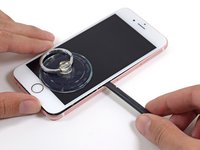
    • 在屏幕下方 耳机孔的上方会有一个缺口,那是撬开手机最安全的地方。

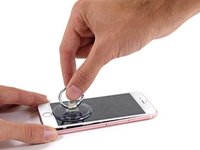
    • 轻轻地拉动吸盘来将前面板与后壳分离。

    • 花点时间和力气。 显示屏组装要比大多数装置要更加的紧密。并且使用粘合剂结合。

    • 一旦打开了一个小缝隙,使用撬棒扁平的一端插入在耳机孔上方的缝隙里。

  4. iPhone 6s 电池连接: 步骤 4 中的图像 1,2 iPhone 6s 电池连接: 步骤 4 中的图像 2,2
    • 扭动撬棒来使得打开更大的缝隙同时让粘合剂分离开来。

    • 在使用撬棒同时也要拉动吸盘。

  5. iPhone 6s 电池连接: 步骤 5 中的图像 1,2 iPhone 6s 电池连接: 步骤 5 中的图像 2,2
    • 使用撬棒的边缘处在缝隙中滑动将手机两侧的粘合剂分离开来。

  6. iPhone 6s 电池连接: 步骤 6 中的图像 1,2 iPhone 6s 电池连接: 步骤 6 中的图像 2,2
    • 使用撬棒的边缘处在缝隙中滑动将手机两侧的粘合剂分离开来。

  7. iPhone 6s 电池连接: 步骤 7 中的图像 1,3 iPhone 6s 电池连接: 步骤 7 中的图像 2,3 iPhone 6s 电池连接: 步骤 7 中的图像 3,3
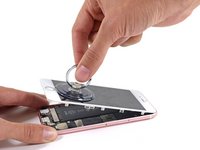
    • 使用吸盘来吸起屏幕,分离最后一点粘合剂。

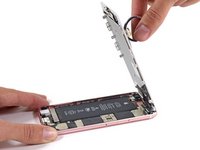
    • 切勿将显示屏掀开超过90度,屏幕仍有排线在顶部连接,如果超过90度这将可能损坏排线。

  8. iPhone 6s 电池连接: 步骤 8 中的图像 1,1
    • 在对手机进行操作时,请使用一些东西来支撑着倾斜的显示屏。

  9. iPhone 6s 电池连接: 步骤 9 中的图像 1,1
    • 移除电池连接保护盖上的2个螺丝。

    • 一个3.0 mm Phillips #00螺丝。

    • 一个 2.3 mm Phillips #00螺丝。

  10. iPhone 6s 电池连接: 步骤 10 中的图像 1,1
    • 卸下电池连接保护盖。

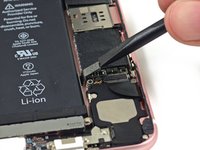
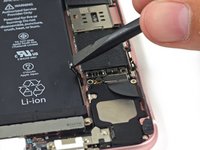
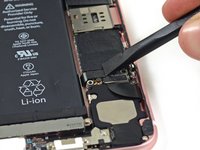
  11. iPhone 6s 电池连接: 步骤 11 中的图像 1,3 iPhone 6s 电池连接: 步骤 11 中的图像 2,3 iPhone 6s 电池连接: 步骤 11 中的图像 3,3
    • 使用撬棒扁平的一段来挑开电池与逻辑板之间的连接器。

    • 将连接器推向一边,来确保其在您进行其他的操作时不会与逻辑板意外的重连。

结论

要重新组装您的设备,请按照本指南的相反顺序进行操作。

另外一个人完成了本指南。

由衷感谢以下译者:

en zh

100%

Leon赵国鑫正在帮助我们修复这个世界! 您也想加入吗?
开始翻译 ›

Sam Goldheart

于10/18/12注册

476,199 声望

创作了538篇指南

团队

iFixit iFixit 的会员

Staff

124 名成员

创作了24,273篇指南

3指南评论

While replacing a charging port on the 6s I realized that the battery didn't seem to stay seated. It also won't charge past a certain percentage. Anyone run into this?

CellularRepairEtc - 回复 分享

BE FOREWARNED: I used this guide and ended up breaking one of the cables to my display on step 8. Now my home button, camera and speaker don’t work and I have to spend 80 dollars for a new lcd panel.

The featured guide (not this one) shows how to completely detach the screen cables so this won’t happen. Do a quick search and take a look before possibly breaking your phone on step 8. Fully detaching the panel would have prevented this issue

Christopher Kuhar - 回复 分享

DO NOT USE THIS GUIDE: It is not complete. I ended up having to goto the store and pay $250 dollars to get my I phone fixed after breaking it with these incomplete directions.

This is a more complete guide use this one: iPhone 6s 电池更换

Christopher Kuhar - 回复 分享

添加评论

浏览统计数据:

过去 24 小时: 0

过去 7 天: 3

过去 30 天: 29

总计 586