跳转到主内容
加入维修社区 - 创建账户

SuperSonic Matrix Mid SC-999 Battery Replacement

浏览量: 2891

浏览统计数据:

过去24小时
2
过去 7 天:
14
过去 30 天:
94
总计
2,891
评论: 2

1 comment on steps, 1 guide comment.

Go to guide comments
已完成: 2

2 人已将本指南标记为“已完成”。你会是下一个完成的人吗?

收藏: 0

暂时还没有人收藏(和订阅)本指南。你会是第一个收藏(和订阅)的人吗?

所需时间: 10 - 15 分钟
难度: 中等
SuperSonic Matrix Mid SC-999 Battery Replacement

In this guide you will be required to take off the back cover of the device in order to locate and remove the battery. You will need to use a soldering iron to accomplish this task.

Because this task requires the use of a soldering iron, prior experience with soldering/desoldering will be beneficial.

你所需要的

工具

    1. SuperSonic Matrix Mid SC-999 Battery Replacement, Back Cover: 步骤 1 中的图像 1,1
      • Wedge the plastic opening tool between the back cover of the device and the front panel.

      • You will hear a snapping sound as the cover is separated from the body of the device.

      询问修复机器人

      添加评论

    2. SuperSonic Matrix Mid SC-999 Battery Replacement: 步骤 2 中的图像 1,1
      • Slide the opening tool along the seam between the front panel and the back cover to un-clip the remaining connections around the device.

      • Again, you will hear a snapping sound as the cover is separated from the body of the device.

      询问修复机器人

      添加评论

    3. SuperSonic Matrix Mid SC-999 Battery Replacement: 步骤 3 中的图像 1,2 SuperSonic Matrix Mid SC-999 Battery Replacement: 步骤 3 中的图像 2,2
      • Lift the back cover from the body of the device to expose the internal components.

      询问修复机器人

      添加评论

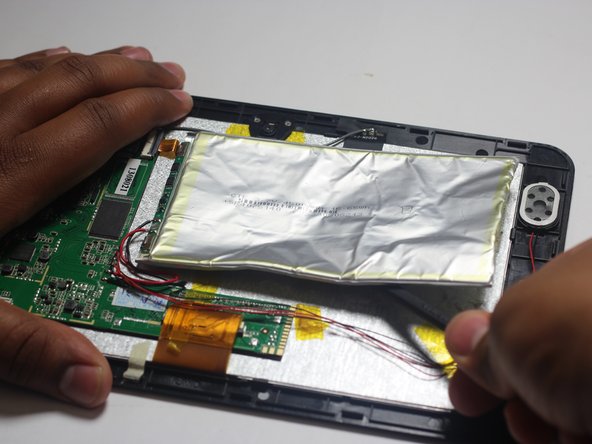
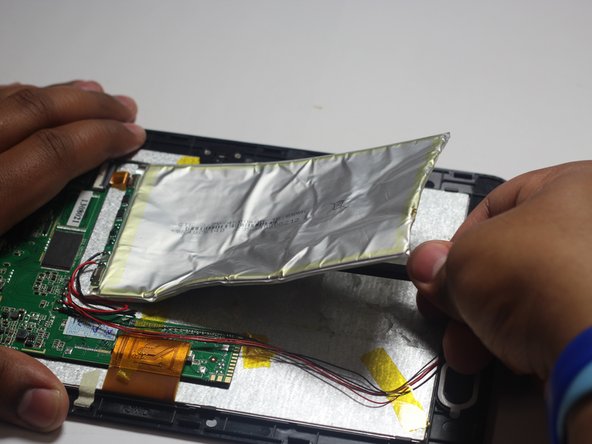
    1. SuperSonic Matrix Mid SC-999 Battery Replacement, Battery: 步骤 4 中的图像 1,3 SuperSonic Matrix Mid SC-999 Battery Replacement, Battery: 步骤 4 中的图像 2,3 SuperSonic Matrix Mid SC-999 Battery Replacement, Battery: 步骤 4 中的图像 3,3
      • Remove the Battery

      • The battery is secured to the back panel with tape and glue.

      • Peel back the tape around the battery and discard it.

      • Tear through the adhesive holding the battery by using the spudger tool.

      询问修复机器人

      添加评论

    2. SuperSonic Matrix Mid SC-999 Battery Replacement: 步骤 5 中的图像 1,3 SuperSonic Matrix Mid SC-999 Battery Replacement: 步骤 5 中的图像 2,3 SuperSonic Matrix Mid SC-999 Battery Replacement: 步骤 5 中的图像 3,3
      • Desolder the 2 Battery Wires

      • The Battery has two wires connected to the motherboard (one black and one red).

      • If you're unfamiliar with soldering or desoldering check out this guide.

      • Be sure to wear protective eye wear. The soldering iron will become extremely hot and a potential danger, so make sure you are aware of your surroundings.

      添加评论

结论

To reassemble your device, follow these instructions in reverse order.

取消:我没有完成这个指南。

2等其他人完成本指南。

团队

Baylor, Team 6-1, Shaver Spring 2015 Baylor, Team 6-1, Shaver Spring 2015 的会员

BU-SHAVER-S15S6G1

4 名成员

创作了108篇指南

1指南评论

Link to the soldering technique guide!

Josh Lewis - 回复 分享

添加评论

浏览统计数据:

过去 24 小时: 2

过去 7 天: 14

过去 30 天: 94

总计 2,891