跳转到主内容
加入维修社区 - 创建账户

Samsung Galaxy Note 10.1 Motherboard Replacement

浏览量: 3706

浏览统计数据:

过去24小时
2
过去 7 天:
28
过去 30 天:
117
总计
3,706
评论: 2

2 comments on steps.

已完成: 5

5 人已将本指南标记为“已完成”。你会是下一个完成的人吗?

收藏: 0

暂时还没有人收藏(和订阅)本指南。你会是第一个收藏(和订阅)的人吗?

所需时间: 10 - 15 分钟
难度: 中等
动态照片拍摄

成为一个动作片主人公!本指南需要一些图片,这些图片能够更好演示如何进行某些特定操作。

Samsung Galaxy Note 10.1 Motherboard Replacement

In this guide, you will learn how to replace the motherboard in a Samsung Galaxy Note 10.1 2012 tablet.

The motherboard connects all of the other components together so that the tablet can operate. Without it, nothing else would function.

Before using this guide, check out the troubleshooting page for the tablet. This is a crucial step because it is difficult to determine when a motherboard is faulty. The issue could be caused by another component, rather than the motherboard itself.

你所需要的

配件

工具

    1. Samsung Galaxy Note 10.1 Motherboard Replacement, Removing the Top Piece: 步骤 1 中的图像 1,3 Samsung Galaxy Note 10.1 Motherboard Replacement, Removing the Top Piece: 步骤 1 中的图像 2,3 Samsung Galaxy Note 10.1 Motherboard Replacement, Removing the Top Piece: 步骤 1 中的图像 3,3
      • This is the back of the device and where you will begin to take it apart

      • It is neccesary to remove this piece first before removing the bigger back piece.

      • Use the plastic opening tools to pry along the indicated box.

      • Lift up the silver piece to reveal the rest of the back cover.

      询问修复机器人

      添加评论

    2. Samsung Galaxy Note 10.1 Motherboard Replacement, Removing the Back Cover: 步骤 2 中的图像 1,3 Samsung Galaxy Note 10.1 Motherboard Replacement, Removing the Back Cover: 步骤 2 中的图像 2,3 Samsung Galaxy Note 10.1 Motherboard Replacement, Removing the Back Cover: 步骤 2 中的图像 3,3
      • Unscrew the three 5 mm screws indicated by the red circles with the Philips #00 screwdriver.

      • Using the plastic opening tools pry along the bottom of the device, moving to the sides of the cover to the top.

      • Remove the back cover.

      • At this point use anti-static gloves or do NOT take it apart on carpet.

      询问修复机器人

      添加评论

    3. Samsung Galaxy Note 10.1 Motherboard Replacement, Removing components covering battery: 步骤 3 中的图像 1,3 Samsung Galaxy Note 10.1 Motherboard Replacement, Removing components covering battery: 步骤 3 中的图像 2,3 Samsung Galaxy Note 10.1 Motherboard Replacement, Removing components covering battery: 步骤 3 中的图像 3,3
      • Carefully remove all of the ribbons that connect over the battery.

      询问修复机器人

      添加评论

    4. Samsung Galaxy Note 10.1 Motherboard Replacement, Removing the Battery: 步骤 4 中的图像 1,3 Samsung Galaxy Note 10.1 Motherboard Replacement, Removing the Battery: 步骤 4 中的图像 2,3 Samsung Galaxy Note 10.1 Motherboard Replacement, Removing the Battery: 步骤 4 中的图像 3,3
      • Remove all of the 3 mm screws indicated by a red circle with the #00 Philips Screwdriver.

      • Disconnect the battery connector from the motherboard.

      • Now you may remove the battery. The replacement battery should be 3.7 Volts and 25.9 kWh.

      添加评论

    1. Samsung Galaxy Note 10.1 Motherboard Replacement, Motherboard: 步骤 5 中的图像 1,3 Samsung Galaxy Note 10.1 Motherboard Replacement, Motherboard: 步骤 5 中的图像 2,3 Samsung Galaxy Note 10.1 Motherboard Replacement, Motherboard: 步骤 5 中的图像 3,3
      在这个步骤中使用的工具:
      Tweezers
      $4.99
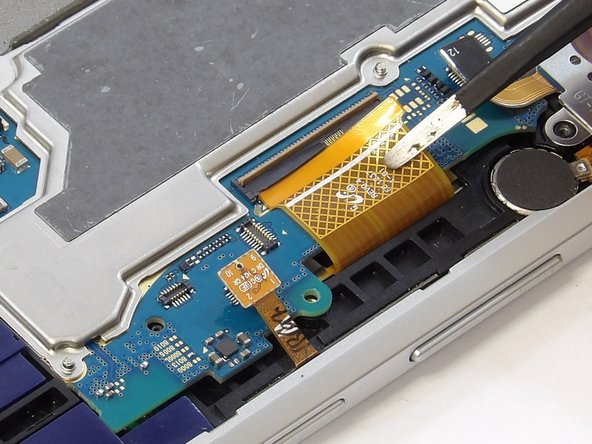
      • Flip the tablet 180 degrees for this step so the motherboard is easier to access.

      • Disconnect the cable connectors from the motherboard by gently lifting the connection hubs.

      • Remove each ribbon cable by lifting the locking mechanism on the casing holding the cable.

      • Gently pull the ribbon cable from the casing with your fingers or tweezers.

      • Carefully remove ribbon cables. Ribbon cables are easy to damage and may not always appear damaged. Any damage could potentially cause your device not to work.

      询问修复机器人

      添加评论

    2. Samsung Galaxy Note 10.1 Motherboard Replacement: 步骤 6 中的图像 1,1
      • Remove the motherboard by gently sliding it out of its casing.

      询问修复机器人

      添加评论

结论

To reassemble your device, follow these instructions in reverse order.

取消:我没有完成这个指南。

5等其他人完成本指南。

0指南评论

添加评论

浏览统计数据:

过去 24 小时: 2

过去 7 天: 28

过去 30 天: 117

总计 3,706