跳转到主内容
加入维修社区 - 创建账户

Prerequisites Only

仅作为前提条件
本指南仅提供前提条件!本指南是另一个程序的一部分,不能单独使用。

你所需要的

  1. Prerequisites Only, Prerequisites Only: 步骤 1 中的图像 1,3 Prerequisites Only, Prerequisites Only: 步骤 1 中的图像 2,3 Prerequisites Only, Prerequisites Only: 步骤 1 中的图像 3,3
    • Use a Phillips #0 screwdriver to unscrew the six 2mm screws on the outer case of the camera.

    • If there is a battery or SD card inside remove before beginning the process.

  2. Prerequisites Only: 步骤 2 中的图像 1,2 Prerequisites Only: 步骤 2 中的图像 2,2
    • Use your hands or a Spudger to Pull off the front cover of the camera.

    • If the casing is not coming apart easily, do not force it.

  3. Prerequisites Only: 步骤 3 中的图像 1,1
    在这个步骤中使用的工具:
    Tweezers
    $4.99
    • Remove the protective black cover layer with your hands and set it aside.

    • The use of tweezers may be necessary if the cover is difficult to remove.

  4. Prerequisites Only: 步骤 4 中的图像 1,2 Prerequisites Only: 步骤 4 中的图像 2,2
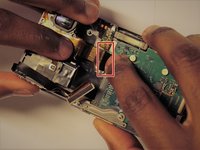
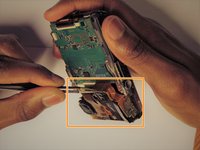
    • The ZIF connector can be removed by flipping the small black holder into the upright position and then sliding the ribbon cable out carefully.

    • Once this has been done, use tweezers to unplug the flat topped connector for the lens’ circuit board from the motherboard.

    • DO NOT force the ribbon cables or they will rip.

    • Refer to the (认识和断开线缆连接头) page for assistance.

结论

To reassemble your device, follow these instructions in reverse order.

Yegor Shea

于03/26/17注册

319 声望

创作了3篇指南

团队

0指南评论

添加评论

浏览统计数据:

过去 24 小时: 1

过去 7 天: 2

过去 30 天: 7

总计 71