跳转到主内容

你所需要的

本篇指南是分解流程而非维修指南。 如果您要维修您的Picstart Plus Development Programmer,应参考我们的维修指南

  1. Picstart Plus Development Programmer Teardown, Picstart Plus Development Programmer Teardown: 步骤 1 中的图像 1,3 Picstart Plus Development Programmer Teardown, Picstart Plus Development Programmer Teardown: 步骤 1 中的图像 2,3 Picstart Plus Development Programmer Teardown, Picstart Plus Development Programmer Teardown: 步骤 1 中的图像 3,3
    • Remove 4 Phillips screws located on the back side of the holding plate.

    • After the screws are removed, remove the case of the development programmer.

    • Carefully take out the circuit board with component side facing up. Put the case aside.

  2. Picstart Plus Development Programmer Teardown: 步骤 2 中的图像 1,2 Picstart Plus Development Programmer Teardown: 步骤 2 中的图像 2,2
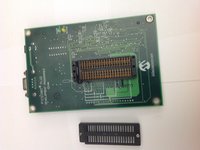
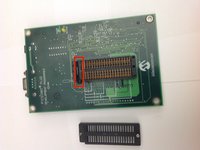
    • Disconnect the microcontroller module from the main board using a spudger or a similar tool.

    • Set the microcontroller module aside.

  3. Picstart Plus Development Programmer Teardown: 步骤 3 中的图像 1,2 Picstart Plus Development Programmer Teardown: 步骤 3 中的图像 2,2
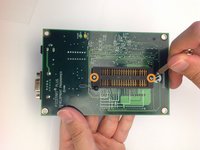
    • Flip over the mainboard so that the component side is facing down and remove the small Pan head screws that holds the cover of the IC holder

    • Remove the cover of the IC holder.

  4. Picstart Plus Development Programmer Teardown: 步骤 4 中的图像 1,2 Picstart Plus Development Programmer Teardown: 步骤 4 中的图像 2,2
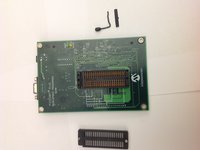
    • Remove the IC holder lever along with the small metal plate that covers the lever.

    • Set the lever and the lever cover aside.

  5. Picstart Plus Development Programmer Teardown: 步骤 5 中的图像 1,1
    • Congratulations! You have completely dismantled the PICSTART Plus Development Programmer!

    • All the extracted components are shown in the picture.

Brad

于11/17/13注册

656 声望

创作了2篇指南

0指南评论

添加评论

浏览统计数据:

过去 24 小时: 1

过去 7 天: 5

过去 30 天: 28

总计 2,730