跳转到主内容
加入维修社区 - 创建账户

Nokia 6085h Front LCD Display

你所需要的

  1. Nokia 6085h Front LCD Display, Battery: 步骤 1 中的图像 1,1
    • Flip over the phone so that the back is facing up.

    • Pressing your thumb against the back cover, slide the cover off of the phone.

    询问修复机器人

    添加评论

  2. Nokia 6085h Front LCD Display: 步骤 2 中的图像 1,1
    • Remove the phone's battery.

    询问修复机器人

    添加评论

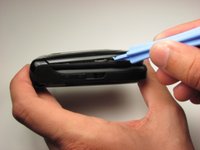
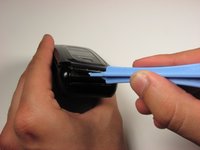
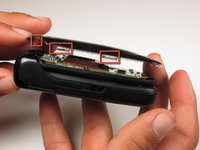
  3. Nokia 6085h Front LCD Display, Front LCD Display: 步骤 3 中的图像 1,3 Nokia 6085h Front LCD Display, Front LCD Display: 步骤 3 中的图像 2,3 Nokia 6085h Front LCD Display, Front LCD Display: 步骤 3 中的图像 3,3
    • With the phone closed, run a plastic opening tool along the seam of the top half of the phone.

    • Make sure to disconnect each of the five clips before proceeding to the next step.

    • There are two clips on each side of the phone and one on the top.

    询问修复机器人

    添加评论

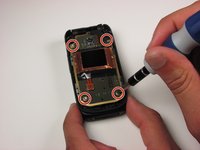
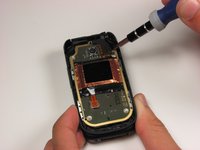
  4. Nokia 6085h Front LCD Display: 步骤 4 中的图像 1,2 Nokia 6085h Front LCD Display: 步骤 4 中的图像 2,2
    • Remove the four 3.2 mm screws from the front panel using a T6 Torx screwdriver.

    • The fourth screw is located under a fold in the ribbon cable.

    询问修复机器人

    添加评论

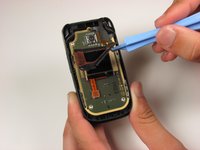
  5. Nokia 6085h Front LCD Display: 步骤 5 中的图像 1,3 Nokia 6085h Front LCD Display: 步骤 5 中的图像 2,3 Nokia 6085h Front LCD Display: 步骤 5 中的图像 3,3
    • Starting in the lower right corner, slowly begin to lift the tape that is holding down the front LCD and cables.

    • Be careful around the two ribbon cables attached to the tape. These cables are fragile.

    • Lift the tape from the board.

    询问修复机器人

    添加评论

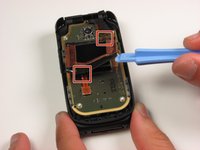
  6. Nokia 6085h Front LCD Display: 步骤 6 中的图像 1,1
    • Using a plastic opening tool, lift the ribbon cable connection below the front LCD.

    询问修复机器人

    添加评论

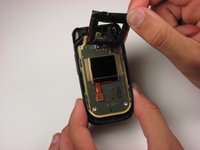
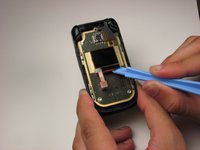
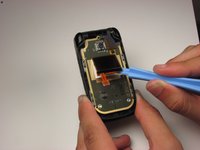
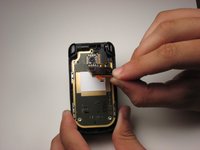
  7. Nokia 6085h Front LCD Display: 步骤 7 中的图像 1,3 Nokia 6085h Front LCD Display: 步骤 7 中的图像 2,3 Nokia 6085h Front LCD Display: 步骤 7 中的图像 3,3
    • Using a plastic opening tool, slowly pry the LCD display from the bottom, releasing it from the glue that is holding it to the board.

    询问修复机器人

    添加评论

结论

To reassemble your device, follow these instructions in reverse order.

取消:我没有完成这个指南。

2等其他人完成本指南。

团队

Cal Poly, Team 4-46, Amido Fall 2010 Cal Poly, Team 4-46, Amido Fall 2010 的会员

CPSU-AMIDO-F10S4G46

4 名成员

创作了14篇指南

0指南评论

添加评论

浏览统计数据:

过去 24 小时: 3

过去 7 天: 11

过去 30 天: 62

总计 1,607