跳转到主内容

Nokia 5310b XpressMusic LCD Screen Replacement

你所需要的

  1. Nokia 5310b XpressMusic LCD Screen Replacement, Battery: 步骤 1 中的图像 1,1
    • Slide the black battery cover down and off the phone with your thumb to remove it.

    • The battery cover is not shown in this picture

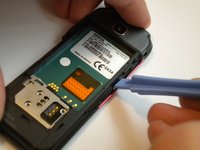
  2. Nokia 5310b XpressMusic LCD Screen Replacement: 步骤 2 中的图像 1,2 Nokia 5310b XpressMusic LCD Screen Replacement: 步骤 2 中的图像 2,2
    • Gently lift the battery with a fingernail to remove it from the back of the phone.

    • Keep the battery removed for the next steps

    • The battery may be replaced or repaired at this step.

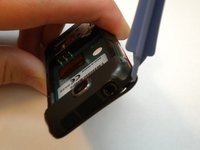
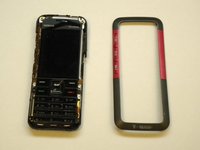
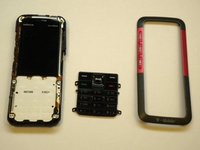
  3. Nokia 5310b XpressMusic LCD Screen Replacement, Keypad: 步骤 3 中的图像 1,3 Nokia 5310b XpressMusic LCD Screen Replacement, Keypad: 步骤 3 中的图像 2,3 Nokia 5310b XpressMusic LCD Screen Replacement, Keypad: 步骤 3 中的图像 3,3
    • On some models, the front case is screwed down from the back. Follow steps 5 and 6 first to remove the camera cover and two T6 screws, BEFORE removing the faceplate.

    • Find a small latch under the music keys and in the middle of each side of the faceplate.

    • Gently lift the edges of the front faceplate off the phone using a spudger.

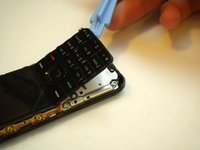
  4. Nokia 5310b XpressMusic LCD Screen Replacement: 步骤 4 中的图像 1,2 Nokia 5310b XpressMusic LCD Screen Replacement: 步骤 4 中的图像 2,2
    • Flip the phone over to the front side.

    • Lift up the keypad from the bottom with either a spudger or your finger.

    • At this time the keypad can be removed and replaced.

  5. Nokia 5310b XpressMusic LCD Screen Replacement, Motherboard: 步骤 5 中的图像 1,1
    • Flip the phone over to the back side.

    • Unsnap the back camera cover from the phone.

    • Lift to remove the back camera cover from the phone after it has been unsnapped.

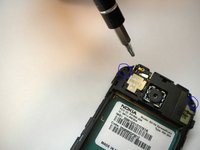
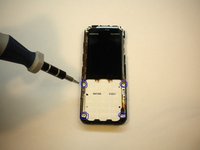
  6. Nokia 5310b XpressMusic LCD Screen Replacement: 步骤 6 中的图像 1,2 Nokia 5310b XpressMusic LCD Screen Replacement: 步骤 6 中的图像 2,2
    • Unscrew and remove the two screws on either side of the camera with the T6 Torx Screwdriver head.

    • Flip the phone over to the front side.

    • Unscrew and remove the 4 screws located at each corner of the white keypad base using the T6 Torx Screwdriver head.

  7. Nokia 5310b XpressMusic LCD Screen Replacement: 步骤 7 中的图像 1,1
    • Flip the phone over to the back side.

    • Unclip the faceplate plug (ribbon) located in the lower left corner of the motherboard.

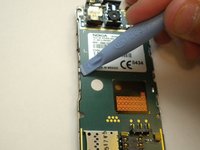
  8. Nokia 5310b XpressMusic LCD Screen Replacement: 步骤 8 中的图像 1,2 Nokia 5310b XpressMusic LCD Screen Replacement: 步骤 8 中的图像 2,2
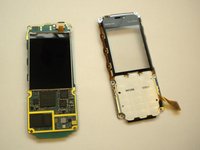
    • Find the 2 metal clips located in the middle of the left and right sides of the motherboard.

    • Pry the 2 metal clips open up by using a spudger.

    • At this point the phone should come apart into 2 pieces (the motherboard/LCD screen and the faceplate).

  9. Nokia 5310b XpressMusic LCD Screen Replacement, LCD Screen: 步骤 9 中的图像 1,1
    • Unclip the ribbon plug located on the top of the LCD screen that connects it to the motherboard.

结论

To reassemble your device, follow these instructions in reverse order.

6等其他人完成本指南。

Max Kirby

于05/01/11注册

518 声望

创作了4篇指南

团队

Cal Poly, Team 15-14, Regan Spring 2011 Cal Poly, Team 15-14, Regan Spring 2011 的会员

CPSU-REGAN-S11S15G14

3 名成员

创作了8篇指南

1指南评论

Thank you much! As efficient & thorough as it gets!

REDACTED FREE PRESS - 回复

添加评论

浏览统计数据:

过去 24 小时: 0

过去 7 天: 5

过去 30 天: 24

总计 9,425