跳转到主内容

Midframe Removal

仅作为前提条件
本指南仅提供前提条件!本指南是另一个程序的一部分,不能单独使用。

你所需要的

  1. Midframe Removal, Prepare your controller for disassembly: 步骤 1 中的图像 1,2 Midframe Removal, Prepare your controller for disassembly: 步骤 1 中的图像 2,2
    • Unplug all cables from your controller before starting.

    • Completely power off your controller.

    • Due to the controller’s odd shape, it can be helpful to stabilize it as you work. To prevent damage, consider laying it on a soft surface like a cloth or towel.

  2. Midframe Removal, Remove the faceplate: 步骤 2 中的图像 1,3 Midframe Removal, Remove the faceplate: 步骤 2 中的图像 2,3 Midframe Removal, Remove the faceplate: 步骤 2 中的图像 3,3
    • Magnets secure the faceplace to the midframe.

    • Lift the top edge of the faceplate to release the magnets securing it.

    • Remove the faceplate.

  3. Midframe Removal, Remove the battery cover: 步骤 3 中的图像 1,2 Midframe Removal, Remove the battery cover: 步骤 3 中的图像 2,2
    • Weak magnets and two clips along the bottom edge secure the battery cover to the controller.

    • Slide the battery cover away from the controller to remove it.

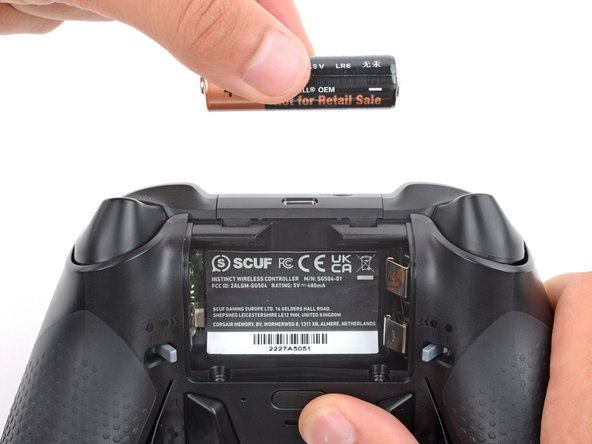
  4. Midframe Removal, Remove the batteries: 步骤 4 中的图像 1,3 Midframe Removal, Remove the batteries: 步骤 4 中的图像 2,3 Midframe Removal, Remove the batteries: 步骤 4 中的图像 3,3
    • If your batteries are starting to corrode, clean the contacts and replace the batteries.

    • Use your fingers to remove the batteries.

    • During reassembly, insert the batteries so their positive (+) and negative () ends match up with the markings on the battery contacts.

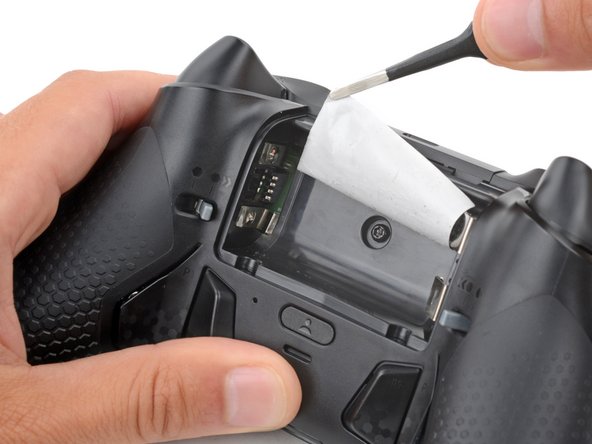
  5. Midframe Removal, Heat the battery sticker: 步骤 5 中的图像 1,2 Midframe Removal, Heat the battery sticker: 步骤 5 中的图像 2,2
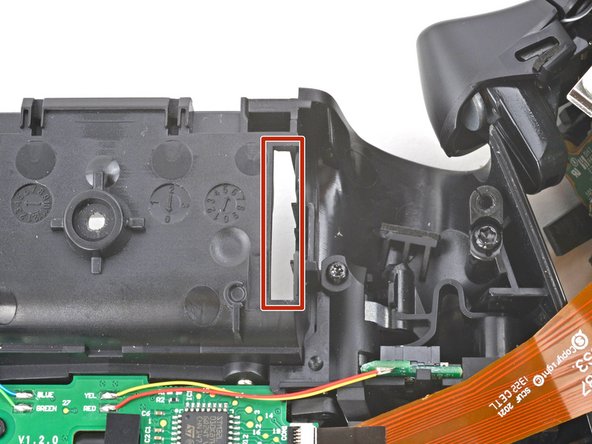
    • The sticker in the battery recess hides a back cover screw.

    • If you don't care about damaging the sticker, you can puncture through the center and skip the next step.

    • Use a hair dryer to heat the sticker and soften the adhesive securing it.

    • The sticker can be peeled without heating, but you risk tearing it.

  6. Midframe Removal, Peel up the battery sticker: 步骤 6 中的图像 1,3 Midframe Removal, Peel up the battery sticker: 步骤 6 中的图像 2,3 Midframe Removal, Peel up the battery sticker: 步骤 6 中的图像 3,3
    在这个步骤中使用的工具:
    Tweezers
    $4.99
    • Use the point of a spudger to push up a corner of the sticker until you can grab it with a pair of blunt nose tweezers.

    • Use your tweezers to peel up the sticker until the back cover screw is accessible.

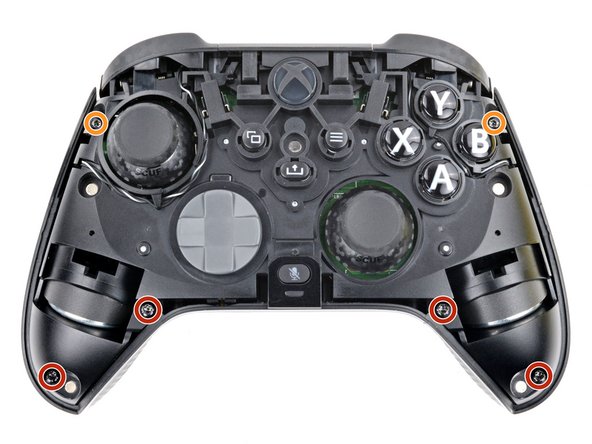
  7. Midframe Removal, Unfasten the midframe: 步骤 7 中的图像 1,3 Midframe Removal, Unfasten the midframe: 步骤 7 中的图像 2,3 Midframe Removal, Unfasten the midframe: 步骤 7 中的图像 3,3
    在这个步骤中使用的工具:
    FixMat
    $36.95
    • Throughout this repair, keep track of each screw and make sure it goes back exactly where it came from.

    • Use a T8 Torx screwdriver to remove five 9.3 mm‑long screws securing the midframe:

    • One back cover screw

    • Four screws on top of the midframe

    • Use a T6 Torx screwdriver to remove the two 9.3 mm‑long screws securing the midframe.

  8. Midframe Removal, Unclip the midframe: 步骤 8 中的图像 1,3 Midframe Removal, Unclip the midframe: 步骤 8 中的图像 2,3 Midframe Removal, Unclip the midframe: 步骤 8 中的图像 3,3
    • Plastic clips secure the bottom edge of the midframe.

    • Insert the flat end of a spudger between the bottom edge of the midframe and back cover.

    • Pry the midframe up with the spudger to release the clips.

    • Continue prying along the bottom edge to release the remaining clips.

    • Don't try to remove the midframe from the back cover yet—a delicate ribbon cable connects them.

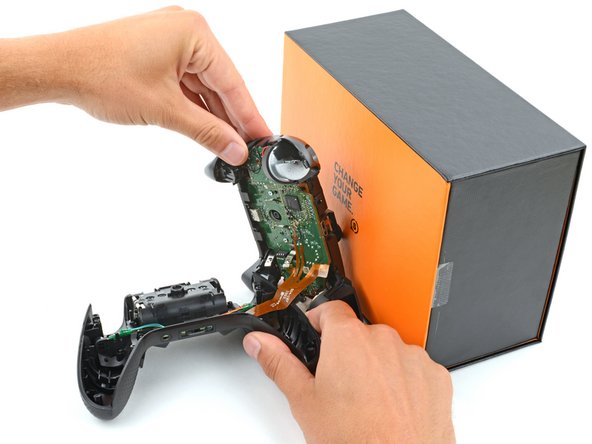
  9. Midframe Removal, Prop up the midframe: 步骤 9 中的图像 1,3 Midframe Removal, Prop up the midframe: 步骤 9 中的图像 2,3 Midframe Removal, Prop up the midframe: 步骤 9 中的图像 3,3
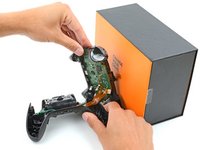
    • Put a box or a stack of books to the right of the controller so you can prop up the midframe while disconnecting its ribbon cable.

    • Secure the back cover with one hand, and use your other hand to grip the midframe's left edge.

    • Lift the midframe and rotate it over the right edge of the back cover, so the midframe's right edge is on your workspace.

    • Prop the midframe up, being careful not to strain the ribbon cable.

  10. Midframe Removal, Reassembly information: 步骤 10 中的图像 1,3 Midframe Removal, Reassembly information: 步骤 10 中的图像 2,3 Midframe Removal, Reassembly information: 步骤 10 中的图像 3,3
    • During reassembly:

    • Guide the battery connectors on the midframe through their slot in the back cover.

    • Make sure the contacts slide into their grooves in the battery recess. If they aren't in the correct spot, the controller won't receive power.

  11. Midframe Removal, Disconnect the midframe: 步骤 11 中的图像 1,3 Midframe Removal, Disconnect the midframe: 步骤 11 中的图像 2,3 Midframe Removal, Disconnect the midframe: 步骤 11 中的图像 3,3
    在这个步骤中使用的工具:
    Tweezers
    $4.99
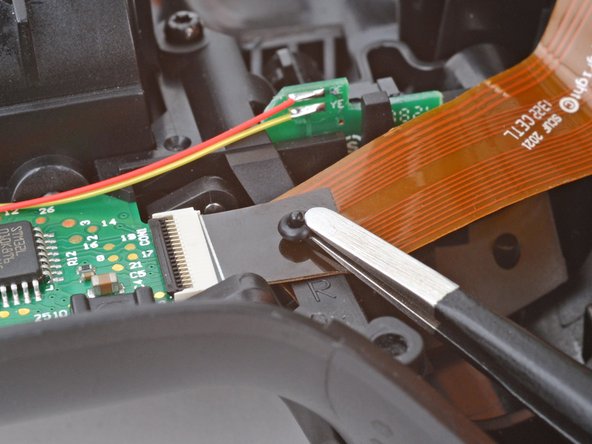
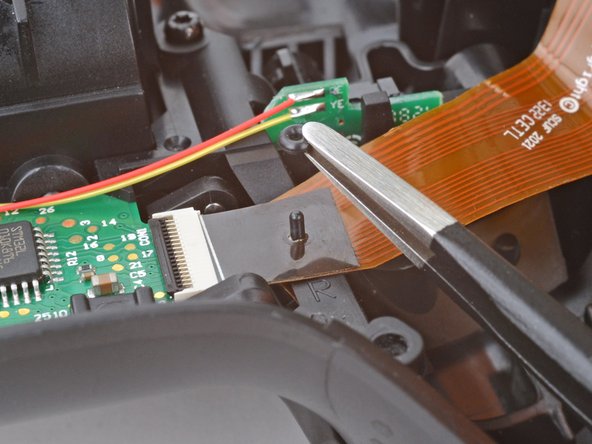
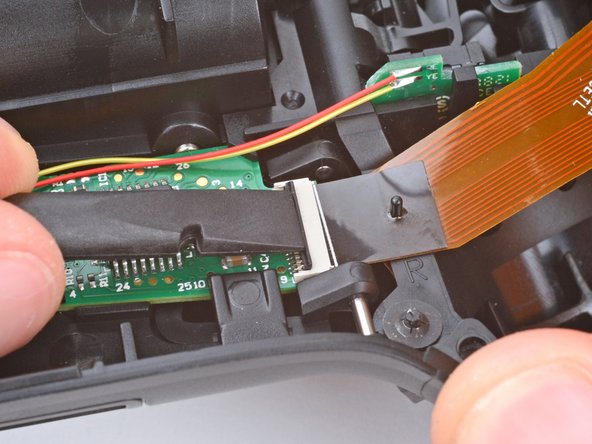
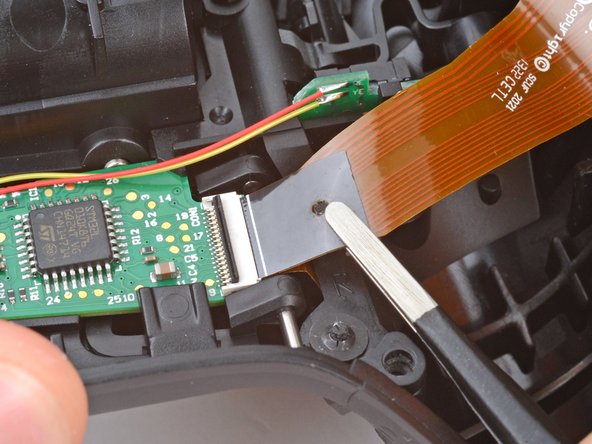
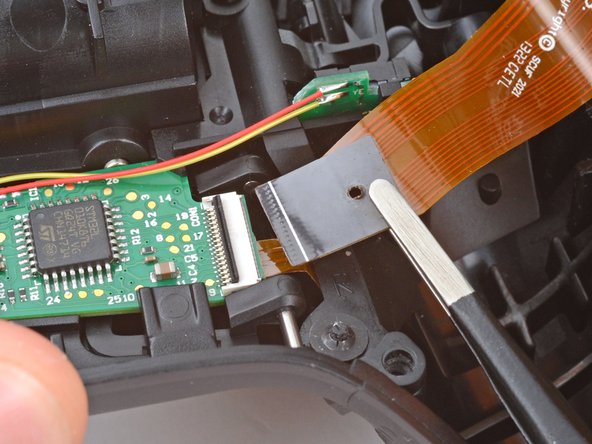
    • A very small rubber grommet secures the midframe's ribbon cable to a post on the right side of the back cover.

    • Use blunt nose tweezers to remove the grommet—don't lose it!

  12. Midframe Removal: 步骤 12 中的图像 1,2 Midframe Removal: 步骤 12 中的图像 2,2
    • Use the flat end of a spudger or a clean fingernail to lift the hinged locking flap on the midframe cable ZIF connector.

  13. Midframe Removal: 步骤 13 中的图像 1,3 Midframe Removal: 步骤 13 中的图像 2,3 Midframe Removal: 步骤 13 中的图像 3,3
    • Use blunt nose tweezers to grip the black pull tab on the midframe cable.

    • Lift the midframe cable off its post and pull it straight out of its socket.

  14. Midframe Removal, Remove the midframe: 步骤 14 中的图像 1,1
    • Remove the midframe.

结论

To reassemble your device, follow these instructions in reverse order.

Spencer Day

于09/14/22注册

155,809 声望

创作了1,033篇指南

团队

iFixit iFixit 的会员

Staff

123 名成员

创作了23,828篇指南

0指南评论

添加评论

浏览统计数据:

过去 24 小时: 0

过去 7 天: 0

过去 30 天: 2

总计 57