跳转到主内容
加入维修社区 - 创建账户

此翻译可能不反映源指南的最新更新。 帮助更新翻译查看源指南

Mac mini(2024)更换底盖

你所需要的

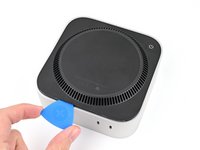
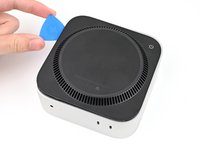
  1. Mac mini(2024)更换底盖, 开始之前: 步骤 1 中的图像 1,2 Mac mini(2024)更换底盖, 开始之前: 步骤 1 中的图像 2,2
    • 完全关闭您的 Mac mini,并拔下所有连接的电缆。

    • 将 Mac mini 翻转并放置在干净平整的表面上,以免划伤机身。

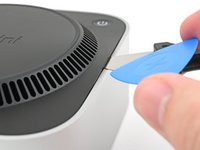
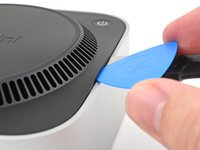
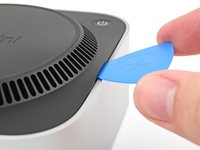
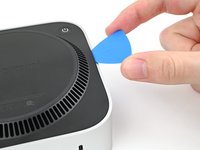
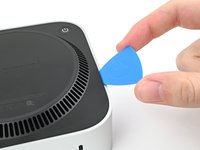
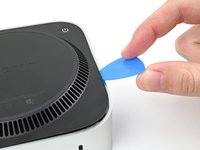
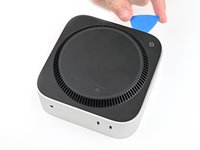
  2. Mac mini(2024)更换底盖, 创建一个缝隙: 步骤 2 中的图像 1,3 Mac mini(2024)更换底盖, 创建一个缝隙: 步骤 2 中的图像 2,3 Mac mini(2024)更换底盖, 创建一个缝隙: 步骤 2 中的图像 3,3
    • 将撬片插入底盖与机身框架之间的缝隙中

    • 撬起底盖以形成一个缝隙

    • 将撬片保持在底盖下方插入的状态

  3. Mac mini(2024)更换底盖, 插入开口撬片: 步骤 3 中的图像 1,3 Mac mini(2024)更换底盖, 插入开口撬片: 步骤 3 中的图像 2,3 Mac mini(2024)更换底盖, 插入开口撬片: 步骤 3 中的图像 3,3
    • 将开口撬片插入由撬片创建的缝隙中

    • 取出翘片

  4. Mac mini(2024)更换底盖, 解除卡扣: 步骤 4 中的图像 1,3 Mac mini(2024)更换底盖, 解除卡扣: 步骤 4 中的图像 2,3 Mac mini(2024)更换底盖, 解除卡扣: 步骤 4 中的图像 3,3
    • 将开口撬片沿底盖滑动,直到感觉到它钩住一个卡扣

    • 底盖共有四个卡扣——每个角各一个

    • 扭转撬片,将卡扣从其卡槽中翘起

  5. Mac mini(2024)更换底盖: 步骤 5 中的图像 1,3 Mac mini(2024)更换底盖: 步骤 5 中的图像 2,3 Mac mini(2024)更换底盖: 步骤 5 中的图像 3,3
    • 继续用撬片沿底盖边缘滑动并撬动,以解除剩余的卡扣。

    • 在电源按钮附近,撬片插入不要超过一英寸(2.54厘米),以免损坏排线

    • 重新组装时,沿底盖边缘按压,直到听到并感觉到所有四个卡扣重新卡入到位。

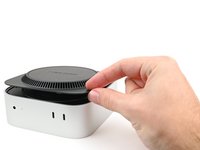
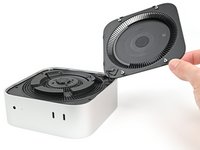
  6. Mac mini(2024)更换底盖: 步骤 6 中的图像 1,2 Mac mini(2024)更换底盖: 步骤 6 中的图像 2,2
    • 不要立即取下底盖,因为它仍通过排线连接到 Mac mini

    • 抬起电源按钮对面的底盖边缘,并将其翻转以露出电源按钮排线

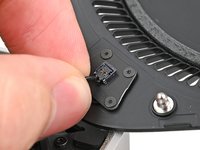
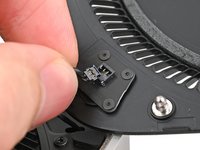
  7. Mac mini(2024)更换底盖, 断开电源按钮的连接: 步骤 7 中的图像 1,2 Mac mini(2024)更换底盖, 断开电源按钮的连接: 步骤 7 中的图像 2,2
    • 握住电源按钮排线靠近接头的位置,将其从插座中拔出以断开连接

  8. Mac mini(2024)更换底盖, 移除底盖: 步骤 8 中的图像 1,1
    • 移除底盖

结论

要重新组装您的设备,请按照以下步骤的逆序操作:

维修没有按计划进行?尝试一些基本故障排除,或前往我们的 [Mac mini (2024) 维修论坛](https://www.ifixit.com/Answers/Device/Ma...) 寻求帮助。

3等其他人完成本指南。

由衷感谢以下译者:

en zh

75%

小左1120正在帮助我们修复这个世界! 您也想加入吗?
开始翻译 ›

Alex Diaz-Kokaisl

于01/16/22注册

216,000 声望

创作了1,047篇指南

团队

iFixit iFixit 的会员

Staff

123 名成员

创作了23,848篇指南

3指南评论

I ripped the crimps off of my power cable because I was pulling out instead of up. Is a new power button cable available for sale somewhere?

Adam Davenport - 回复

@alexdk I created a draft update to the guide with some text with an easier way to open this without potentially marring the aluminum with the Jimmy.

Can you take a look and maybe reword it and give it a test yourself using just a pair of normal spudgers, one in a vent slot to gently lift the edge and one to pry close to the "pins" next to the edge alignment plastic clips (which is a misnomer because they are only for alignment and don't clip anything, only the pins hold things together)?

You can always determine the correct orientation to pry near the pins because they are on the "ends" of the mac mini text, aka left and right as you are reading the words.

dragon788 - 回复

Hello!

Thank you for the suggestions! I tried out the double spudger technique, and it worked somewhat well. I had to really dig the tip of a spudger into the vent, which will have varying mileage for people with dull tips. It was also difficult to get a good enough angle so I could pry up on the edge of the Mac Mini without holding it down with another hand. With that said, I'll incorporate it as alternative procedure for people who want to avoid marring the aluminum (because you're 100% right it will probably happen). I'll make that clear.

Alex Diaz-Kokaisl -

添加评论

浏览统计数据:

过去 24 小时: 11

过去 7 天: 73

过去 30 天: 293

总计 4,223