跳转到主内容
加入维修社区 - 创建账户

Logitech G920 Driving Force Steering Wheel Motherboard Replacement

你所需要的

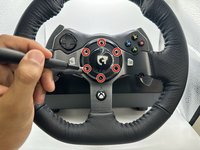
  1. Logitech G920 Driving Force Steering Wheel Motherboard Replacement, Steering Wheel Motherboard: 步骤 1 中的图像 1,1
    • Use the Phillips #0 screwdriver to remove the five 9.5 mm external screws.

    • Only three of the five screws are visible from each side of the wheel due to the center unit.

    询问修复机器人
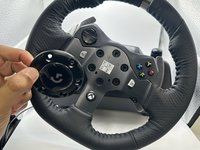
  2. Logitech G920 Driving Force Steering Wheel Motherboard Replacement: 步骤 2 中的图像 1,1
    • Using the Phillips #0 screwdriver, remove the 5 mm screws holding the bumpers in place.

    询问修复机器人
  3. Logitech G920 Driving Force Steering Wheel Motherboard Replacement: 步骤 3 中的图像 1,2 Logitech G920 Driving Force Steering Wheel Motherboard Replacement: 步骤 3 中的图像 2,2
    • Using the TR25 Torx Security Screwdriver, remove the six 23.8 mm screws holding the face plate together.

    • Remove the face plate from the steering wheel.

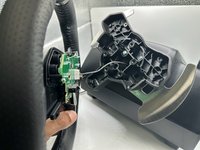
  4. Logitech G920 Driving Force Steering Wheel Motherboard Replacement: 步骤 4 中的图像 1,2 Logitech G920 Driving Force Steering Wheel Motherboard Replacement: 步骤 4 中的图像 2,2
    • Remove the wheel from the main steering wheel console.

    • Ensure this is done carefully as to not damage the connection wire.

    询问修复机器人
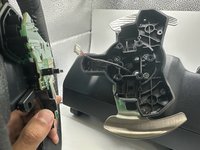
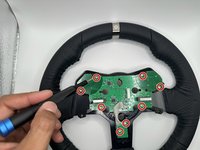
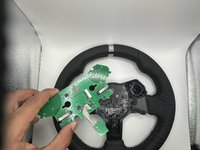
  5. Logitech G920 Driving Force Steering Wheel Motherboard Replacement: 步骤 5 中的图像 1,2 Logitech G920 Driving Force Steering Wheel Motherboard Replacement: 步骤 5 中的图像 2,2
    • Remove the eight 7.5 mm screws holding the steering wheel motherboard in place using a Phillips #0 screwdriver.

    • Remove the steering wheel motherboard.

    询问修复机器人
结论

To reassemble your device, follow these instructions in reverse order.

另外一个人完成了本指南。

1指南评论

what is on the wire that connect to the motherborade

saleh - 回复 分享

添加评论

浏览统计数据:

过去 24 小时: 6

过去 7 天: 35

过去 30 天: 166

总计 2,572