简介
“自动启动” 功能会在你一掀开笔记本盖子时就自动开机,所以要是要做某些维修,得先把这个功能关掉。2016 年及之后出的 MacBook Pro,还有 2017 年及之后的 12 英寸 Retina MacBook,都有这个功能
这篇指南会一步步教你怎么关掉自动启动,等修完了再怎么重新打开它
注意:2020 年底及之后出的新款苹果 MacBook(就是用 ARM 架构的 M 系列芯片的那种),可能关不了自动启动,另外,目前对于装了 Big Sur 11.1 及更高版本系统的设备,我们也还不知道怎么关这个功能


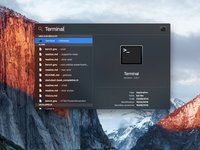
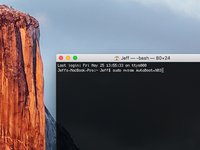
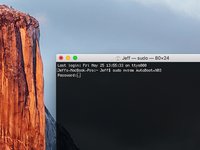
恭喜!你搞定啦
68等其他人完成本指南。



24指南评论
hello may i ask, how do u make it Jeff$? mine’s scarlet$ and i want to change it but idk how
You change the your user/Homefolder name
You do not need to change it for the command to work. But if you really do want to for a different reason, rename your home folder name.
I can’t type anything into the terminal…what am I doing wrong?
HELP
it doesn’t work on MacBook Air><
my sister’s pro did work, thanks!! but mine can’t do so. what should I do???
