跳转到主内容
加入维修社区 - 创建账户

HTC Vive Pro 2 All-In-One Cable Replacement

你所需要的

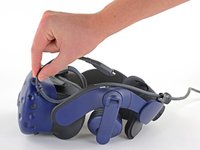
  1. HTC Vive Pro 2 All-In-One Cable Replacement, Reposition the head strap: 步骤 1 中的图像 1,2 HTC Vive Pro 2 All-In-One Cable Replacement, Reposition the head strap: 步骤 1 中的图像 2,2
    • Rotate the head strap forward as far as it will go.

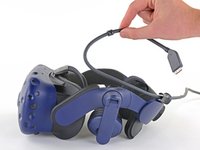
  2. HTC Vive Pro 2 All-In-One Cable Replacement, Unplug the All-In-One Cable: 步骤 2 中的图像 1,2 HTC Vive Pro 2 All-In-One Cable Replacement, Unplug the All-In-One Cable: 步骤 2 中的图像 2,2
    • Unplug the All-In-One Cable from your headset.

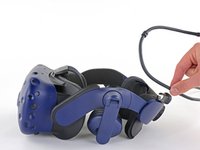
  3. HTC Vive Pro 2 All-In-One Cable Replacement, Remove the All-In-One Cable: 步骤 3 中的图像 1,3 HTC Vive Pro 2 All-In-One Cable Replacement, Remove the All-In-One Cable: 步骤 3 中的图像 2,3 HTC Vive Pro 2 All-In-One Cable Replacement, Remove the All-In-One Cable: 步骤 3 中的图像 3,3
    • Remove the All-In-One Cable from the cable guides along the left side of the head strap.

    • During reassembly, connect the All-In-One Cable to the headset before routing it through the cable guides. This will ensure it has the right amount of slack.

结论

To reassemble your device, follow the above steps in reverse order.

Repair didn’t go as planned? Try some basic troubleshooting, or ask our Answers community for help.

Alex Diaz-Kokaisl

于01/16/22注册

217,854 声望

创作了1,087篇指南

团队

iFixit iFixit 的会员

Staff

123 名成员

创作了23,991篇指南

0指南评论

添加评论

浏览统计数据:

过去 24 小时: 2

过去 7 天: 10

过去 30 天: 61

总计 497