跳转到主内容

Canon EOS Rebel T2i LCD Screen Assembly Replacement

你所需要的

  1. Canon EOS Rebel T2i LCD Screen Assembly Replacement, I/F Terminal Cover: 步骤 1 中的图像 1,3 Canon EOS Rebel T2i LCD Screen Assembly Replacement, I/F Terminal Cover: 步骤 1 中的图像 2,3 Canon EOS Rebel T2i LCD Screen Assembly Replacement, I/F Terminal Cover: 步骤 1 中的图像 3,3
    • Before beginning, ensure that the camera is off, and the battery is removed.

    • Pry open the rubber I/F terminal cap with your finger.

    • Remove the two M1.7x2.5mm JIS #000 screws that are underneath the I/F terminal cap.

    • Using a plastic pick, or another thin plastic prying tool, pop off the I/F terminal cover from the camera.

  2. Canon EOS Rebel T2i LCD Screen Assembly Replacement, Remove the back casing.: 步骤 2 中的图像 1,2 Canon EOS Rebel T2i LCD Screen Assembly Replacement, Remove the back casing.: 步骤 2 中的图像 2,2
    • On the left side of the camera, remove the following screw:

    • One M1.7x6.0mm JIS #000 screw

    • On the right side, remove the following screws:

    • One M1.7x5.5mm JIS #000 screw

    • One M1.7x3.5mm JIS #000 screw

  3. Canon EOS Rebel T2i LCD Screen Assembly Replacement: 步骤 3 中的图像 1,2 Canon EOS Rebel T2i LCD Screen Assembly Replacement: 步骤 3 中的图像 2,2
    • Remove the battery door.

    • Open the battery door to about a 35° angle.

    • Pull the battery door straight outwards.

    • Remove the following screws from the bottom of the camera:

    • One M1.7x6.0mm JIS #000 screw

    • Two M1.7x2.5mm JIS #000 screws

    • One M1.7x5.5mm JIS #000 screw

  4. Canon EOS Rebel T2i LCD Screen Assembly Replacement, Open the back panel.: 步骤 4 中的图像 1,3 Canon EOS Rebel T2i LCD Screen Assembly Replacement, Open the back panel.: 步骤 4 中的图像 2,3 Canon EOS Rebel T2i LCD Screen Assembly Replacement, Open the back panel.: 步骤 4 中的图像 3,3
    • Slide the viewfinder eyepiece vertically upwards.

    • Start to pull the back cover partially off of the camera.

    • Use caution when removing the back cover, there is a ribbon cable that connects the LCD screen to the main PCB board.

    • Disconnect the LCD screen ribbon cable from the main PCB board.

    • Use a plastic spudger to lift up the black locking tab.

    • Carefully pull out the ribbon cable from its connector using a pair of angled tweezers.

    • Finish pulling the back cover off of the camera body.

  5. Canon EOS Rebel T2i LCD Screen Assembly Replacement, LCD Screen Assembly: 步骤 5 中的图像 1,3 Canon EOS Rebel T2i LCD Screen Assembly Replacement, LCD Screen Assembly: 步骤 5 中的图像 2,3 Canon EOS Rebel T2i LCD Screen Assembly Replacement, LCD Screen Assembly: 步骤 5 中的图像 3,3
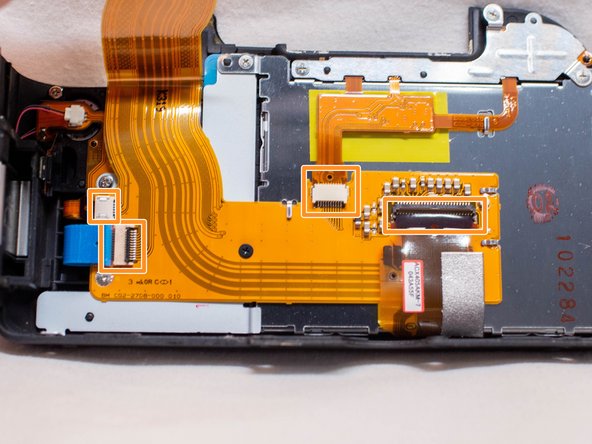
    • Use extreme care while handling ribbon cables and connectors as they can be easy to damage.

    • Use a plastic spudger to lift up the locking tabs on the two ribbon cable connectors.

    • iFixit connector guide

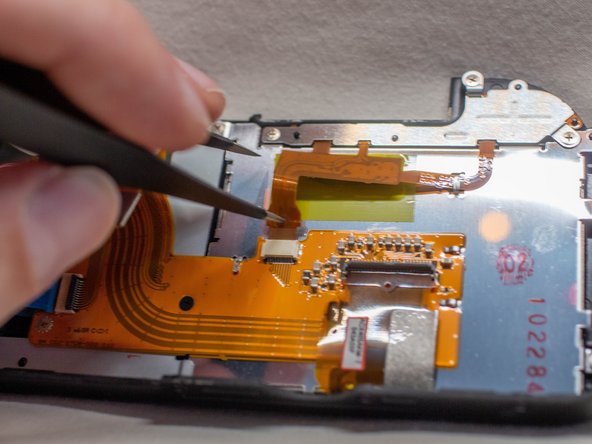
    • Remove the four ribbon cables connected to the FPC assembly.

    • Stick one of the ends of a pair of pointed tweezers through the hole in the ribbon cable and carefully pull the ribbon cable out of each connector.

  6. Canon EOS Rebel T2i LCD Screen Assembly Replacement: 步骤 6 中的图像 1,2 Canon EOS Rebel T2i LCD Screen Assembly Replacement: 步骤 6 中的图像 2,2
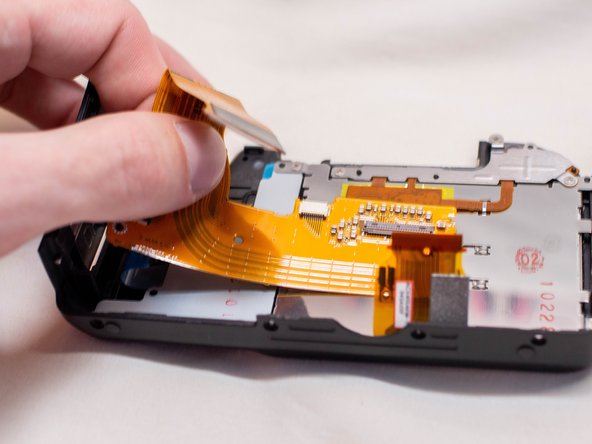
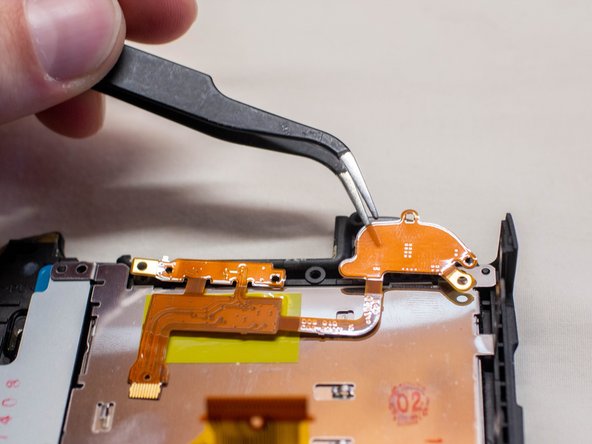
    • Remove the following screws from the back cover FPC assembly:

    • One M1.7x3.5mm JIS #000 screw

    • One M1.7x4.0mm JIS #000 screw

    • Carefully slide out the back cover FPC assembly from underneath the metal tabs holding it in place.

  7. Canon EOS Rebel T2i LCD Screen Assembly Replacement: 步骤 7 中的图像 1,3 Canon EOS Rebel T2i LCD Screen Assembly Replacement: 步骤 7 中的图像 2,3 Canon EOS Rebel T2i LCD Screen Assembly Replacement: 步骤 7 中的图像 3,3
    • Remove the following screws on the LCD screen assembly:

    • Five M1.7x3.5mm JIS #000 screws

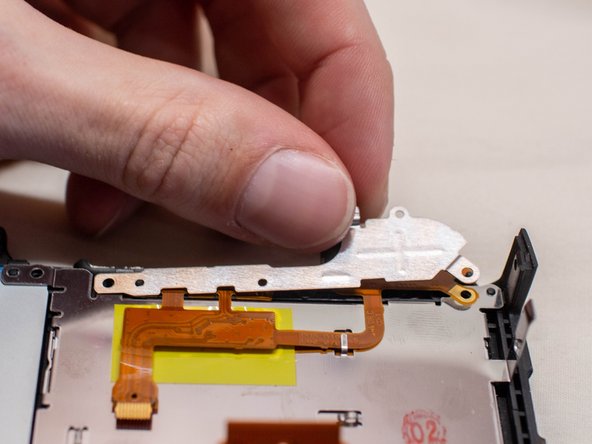
    • Pull off the metal holding plate.

    • With a pair of angled tweezers, carefully pull off the DOS FPC assembly.

  8. Canon EOS Rebel T2i LCD Screen Assembly Replacement: 步骤 8 中的图像 1,1
    • Gently lift up the right side of the LCD screen and pull it off of the back cover.

    • Before installing a new LCD screen, ensure that there is no dust on the inside of the LCD window.

结论

To reassemble your device, follow these instructions in reverse order.

另外一个人完成了本指南。

附加文件

Zephosk

于09/26/24注册

5,457 声望

创作了34篇指南

团队

LGBTQ Technicians LGBTQ Technicians 的会员

Community

48 名成员

创作了78篇指南

0指南评论

添加评论

浏览统计数据:

过去 24 小时: 1

过去 7 天: 4

过去 30 天: 21

总计 317